Delta Lake Interview Questions: 25 Scenario Problems with Answers
25 scenario-based Delta Lake interview questions in five areas, with what the interviewer is checking and a strong answer for each.
TL;DR
- Delta interviews have moved past "what is Delta Lake?". Expect "this broke in production, what happened and what do you do?"
- Most questions are secretly about the transaction log. If you can say what got committed and which files it pointed at, you can answer almost anything.
- Every answer below has three parts: the scenario, what's being tested, and a strong answer you can adapt.
- Five areas: log and concurrency, MERGE and CDC, layout and performance, maintenance and recovery, schema and table features.
How to answer a Delta scenario
Strong answers follow the same four beats:
- What happened in the log. Name the commit, the operation, the files.
- Why it broke. The rule or retention or conflict that caused it.
- The fix and the command. Be specific:
RESTORE TABLE ... TO VERSION AS OF 56, not "roll it back". - How you'd prevent it. A property, a check, a runbook step.
Version numbers help. "The DELETE committed version 57, so I'd restore to 56 after checking nothing good landed in 58" tells the interviewer you think in commits.
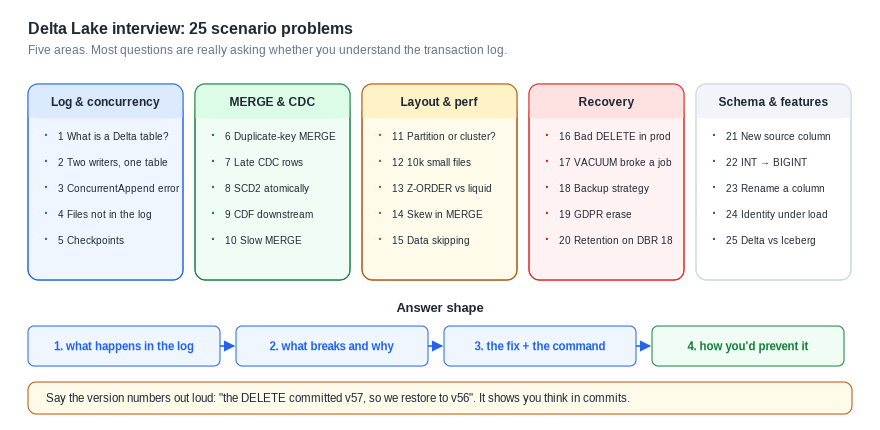 Five areas, one underlying idea: the log decides everything.
Transaction log and concurrency
1. What actually makes a folder of Parquet files a Delta table?
Testing: The core mental model.
Strong answer: The _delta_log folder: an ordered sequence of JSON commits plus periodic Parquet checkpoints. Each commit lists add and remove actions for data files, plus schema, protocol and audit info. The table at any version is the set of files the log says are active. Files in the folder but not in the log are invisible. See Inside the Delta Transaction Log.
2. Two jobs append to the same Delta table at the same time. What happens? Testing: Optimistic concurrency. Strong answer: Both write their data files, then race to create the next commit file with put-if-absent. One wins as version N+1. The other sees N+1 exists, checks for conflicts, finds that two blind appends don't conflict, and commits as N+2. Both succeed.
3. A nightly MERGE for the SOUTH region and one for WEST fail with ConcurrentAppendException. Why, and how do you fix it?
Testing: Conflict detection is based on what you read.
Strong answer: Neither ON clause restricted the region, so each MERGE logically read the whole table, and the other job's new files fell inside that read. Add AND t.region = 'SOUTH' (and 'WEST') to the ON conditions so the reads are disjoint. With deletion vectors on recent runtimes, row-level concurrency also reduces these conflicts. Or run them sequentially.
4. Someone copied Parquet files into the table's storage folder. They don't show up. Why?
Testing: Log as source of truth.
Strong answer: No commit references them. Load data through Delta (INSERT, COPY INTO, Auto Loader). If those files are already there, VACUUM will eventually delete them as uncommitted files once they pass the retention window.
5. Why does Delta write checkpoints, and what happens if you delete old JSON log files by hand?
Testing: Snapshot reconstruction.
Strong answer: Checkpoints store the full table state so readers don't replay thousands of JSON commits; readers load the latest checkpoint and replay only later commits. Deleting log files by hand can break the table, or time travel, if a needed commit or checkpoint disappears. Log cleanup is automatic, governed by delta.logRetentionDuration.
MERGE and CDC
6. MERGE fails with "multiple source rows matched and attempted to modify the same target row". Fix it.
Testing: Source deduplication.
Strong answer: The batch has two rows for one key. Deduplicate before the MERGE with ROW_NUMBER() OVER (PARTITION BY key ORDER BY source_seq DESC) = 1, ordered by a real sequence from the source, with a deterministic tie-break. dropDuplicates isn't enough because it keeps an arbitrary row.
7. A CDC feed delivers events late and out of order. Old updates are overwriting new ones. Design the MERGE.
Testing: Late-data handling.
Strong answer: Store the source sequence (LSN) on the target. Dedupe within each batch. Guard every matched clause with s.lsn > t.lsn. Handle deletes as tombstones that keep the LSN, so a late update can't resurrect the row; purge tombstones after the maximum lateness window. Prove it with two tests: replaying a batch changes nothing, and a late older row changes nothing. Full walkthrough: Deduplicate Late-Arriving CDC Rows with MERGE.
8. Implement SCD Type 2 so a failure can never leave a customer with zero or two current rows.
Testing: Atomicity.
Strong answer: One MERGE, not an UPDATE then an INSERT. Stage changed rows twice: once with the real key (matches and expires the current row), once with a NULL merge key (never matches, so it inserts the new version). One commit, idempotent on replay. See SCD Type 2 with Delta MERGE.
9. Gold should refresh hourly from silver, but rebuilding takes 35 minutes. How?
Testing: Change Data Feed.
Strong answer: Enable delta.enableChangeDataFeed on silver. Read changes with readChangeFeed in a stream with trigger(availableNow=True); drop update_preimage, keep the latest change per key, and MERGE into gold, deleting on delete rows. The checkpoint tracks the last processed version. Make sure file retention exceeds the longest consumer outage, because change files are vacuumed like data. See Delta Change Data Feed.
10. An hourly MERGE rewrites 650 GB to update 20,000 rows. Make it cheaper.
Testing: MERGE cost model.
Strong answer: Cost follows files touched, not rows. Cluster the target on the merge key so changes concentrate in few files; add a pruning predicate in ON if a date range is known; enable deletion vectors so matched rows are marked instead of rewriting whole files; skip unchanged rows with a hash comparison. Check numTargetFilesRemoved in DESCRIBE HISTORY before and after.
Layout and performance
11. A 300 GB table is partitioned by date and store. Queries by product are slow. What do you do?
Testing: Partitioning judgement.
Strong answer: It's over-partitioned: 300 GB across dates × stores means tiny files, and partitions don't help product filters at all. Rebuild without partitions using liquid clustering on the real filter columns, or CLUSTER BY AUTO on a Unity Catalog managed table. Partition only very large tables, by a low-cardinality column like date, with at least ~1 GB per partition.
12. A streaming table has 2 million files averaging 40 KB. Fix it.
Testing: Small files: cause before cure.
Strong answer: Find the writer: likely a seconds-level trigger and fine partitioning. Lengthen the trigger to what consumers need, remove fine-grained partitions, enable optimized writes. Then compact with OPTIMIZE or predictive optimization, and VACUUM afterwards. Compaction alone loses to a writer creating files faster than it merges them. See The Small Files Problem.
13. Z-ORDER or liquid clustering for a new 2 TB fact table?
Testing: Current best practice.
Strong answer: Liquid clustering. Keys are stored on the table, clustering is incremental so maintenance cost tracks new data, keys can change with ALTER TABLE ... CLUSTER BY without a rewrite, and it handles high cardinality. Z-ORDER rewrites already-ordered data each run and its columns aren't recorded. Z-ORDER still makes sense inside existing partitioned tables. They can't be combined.
14. A MERGE has one task running for 40 minutes while the rest finish in 2. Why?
Testing: Skew.
Strong answer: Key skew in the source, often a default like 'UNKNOWN' or NULL with millions of rows matching the same target files. Filter or route those rows separately, fix the upstream default, or salt the key if the hot key is legitimate. Check the Spark UI task metrics to confirm.
15. You filter on customer_id but no files are skipped. Why might data skipping not work?
Testing: Stats mechanics.
Strong answer: Either the column has no stats (it's beyond the first 32 columns, delta.dataSkippingNumIndexedCols), or values aren't clustered so every file's min/max spans the whole range. Fix the first with delta.dataSkippingStatsColumns and recompute stats; fix the second by clustering on the column.
Maintenance and recovery
16. A DELETE with the wrong filter just ran on a production table. Walk me through recovery.
Testing: Calm, ordered recovery.
Strong answer: Pause writers. DESCRIBE HISTORY to find the bad version (say 57) and check what committed after it. If nothing good came after, RESTORE TABLE ... TO VERSION AS OF 56. If good writes landed later, insert the missing rows from VERSION AS OF 56 instead. Validate counts, consider downstream streams that will see the restore as a change, then resume. See Delta Lake Time Travel in 12 Minutes.
17. A job reading a table fails with file-not-found the morning after VACUUM. Why?
Testing: VACUUM and retention.
Strong answer: Either the job was time-travelling to (or still reading) a version whose files were removed, or retention was lowered so VACUUM deleted files still in use by a long-running query. Keep retention at least 7 days, longer than any job or time travel need. On Runtime 18+, the table property controls it and RETAIN is ignored.
18. What's your backup strategy for critical Delta tables? Testing: Time travel isn't backup. Strong answer: Scheduled deep clones to a separate catalog and storage account (ideally another region), re-run incrementally, with their own permissions and retention, and a restore drill every quarter. Time travel and shallow clones depend on the source's files and permissions, so they protect against bad writes, not against losing the storage. See Shallow vs Deep Clone and RESTORE.
19. A customer requests erasure under GDPR. Their rows are in a Delta table. What do you run?
Testing: Physical deletion.
Strong answer: DELETE the rows; if deletion vectors are on, REORG TABLE ... APPLY (PURGE) to rewrite affected files; then VACUUM after the retention window so old files holding their data are removed. Until then, time travel can still read the data, so the erasure SLA must account for retention. Better design: keep PII in a small separate table so erasure touches less data.
20. Your team says "we can time travel 30 days back, history shows it". On Runtime 18 a 10-day-old query fails. Explain.
Testing: Current retention rules.
Strong answer: History is governed by delta.logRetentionDuration (30 days by default) but data files by delta.deletedFileRetentionDuration (7 days). On Runtime 18+, time travel beyond the file retention is blocked, and log retention must be at least file retention. For 30 days of time travel, set both to 30 days and budget the storage.
Schema and table features
21. A source adds a new column. How do you accept it in bronze but not let random columns into silver?
Testing: Controlled evolution.
Strong answer: Per-write evolution in bronze: .option("mergeSchema", "true") or MERGE WITH SCHEMA EVOLUTION. Never a cluster-wide auto-merge setting. In silver, compare incoming columns to an allow-list and fail on anything unexpected; add expected columns with explicit ALTER TABLE ... ADD COLUMNS in a reviewed change. See Schema Evolution and Enforcement.
22. A column must change from INT to BIGINT on a 5 TB table. Do you rewrite it?
Testing: Type widening.
Strong answer: Not if type widening is available: set delta.enableTypeWidening = true and ALTER COLUMN ... TYPE BIGINT. It's metadata-only; old files are read as BIGINT. It adds a table feature, so check reader compatibility. Without it, the fallback is a full rewrite with overwriteSchema.
23. Rename cust_id to customer_id without rewriting data. What do you need, and what can break?
Testing: Column mapping.
Strong answer: Enable delta.columnMapping.mode = 'name', then ALTER TABLE ... RENAME COLUMN. Metadata-only. What can break: streaming readers (need schemaTrackingLocation), change data feed reads across the change, and older clients that don't support column mapping.
24. Two pipelines load the same dimension in parallel and fail intermittently. The table has an identity key. Why? Testing: Identity column limits. Strong answer: Tables with identity columns don't support concurrent write transactions. Run the loads sequentially with one owner, or switch to deterministic hash keys, which also survive rebuilds. Also: identity values are unique and increasing but not consecutive, so never reconcile on key ranges. See Identity and Generated Columns.
25. Another team wants to query your Delta tables from Trino and a warehouse that speaks Iceberg. Do you migrate to Iceberg? Testing: Interoperability and judgement. Strong answer: Not by default. List who needs to read versus write. For read access, enable UniForm so Iceberg clients read the same files through the catalog's Iceberg REST endpoint. For tables another engine must write, use managed Iceberg tables in the same catalog. Migrate only if most writers end up outside Spark. See Delta Lake vs Apache Iceberg vs Hudi.
From production: what actually trips candidates
- "Delta deletes the data." It doesn't, until
VACUUM. Saying that unprompted is a strong signal. - "VACUUM 0 hours to save space." Instant red flag: it can delete files from running jobs and ends time travel.
- "Just partition by everything." Interviewers in 2026 expect liquid clustering and a reason to partition, not a reason not to.
- Answering MERGE questions without deduplication. Mention it before you're asked.
- No numbers. "The MERGE removed 900 files to update 200 rows" is an engineering answer. "It was slow" isn't.
Checklist
- Can draw
_delta_logand explain a commit's actions - Can explain what happens when two writers race
- Can write a deduplicated, newer-wins MERGE from memory
- Can explain both retention properties and the Runtime 18 change
- Can choose between partitioning, Z-ORDER and liquid clustering, with reasons
- Can list the recovery options: RESTORE, targeted fix, deep-clone backup
Practice
- Try: PySpark Interview Questions: 50 Coding and Scenario Problems
- Try: Data Modeling Interview Questions: 20 Design Problems
- Do it out loud: pick five questions, set a 5-minute timer for each, and answer using the four beats. Record yourself once; it's uncomfortable and very effective.
Further reading
Keep going
Inside the Delta Transaction Log: Commits, Checkpoints and Optimistic Concurrency
Read _delta_log yourself: what commits and checkpoints contain, how readers build snapshots, and how concurrent writers avoid corruption.
Delta Lake MERGE: Five Upsert Patterns and How to Make Them Fast
The five Delta MERGE patterns (upsert, insert-only, newer-wins, deletes, full sync), the errors that break them, and how to make them fast.
Deduplicate Late-Arriving CDC Rows with MERGE: A Worked Problem
A CDC feed sends duplicates and out-of-order changes. Build a MERGE that keeps the latest row per key, ignores late events and is safe to replay.
One practical note a week
Get new articles, problems and guides in your inbox.
Thanks! You're on the list. (Local demo — no email provider is wired up yet.)