Delta Change Data Feed: CDC Downstream Without Extra Tooling
Enable Change Data Feed and read row-level inserts, updates and deletes by version to refresh downstream Delta tables incrementally.
TL;DR
- Change Data Feed (CDF) makes a Delta table record what changed in every commit: inserted, updated (before and after) and deleted rows.
- Turn it on with
delta.enableChangeDataFeed = true. It only covers commits after that point. - Read it in batch with
table_changes('t', start, end)or in streaming withreadChangeFeed. Each row carries_change_type,_commit_versionand_commit_timestamp. - The usual consumer pattern: drop
update_preimage, keep the latest change per key,MERGEinto the downstream table. - CDF is an incremental-processing tool, not an archive. Its files follow the same retention and
VACUUMrules as data.
The problem
NorthBridge's gold.customer_360 was rebuilt nightly from silver.customers (48 million rows) even though about 60,000 customers changed per day. The rebuild took 35 minutes and the marketing team wanted it hourly.
The question was: "what changed in silver since the last run?" Diffing two snapshots answers it, expensively. Delta can answer it directly.
Key concepts
| Concept | What it means | Why it matters here |
|---|---|---|
_change_type |
insert, update_preimage, update_postimage, delete |
Tells the consumer what to do with each row |
_commit_version |
The table version that made the change | Ordering and checkpointing |
_commit_timestamp |
When that version committed | Time-based reads and lateness checks |
_change_data folder |
Where Delta stores change rows for updates and deletes | Extra storage, cleaned by VACUUM |
| Starting version | Where a reader begins | Must be at or after CDF was enabled |
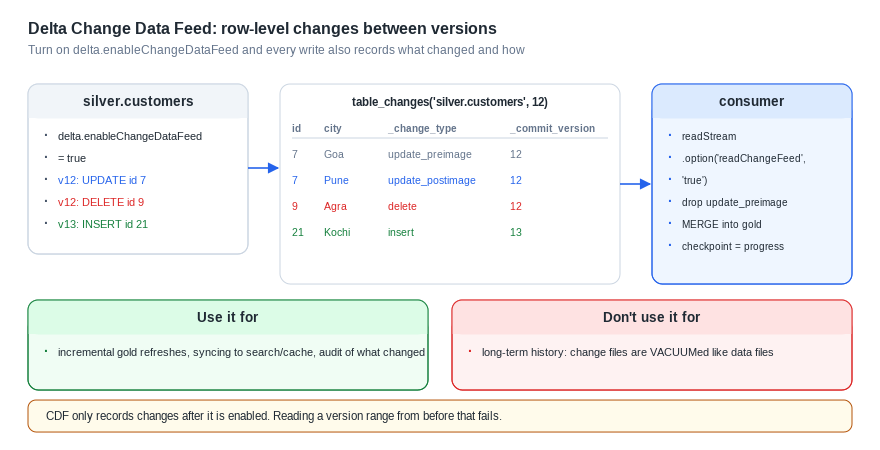 An update produces two rows, before and after. A delete produces one.
Step-by-step implementation
Step 1 — Enable CDF
-- Databricks Runtime 16.4 LTS+, Unity Catalog
ALTER TABLE northbridge.silver.customers
SET TBLPROPERTIES (delta.enableChangeDataFeed = true);

-- For new tables
CREATE TABLE northbridge.silver.stores (store_id STRING, region STRING, manager STRING)
TBLPROPERTIES (delta.enableChangeDataFeed = true);
Note the version at which you enabled it (DESCRIBE HISTORY shows a SET TBLPROPERTIES commit). Reads starting earlier will fail.
Step 2 — Look at changes in batch
-- Changes from version 120 to the latest
SELECT customer_id, city, _change_type, _commit_version, _commit_timestamp
FROM table_changes('northbridge.silver.customers', 120)
ORDER BY _commit_version, customer_id;

-- A bounded range, by version or timestamp
SELECT * FROM table_changes('northbridge.silver.customers', 120, 125);
SELECT * FROM table_changes('northbridge.silver.customers', '2026-11-13 00:00:00', '2026-11-13 12:00:00');
In PySpark:
# Databricks Runtime 16.4 LTS+, PySpark
changes = (spark.read
           .option("readChangeFeed", "true")
           .option("startingVersion", 120)
           .option("endingVersion", 125)
           .table("northbridge.silver.customers"))
What each operation produces:
| Operation on source | CDF rows |
|---|---|
INSERT / append |
insert |
UPDATE or matched MERGE update |
update_preimage + update_postimage |
DELETE or MERGE delete |
delete (with the deleted row's values) |
OPTIMIZE, VACUUM |
Nothing. They don't change data |
That last row matters. Maintenance doesn't flood consumers with fake changes.
Step 3 — Consume changes into a downstream table
# Databricks Runtime 16.4 LTS+, PySpark, delta-spark
from delta.tables import DeltaTable
from pyspark.sql import functions as F, Window

gold = DeltaTable.forName(spark, "northbridge.gold.customer_360")

def apply_changes(batch_df, batch_id):
    latest = (batch_df
        .filter(F.col("_change_type") != "update_preimage")
        .withColumn("_rn", F.row_number().over(
            Window.partitionBy("customer_id")
                  .orderBy(F.col("_commit_version").desc(),
                           # within one commit, a delete beats an insert
                           F.when(F.col("_change_type") == "delete", 0).otherwise(1))))
        .filter("_rn = 1"))

    (gold.alias("t")
        .merge(latest.alias("s"), "t.customer_id = s.customer_id")
        .whenMatchedDelete(condition="s._change_type = 'delete'")
        .whenMatchedUpdate(
            condition="s._change_type != 'delete' AND s._commit_version > t.src_version",
            set={"full_name": "s.full_name", "city": "s.city", "loyalty_tier": "s.loyalty_tier",
                 "src_version": "s._commit_version"})
        .whenNotMatchedInsert(
            condition="s._change_type != 'delete'",
            values={"customer_id": "s.customer_id", "full_name": "s.full_name",
                    "city": "s.city", "loyalty_tier": "s.loyalty_tier",
                    "src_version": "s._commit_version"})
        .execute())

(spark.readStream
   .option("readChangeFeed", "true")
   .option("startingVersion", 120)          # only used on the very first run
   .table("northbridge.silver.customers")
   .writeStream
   .foreachBatch(apply_changes)
   .option("checkpointLocation", "/Volumes/northbridge/chk/gold_customer_360")
   .trigger(availableNow=True)
   .start())
The checkpoint records which source version was processed last, so each run picks up exactly where the previous one stopped. With availableNow, an hourly Lakeflow Job runs it like a batch job with streaming bookkeeping.
The dedupe and the src_version guard are the same defences described in Deduplicate Late-Arriving CDC Rows with MERGE. A micro-batch can contain several versions, and a key can change in more than one of them.
Step 4 — Joins and aggregates
CDF is easiest when the downstream table has the same key as the source. For aggregates (sales by region), use changes to find which keys are affected, then recompute only those:
CREATE OR REPLACE TEMP VIEW affected_regions AS
SELECT DISTINCT region
FROM table_changes('northbridge.silver.stores', 340)
WHERE _change_type IN ('insert', 'update_postimage', 'update_preimage', 'delete');
Keep the preimage here: a store moving from SOUTH to WEST affects both regions.
Where CDF data lives and how long it lasts
For inserts, Delta derives change rows from the added data files, so there's no extra storage. For updates and deletes, it writes change rows to a _change_data folder inside the table. These files:
- are not part of the table's current data,
- follow the same
delta.deletedFileRetentionDuration, and - are removed by
VACUUMlike any other old file.
So a consumer that's paused for longer than the retention window can't catch up from CDF. It needs a full refresh. Set retention to comfortably exceed your longest expected consumer outage.
From production: gotchas and lessons
-
Symptom: A new consumer failed with an error about the starting version. Cause:
startingVersionwas before CDF was enabled. Fix: Start at or after the enabling version, and do an initial full load for earlier data. -
Symptom: Gold row counts slowly drifted from silver. Cause: The consumer ignored
deleterows. Fix: Handle all four change types explicitly. Write a nightly reconciliation count that fails loudly. -
Symptom: A consumer job down for 10 days couldn't restart. Cause: The change files it needed had been vacuumed. Fix: Full refresh, then a new checkpoint. Retention now covers 14 days and the job alerts after one missed run.
-
Symptom: The CDF stream failed after a column was renamed on the source. Cause: Non-additive schema changes on tables with column mapping restrict CDF reads across the change. Fix: Treat renames on CDF sources as migrations: drain consumers, change, restart with a fresh starting point.
Performance and cost notes
CDF adds a little write overhead for updates and deletes (the change rows) and some storage. In exchange, downstream jobs read thousands of changed rows instead of millions of unchanged ones. For NorthBridge, the hourly incremental run took 90 seconds versus 35 minutes for the rebuild.
Deletion vectors and row tracking make CDF cheaper to produce on recent runtimes; see Deletion Vectors and Row Tracking.
When not to use this
- As an audit history. Retention ends it. Use an append-only audit table or SCD Type 2.
- When the downstream is a full recompute anyway (a small table, or a complex model you can't apply incrementally).
- Inside declarative pipelines, materialized views can refresh incrementally on their own, often using row tracking and CDF under the hood.
- For source-system CDC. CDF describes changes to a Delta table. Getting changes out of an operational database is a different tool (Lakeflow Connect, Debezium and similar).
Checklist
- CDF enabled and the enabling version recorded
- Consumers handle insert, update_postimage, delete (and ignore or use preimage deliberately)
- Latest change per key selected within each micro-batch
- Downstream
MERGEguarded by source version - Retention longer than the longest consumer outage
- Reconciliation check between source and target
Practice
- Try: Delta Lake Interview Questions: 25 Scenario Problems
- Build it yourself: enable CDF, run an
UPDATE, aDELETEand aMERGE, then readtable_changesand predict each row before you look.
Further reading
Keep going
Deduplicate Late-Arriving CDC Rows with MERGE: A Worked Problem
A CDC feed sends duplicates and out-of-order changes. Build a MERGE that keeps the latest row per key, ignores late events and is safe to replay.
Delta Lake MERGE: Five Upsert Patterns and How to Make Them Fast
The five Delta MERGE patterns (upsert, insert-only, newer-wins, deletes, full sync), the errors that break them, and how to make them fast.
Deletion Vectors and Row Tracking in Delta: What They Change and What They Cost
Deletion vectors mark rows instead of rewriting files; row tracking gives rows stable IDs. How both work, what they cost, and how to purge.
One practical note a week
Get new articles, problems and guides in your inbox.
Thanks! You're on the list. (Local demo — no email provider is wired up yet.)