Delta Lake MERGE: Five Upsert Patterns and How to Make Them Fast
The five Delta MERGE patterns (upsert, insert-only, newer-wins, deletes, full sync), the errors that break them, and how to make them fast.
TL;DR
MERGEis one statement with up to three kinds of clause:WHEN MATCHED,WHEN NOT MATCHED, andWHEN NOT MATCHED BY SOURCE. Which ones you include decides the pattern.- Five patterns cover almost every pipeline: upsert, insert-only dedupe, newer-wins, upsert with deletes, and full sync.
- The most common failure is two source rows matching one target row. Deduplicate the source before every
MERGE. - Cost is driven by how many target files the
ONcondition forces Delta to read and rewrite. Prune inON, cluster on the join key, and enable deletion vectors. DESCRIBE HISTORYshows exactly what eachMERGEdid. Read it.
The problem
NorthBridge's silver.customers table started as an hourly MERGE that took 40 seconds. Eight months later it took 26 minutes, failed twice a week with "multiple source rows matched", and once quietly overwrote newer addresses with older ones from a replayed file.
None of these were Delta bugs. They were four different MERGE patterns written as one generic upsert. This article separates them.
Key concepts
| Concept | What it means | Why it matters here |
|---|---|---|
| Target / source | The Delta table being changed / the incoming batch | Only the target must be Delta |
ON condition |
How source rows find target rows | Decides correctness and how many files are read |
| Matched / not matched | Source row found / not found in target | Each gets its own actions |
| Not matched by source | Target row with no source row | Used for deletes in full syncs |
| File rewrite | Changing one row rewrites its whole file (without deletion vectors) | The main cost of MERGE |
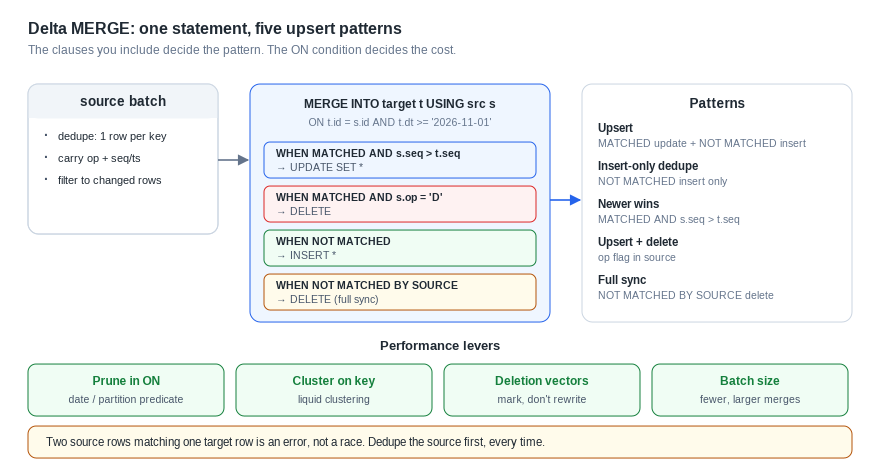 The clauses decide the pattern. The
ON condition decides the cost.
The setup
-- Databricks Runtime 16.4 LTS+, Unity Catalog
CREATE TABLE IF NOT EXISTS northbridge.silver.customers (
  customer_id   STRING NOT NULL,
  full_name     STRING,
  email         STRING,
  city          STRING,
  source_seq    BIGINT,       -- monotonically increasing per source change
  updated_at    TIMESTAMP,
  is_deleted    BOOLEAN
)
CLUSTER BY (customer_id);
Every pattern below assumes a staged view, customer_batch, with the same columns plus an op column (I, U or D).
Step 0 — Deduplicate the source (every pattern)
CREATE OR REPLACE TEMP VIEW customer_batch_dedup AS
SELECT *
FROM customer_batch
QUALIFY ROW_NUMBER() OVER (
  PARTITION BY customer_id
  ORDER BY source_seq DESC
) = 1;
If two source rows match the same target row in a MERGE that updates or deletes, Delta fails the statement with DELTA_MULTIPLE_SOURCE_ROW_MATCHING_TARGET_ROW_IN_MERGE. It won't guess which one you meant. Choose the winner yourself, using a real ordering column, not ingestion time.
Pattern 1 — Plain upsert
Update if it exists, insert if it doesn't.
MERGE INTO northbridge.silver.customers AS t
USING customer_batch_dedup AS s
ON t.customer_id = s.customer_id
WHEN MATCHED THEN UPDATE SET *
WHEN NOT MATCHED THEN INSERT *;
UPDATE SET * and INSERT * map columns by name and require the source to have every target column. Extra source columns like op are ignored, until someone turns on schema evolution and op quietly becomes a target column. Drop helper columns in the view, or list the columns explicitly.
Use this only when the source is guaranteed to be newer than the target. That's rarer than people think.
Pattern 2 — Insert-only dedupe
For append-only facts (events, orders, clicks) where duplicates arrive from at-least-once delivery:
MERGE INTO northbridge.silver.web_events AS t
USING web_events_batch_dedup AS s
ON  t.event_id   = s.event_id
AND t.event_date >= current_date() - INTERVAL 3 DAYS   -- pruning, see below
WHEN NOT MATCHED THEN INSERT *;
No WHEN MATCHED clause means existing rows are never touched, so Delta only appends new files. Insert-only merges are much cheaper than upserts, and replaying the same batch is a no-op.
The date predicate in ON assumes duplicates arrive within three days. If they can arrive later, widen it; if you don't know, measure it first.
Pattern 3 — Newer wins
Protect the target from older data: replayed files, backfills, out-of-order CDC.
MERGE INTO northbridge.silver.customers AS t
USING customer_batch_dedup AS s
ON t.customer_id = s.customer_id
WHEN MATCHED AND s.source_seq > t.source_seq THEN UPDATE SET
  t.full_name  = s.full_name,
  t.email      = s.email,
  t.city       = s.city,
  t.source_seq = s.source_seq,
  t.updated_at = s.updated_at
WHEN NOT MATCHED THEN INSERT
  (customer_id, full_name, email, city, source_seq, updated_at, is_deleted)
  VALUES (s.customer_id, s.full_name, s.email, s.city, s.source_seq, s.updated_at, false);
The extra AND s.source_seq > t.source_seq is the fix for the "older address overwrote newer address" incident. Matched rows that fail the condition are simply left alone. The full late-data treatment, including deletes, is in Deduplicate Late-Arriving CDC Rows with MERGE.
Pattern 4 — Upsert with deletes
When the source carries an operation flag:
MERGE INTO northbridge.silver.customers AS t
USING customer_batch_dedup AS s
ON t.customer_id = s.customer_id
WHEN MATCHED AND s.op = 'D' AND s.source_seq > t.source_seq THEN
  UPDATE SET t.is_deleted = true, t.source_seq = s.source_seq, t.updated_at = s.updated_at
WHEN MATCHED AND s.op <> 'D' AND s.source_seq > t.source_seq THEN
  UPDATE SET t.full_name = s.full_name, t.email = s.email, t.city = s.city,
             t.source_seq = s.source_seq, t.updated_at = s.updated_at, t.is_deleted = false
WHEN NOT MATCHED AND s.op <> 'D' THEN INSERT
  (customer_id, full_name, email, city, source_seq, updated_at, is_deleted)
  VALUES (s.customer_id, s.full_name, s.email, s.city, s.source_seq, s.updated_at, false);
Two things to notice. Clauses are evaluated in order, and the first matching clause wins, so put the more specific one first. And this is a soft delete: keeping the row with its source_seq means a late, older update can't resurrect it. A hard THEN DELETE loses that protection.
Pattern 5 — Full sync (mirror a snapshot)
When the source is a complete snapshot and anything missing from it should go:
MERGE INTO northbridge.silver.store_master AS t
USING store_master_snapshot AS s
ON t.store_id = s.store_id
WHEN MATCHED AND t.row_hash <> s.row_hash THEN UPDATE SET *
WHEN NOT MATCHED THEN INSERT *
WHEN NOT MATCHED BY SOURCE THEN DELETE;
WHEN NOT MATCHED BY SOURCE (Databricks Runtime 12.2 LTS+) acts on target rows that have no source row. It scans the whole target, so keep it for small-to-medium dimensions. You can scope it: WHEN NOT MATCHED BY SOURCE AND t.region = 'SOUTH' THEN DELETE.
The row_hash check stops unchanged rows from being rewritten. Without it, a full sync rewrites every file every run.
The same thing in PySpark
# Databricks Runtime 16.4 LTS+, PySpark, delta-spark
from delta.tables import DeltaTable

target = DeltaTable.forName(spark, "northbridge.silver.customers")
batch = spark.table("customer_batch_dedup")

(target.alias("t")
   .merge(batch.alias("s"), "t.customer_id = s.customer_id")
   .whenMatchedUpdate(
       condition="s.op = 'D' AND s.source_seq > t.source_seq",
       set={"is_deleted": "true", "source_seq": "s.source_seq", "updated_at": "s.updated_at"})
   .whenMatchedUpdate(
       condition="s.op <> 'D' AND s.source_seq > t.source_seq",
       set={"full_name": "s.full_name", "email": "s.email", "city": "s.city",
            "source_seq": "s.source_seq", "updated_at": "s.updated_at", "is_deleted": "false"})
   .whenNotMatchedInsert(
       condition="s.op <> 'D'",
       values={"customer_id": "s.customer_id", "full_name": "s.full_name",
               "email": "s.email", "city": "s.city", "source_seq": "s.source_seq",
               "updated_at": "s.updated_at", "is_deleted": "false"})
   .execute())
For streaming sources, wrap the same code in a foreachBatch function and deduplicate inside each micro-batch.
Read what the MERGE did
SELECT version, timestamp,
       operationMetrics['numSourceRows']          AS source_rows,
       operationMetrics['numTargetRowsUpdated']   AS updated,
       operationMetrics['numTargetRowsInserted']  AS inserted,
       operationMetrics['numTargetRowsDeleted']   AS deleted,
       operationMetrics['numTargetFilesAdded']    AS files_added,
       operationMetrics['numTargetFilesRemoved']  AS files_removed,
       operationMetrics['executionTimeMs']        AS ms
FROM (DESCRIBE HISTORY northbridge.silver.customers)
WHERE operation = 'MERGE'
ORDER BY version DESC
LIMIT 20;
The ratio to watch is files removed per row updated. If 200 updated rows removed 900 files, the MERGE is rewriting most of the table to change a sliver of it. That's a layout problem, not a cluster-size problem.
From production: gotchas and lessons
-
Symptom:
MERGEfailed with "multiple source rows matched and attempted to modify the same target row". Cause: One customer changed twice inside the same hourly batch. Fix: The Step 0 dedup, ordered by the source's sequence number. -
Symptom: Replaying a two-week-old file overwrote current addresses. Cause: Plain upsert (Pattern 1) assumes the source is always newer. Fix: Newer-wins condition (Pattern 3). Every CDC-fed table should have one.
-
Symptom: Two jobs merging into the same table failed with
ConcurrentAppendException. Cause: Both jobs read and rewrote the same files. Fix: Make their conditions provably disjoint (for example, each job includes its ownregion = ...inON), or run them in sequence. Tables with deletion vectors also get row-level conflict detection on recent runtimes, which removes many of these false conflicts. -
Symptom: A daily full-sync
MERGEon a 900M-row table took 70 minutes. Cause:WHEN NOT MATCHED BY SOURCEforces a full target scan, and every matched row was rewritten. Fix: Added therow_hashguard, and moved deletes to a separate, scoped clause. Runtime dropped to 9 minutes.
Performance and cost notes
- Prune in
ON. Delta can only skip target files using predicates it can see. A filter on a clustered or partitioned column insideON(not just in the source query) is the single biggest win. - Cluster on the join key. With liquid clustering on
customer_id, each incoming key lives in a small number of files. See Liquid Clustering vs Partitioning vs Z-Order. - Enable deletion vectors. Matched rows are marked rather than having their whole file rewritten. See Deletion Vectors and Row Tracking.
- Batch sensibly. A
MERGEhas fixed overhead (listing, planning, commit). Fifty merges of 100 rows cost more than one of 5,000. - Watch skew. A source where one key (often a default like
'UNKNOWN') has millions of rows will make one task do all the work. Filter or salt it before the merge.
When not to use this
- If the target is append-only and the source has no duplicates, plain
INSERT INTO(or.mode("append")) is cheaper. - If you're inside Lakeflow Spark Declarative Pipelines with a CDC source,
AUTO CDChandles ordering, deletes and SCD types for you. - If you're replacing a whole partition or date range,
INSERT ... REPLACE WHEREis simpler than aMERGE.
Checklist
- Source deduplicated to one row per key, by a real sequence column
- Newer-wins condition on every CDC-fed target
- Deletes are soft, with the sequence column kept
-
ONcontains a pruning predicate on a clustered column - Unchanged rows skipped with a hash or column comparison
-
operationMetricsmonitored for files removed per row changed - Re-running the same batch is a confirmed no-op
Practice
- Try: Delta Lake Interview Questions: 25 Scenario Problems
- Try: PySpark Interview Questions: 50 Coding and Scenario Problems
- Build it yourself: run Pattern 1 and Pattern 3 against the same out-of-order batches and compare the final rows.
Further reading
Keep going
Deduplicate Late-Arriving CDC Rows with MERGE: A Worked Problem
A CDC feed sends duplicates and out-of-order changes. Build a MERGE that keeps the latest row per key, ignores late events and is safe to replay.
SCD Type 2 with Delta MERGE: One Atomic Statement, SQL and PySpark
Expire the old version and insert the new one in a single Delta MERGE. The staged-union pattern, a PySpark version, the tests that catch broken history, and when to hand it to AUTO CDC.
Liquid Clustering vs Partitioning vs Z-Order: Which Layout and When
Three ways to make Delta skip files, compared on cost and flexibility, with a decision order, migration steps and when partitioning still wins.
One practical note a week
Get new articles, problems and guides in your inbox.
Thanks! You're on the list. (Local demo — no email provider is wired up yet.)