Delta Lake Schema Evolution and Enforcement: Add, Widen, Rename, Replace
Delta rejects mismatched writes by default. How to allow new columns, wider types, renames and drops on purpose, one write at a time.
TL;DR
- Enforcement is on by default: a write whose schema doesn't fit the table fails and writes nothing.
- Evolution is opt-in and should be enabled per write, not for the whole cluster.
- Four kinds of change, four tools:
- new columns →
mergeSchema/WITH SCHEMA EVOLUTION - wider types (INT → BIGINT) → type widening
- rename or drop → column mapping, then
ALTER TABLE - everything else →
overwriteSchema(a full replace)
- new columns →
- Narrowing a type or changing STRING to INT is never "evolution". It's a migration.
- Every schema change conflicts with concurrent writers. One owner per table.
The problem
NorthBridge's order feed from a partner marketplace added a channel field one Tuesday and changed qty from a 32-bit to a 64-bit integer. The bronze job, which had spark.databricks.delta.schema.autoMerge.enabled = true set on the cluster "to stop schema errors", accepted both. It also accepted Qty (capitalised, from a buggy test payload), and three columns named unnamed_0, unnamed_1, unnamed_2 from a malformed CSV later that week.
Schema evolution isn't dangerous. Schema evolution that nobody chose is.
Key concepts
| Concept | What it means | Why it matters here |
|---|---|---|
| Schema enforcement | Writes must match the table's columns and types | The default safety net |
| Schema evolution | Allowing a write to change the table schema | Needed, but should be deliberate |
| Additive change | New column, appended at the end | The only change mergeSchema makes |
| Type widening | Changing a type to a wider one without rewriting data | INT → BIGINT, FLOAT → DOUBLE and similar |
| Column mapping | Columns referenced by ID, not by Parquet name | Makes rename and drop metadata-only |
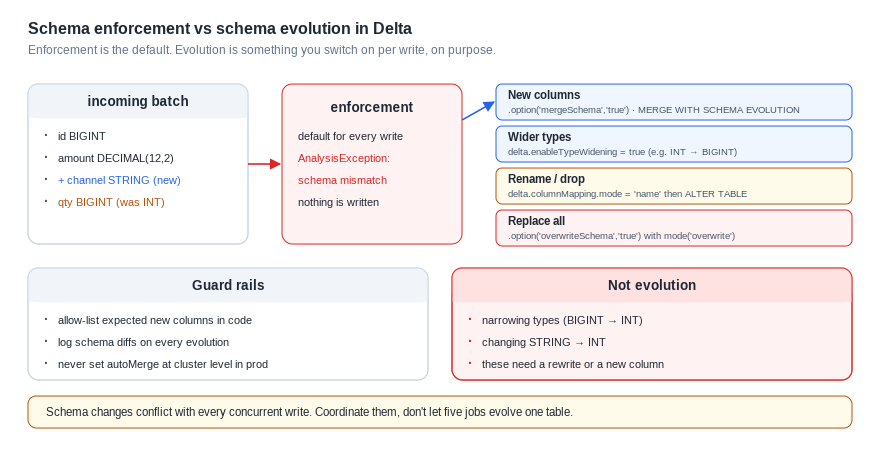 Enforcement is the default. Each kind of change has its own opt-in.
What enforcement checks
When you write to a Delta table, the write fails if the incoming data:
- has a column the table doesn't (unless evolution is enabled),
- has a column whose type can't be safely cast to the table's type,
- has two columns that differ only by case (
qtyandQty), or - violates a
NOT NULLorCHECKconstraint.
Missing columns are fine: they're written as NULL (unless the column is NOT NULL).
# Databricks Runtime 16.4 LTS+, PySpark
batch.write.mode("append").saveAsTable("northbridge.bronze.partner_orders")
# AnalysisException: [DELTA_METADATA_MISMATCH] A schema mismatch detected when writing to the Delta table...
That error is the system working. Read it; it lists the exact differences.
Change 1 — Add new columns
Per write, DataFrame API
(batch.write
   .mode("append")
   .option("mergeSchema", "true")
   .saveAsTable("northbridge.bronze.partner_orders"))
New columns are appended to the end of the schema (or the end of their struct). Existing rows read them as NULL.
In MERGE
-- Databricks Runtime 15.2+
MERGE WITH SCHEMA EVOLUTION INTO northbridge.silver.orders AS t
USING orders_batch AS s
ON t.order_id = s.order_id
WHEN MATCHED THEN UPDATE SET *
WHEN NOT MATCHED THEN INSERT *;
In Python, use .withSchemaEvolution() on the merge builder.
In SQL INSERT
On Databricks Runtime 18.1 and above, INSERT WITH SCHEMA EVOLUTION INTO ... SELECT ... works. On earlier runtimes, use the DataFrame mergeSchema option.
In streaming
(stream_df.writeStream
   .option("mergeSchema", "true")
   .option("checkpointLocation", "/Volumes/northbridge/chk/partner_orders")
   .toTable("northbridge.bronze.partner_orders"))
If the source is Auto Loader, schema inference and evolution happen there first; see Auto Loader: Schema Evolution, Notifications and Checkpoints.
Do it explicitly instead
For silver and gold tables, an explicit DDL change in a reviewed migration is usually better than implicit evolution:
ALTER TABLE northbridge.silver.orders ADD COLUMNS (channel STRING COMMENT 'Sales channel from partner feed');Change 2 — Widen a type
ALTER TABLE northbridge.silver.orders SET TBLPROPERTIES ('delta.enableTypeWidening' = 'true');

ALTER TABLE northbridge.silver.orders ALTER COLUMN qty TYPE BIGINT;
With type widening enabled, the change is metadata-only: existing files keep their INT data and are read as BIGINT. With schema evolution also on for a write, widening can happen automatically when incoming data has the wider type.
Supported changes include BYTE → SHORT → INT → BIGINT, FLOAT → DOUBLE, wider DECIMAL precision and DATE → TIMESTAMP_NTZ; check your runtime's docs for the full list. Enabling it adds a table feature, so older readers may not open the table.
Without type widening, the only way to change a type is to rewrite the table:
(spark.table("northbridge.silver.orders")
   .withColumn("qty", F.col("qty").cast("bigint"))
   .write.mode("overwrite")
   .option("overwriteSchema", "true")
   .saveAsTable("northbridge.silver.orders"))
Change 3 — Rename or drop a column
Parquet stores data by column name, so renaming used to mean rewriting. Column mapping changes that by giving each column a stable ID:
ALTER TABLE northbridge.silver.orders SET TBLPROPERTIES (
  'delta.columnMapping.mode' = 'name'
);

ALTER TABLE northbridge.silver.orders RENAME COLUMN cust_id TO customer_id;
ALTER TABLE northbridge.silver.orders DROP COLUMN legacy_flag;
Both are metadata-only. Two consequences people miss:
DROP COLUMNdoesn't erase the data from storage. If the column held personal data, runREORG TABLE ... APPLY (PURGE)and thenVACUUMto physically remove it.- Streaming readers of a table with renamed or dropped columns need
schemaTrackingLocationset, and change data feed reads across such changes have restrictions. Plan renames on streamed tables carefully.
Change 4 — Replace the schema
(new_df.write
   .mode("overwrite")
   .option("overwriteSchema", "true")
   .saveAsTable("northbridge.silver.orders"))
This replaces data and schema in one commit. Previous versions stay available via time travel. Use it for planned migrations, never in a scheduled job.
Guard rails that actually work
1. Evolution per write, never per cluster. Remove spark.databricks.delta.schema.autoMerge.enabled from cluster configs. An option on the write is visible in code review; a cluster setting isn't.
2. Allow-list in silver. Bronze can evolve freely (it's a landing zone). Silver should only accept columns someone expects:
EXPECTED_NEW = {"channel"}
current = set(spark.table("northbridge.silver.orders").columns)
incoming = set(batch.columns)
unexpected = incoming - current - EXPECTED_NEW
if unexpected:
    raise ValueError(f"Unexpected new columns, refusing to evolve: {sorted(unexpected)}")
3. Log every schema change. DESCRIBE HISTORY records it, but nobody reads it. Compare batch.schema with the table schema before writing and send the diff to your alerting channel.
4. Constraints for things types can't express.
ALTER TABLE northbridge.silver.orders ADD CONSTRAINT qty_positive CHECK (qty > 0);From production: gotchas and lessons
-
Symptom: Silver suddenly had
unnamed_0,unnamed_1,unnamed_2columns. Cause: Cluster-wide auto-merge plus a malformed file. Fix: Per-write evolution in bronze only, and an allow-list in silver. Removing the junk columns needed column mapping andDROP COLUMN. -
Symptom: A
MERGEfailed after a source column changed from INT to BIGINT. Cause:WITH SCHEMA EVOLUTIONadds columns; it doesn't widen types unless type widening is enabled on the table. Fix: Enable type widening, or cast in the source query. -
Symptom: A streaming job failed after a column rename on its source table. Cause: Non-additive schema change on a streaming source. Fix: Restart with
schemaTrackingLocationconfigured, after confirming downstream logic uses the new name. -
Symptom: Two pipelines writing to one table both failed with
MetadataChangedException. Cause: One evolved the schema while the other was writing. Fix: One writer owns schema changes. Others write with enforcement only.
When not to use this
Don't use schema evolution to paper over an unknown source. If you don't know what a feed will send, land it as a string or VARIANT in bronze and parse it into typed columns in silver, where changes are deliberate.
Checklist
- No cluster-level
autoMergesetting in any environment - Evolution enabled per write, only where expected
- Silver writes check incoming columns against an allow-list
- Type widening enabled on tables whose numeric ranges may grow
- Column mapping enabled before you ever need a rename
- Dropped PII columns purged and vacuumed
- One owner for schema changes per table
Practice
- Try: Delta Lake Interview Questions: 25 Scenario Problems
- Build it yourself: write three batches to a table, each with a different change (new column, wider type, renamed column) and find which option each needs.
Further reading
Keep going
Delta Lake MERGE: Five Upsert Patterns and How to Make Them Fast
The five Delta MERGE patterns (upsert, insert-only, newer-wins, deletes, full sync), the errors that break them, and how to make them fast.
Auto Loader: Schema Evolution, Notifications and Checkpoints
The three settings that decide whether Auto Loader is cheap and boring or expensive and surprising — file discovery mode, schema evolution mode, and what actually lives in the checkpoint.
Delta Change Data Feed: CDC Downstream Without Extra Tooling
Enable Change Data Feed and read row-level inserts, updates and deletes by version to refresh downstream Delta tables incrementally.
One practical note a week
Get new articles, problems and guides in your inbox.
Thanks! You're on the list. (Local demo — no email provider is wired up yet.)