The Small Files Problem in Delta Lake: Causes, Diagnosis and Compaction Strategies
Why Delta tables collect tiny files, how to measure it, and the writer fixes and compaction strategies that stop it coming back.
TL;DR
- Small files are a write-side habit with a read-side bill: slow planning, one task per file, weak data skipping, more storage API calls.
- Measure first:
DESCRIBE DETAILgivesnumFilesandsizeInBytes. Average file size under ~32 MB on a table bigger than a few GB is a problem. - The usual causes: very frequent streaming triggers, fine-grained partitioning, many tiny appends, and wide
MERGEs. - Fix the writer first (trigger interval, partitioning, optimized writes), then let compaction (auto compaction,
OPTIMIZE, predictive optimization) clean up what's left. - Compaction without a writer fix just schedules the same problem for next week.
The problem
NorthBridge's IoT team streamed freezer temperature readings from 1,800 stores into bronze.freezer_readings with a 5-second trigger, partitioned by store_id and reading_date. Each micro-batch wrote one small file into each store's folder.
After six weeks: 23 million files, average size 41 KB. A query for one store's last day took 8 seconds to plan and 2 seconds to run. The nightly OPTIMIZE ran for four hours and never quite caught up.
Key concepts
| Concept | What it means | Why it matters here |
|---|---|---|
| Target file size | The size Delta aims for when writing or compacting | Typically 128 MB–1 GB; Databricks may autotune |
| Optimized writes | A shuffle before writing so each partition gets fewer, larger files | Prevents small files at write time |
| Auto compaction | A small synchronous compaction after a write | Cleans up recent small files cheaply |
OPTIMIZE |
Full compaction (and clustering) on demand | Catches everything else |
| Planning overhead | Time spent reading the log and file stats before running | Grows with file count, not data size |
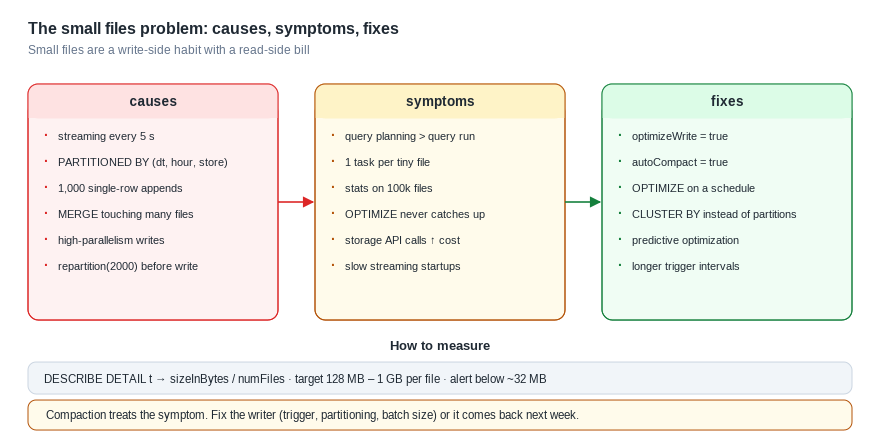 Fix the writer on the left, and the bill in the middle shrinks.
Step 1 — Measure
-- Databricks Runtime 16.4 LTS+, Unity Catalog
DESCRIBE DETAIL northbridge.bronze.freezer_readings;
d = spark.sql("DESCRIBE DETAIL northbridge.bronze.freezer_readings").first()
avg_mb = d.sizeInBytes / max(d.numFiles, 1) / 1024 / 1024
print(f"{d.numFiles:,} files, {d.sizeInBytes/1e9:.1f} GB, avg {avg_mb:.2f} MB")Rough thresholds for tables over a few GB:
| Average file size | Verdict |
|---|---|
| > 128 MB | Healthy |
| 32–128 MB | Fine for frequently updated tables |
| 8–32 MB | Worth fixing |
| < 8 MB | Urgent: planning and task overhead dominate |
A tiny table with tiny files is fine. 50 files of 1 MB is not a problem; 500,000 is.
Step 2 — Find the writer
DESCRIBE HISTORY shows which operations add the most files:
SELECT operation,
       COUNT(*)                                                   AS commits,
       SUM(CAST(operationMetrics['numFiles']       AS BIGINT))   AS files_written_append,
       SUM(CAST(operationMetrics['numAddedFiles']  AS BIGINT))   AS files_added_other,
       ROUND(AVG(CAST(operationMetrics['numOutputBytes'] AS BIGINT)
                / NULLIF(CAST(operationMetrics['numFiles'] AS BIGINT), 0)) / 1e6, 2) AS avg_mb_per_file
FROM (DESCRIBE HISTORY northbridge.bronze.freezer_readings LIMIT 2000)
GROUP BY operation
ORDER BY commits DESC;
In NorthBridge's case: 17,280 STREAMING UPDATE commits a day, each writing one file per store that had data. That's the cause, and no compaction schedule could out-run it.
Step 3 — Fix the writer
Slow down the trigger
(readings.writeStream
   .trigger(processingTime="2 minutes")      # was 5 seconds
   .option("checkpointLocation", "/Volumes/northbridge/chk/freezer_readings")
   .toTable("northbridge.bronze.freezer_readings"))
Ask what latency the consumer actually needs. For a dashboard refreshed every 15 minutes, a 5-second trigger buys nothing and costs 24× the files of a 2-minute trigger. For batch-style consumers, trigger(availableNow=True) on a schedule is even better.
Stop over-partitioning
PARTITIONED BY (store_id, reading_date) multiplies every write by the number of stores. Rebuild with liquid clustering instead:
CREATE TABLE northbridge.bronze.freezer_readings_v2
CLUSTER BY (store_id, reading_ts)
AS SELECT * FROM northbridge.bronze.freezer_readings;
See Liquid Clustering vs Partitioning vs Z-Order for the migration steps.
Turn on optimized writes
ALTER TABLE northbridge.bronze.freezer_readings_v2 SET TBLPROPERTIES (
  'delta.autoOptimize.optimizeWrite' = 'true'
);
Optimized writes add a shuffle so each output partition receives enough rows to write reasonably sized files. It costs a little write latency; it's on by default for many write paths on recent Databricks runtimes (including MERGE, UPDATE and DELETE, and Unity Catalog managed tables), but setting it explicitly documents the intent.
Don't fight Spark's parallelism
# Anti-pattern: 2,000 output files for 3 GB of data
df.repartition(2000).write.mode("append").saveAsTable("...")

# Better: let optimized writes size the files, or coalesce to a sensible count
df.write.mode("append").saveAsTable("...")
Batch tiny appends
Applications that insert one row at a time (a web app logging events with INSERT INTO ... VALUES) create one file and one commit per row. Buffer them (a queue, Event Hubs, a staging table) and land them in batches.
Step 4 — Compact what's left
Auto compaction
ALTER TABLE northbridge.bronze.freezer_readings_v2 SET TBLPROPERTIES (
  'delta.autoOptimize.autoCompact' = 'true'
);
After a write succeeds, Delta checks whether enough small files have accumulated in the areas it just wrote and, if so, compacts them synchronously on the same cluster. It's cheap because it only looks at recent files. It does add latency to the write that triggers it, so for latency-sensitive streams some teams leave it off and rely on scheduled OPTIMIZE.
Scheduled OPTIMIZE or predictive optimization
OPTIMIZE northbridge.bronze.freezer_readings_v2;On Unity Catalog managed tables, enable predictive optimization and let Databricks schedule it. Details in OPTIMIZE, VACUUM and Z-ORDER Explained.
Then VACUUM
Compaction leaves the small files on storage until VACUUM removes them after the retention window. Until then, storage goes up, not down.
The result
For the freezer table: 2-minute trigger, liquid clustering on store_id, reading_ts, optimized writes, predictive optimization. Six weeks later, 9,400 files averaging 180 MB. Planning time for the single-store query dropped from 8 seconds to under 1. The four-hour nightly OPTIMIZE job was deleted.
From production: gotchas and lessons
-
Symptom:
OPTIMIZEran every night and file count still grew. Cause: The writer created files faster than compaction could merge them. Fix: Fix the trigger interval and partitioning. Compaction is the mop, not the tap. -
Symptom: Streaming latency jumped from 10 to 40 seconds after enabling auto compaction. Cause: Auto compaction runs synchronously after the triggering write. Fix: Keep it off for that stream; compact with scheduled
OPTIMIZEor predictive optimization instead. -
Symptom: A
MERGEproduced 3,000 new files for 50,000 updated rows. Cause: The matched rows were spread across 3,000 files, each rewritten. Fix: Cluster on the merge key so changes concentrate in fewer files, and enable deletion vectors so matched rows don't force full rewrites. -
Symptom: Streaming job startup took minutes. Cause: Millions of log entries and file stats to load for the initial snapshot. Fix: Compaction plus regular checkpoints. File count drives log size.
Performance and cost notes
Small files cost three times: compute for planning and tasks, storage API calls (list and get requests are billed per call on cloud object storage), and the maintenance jobs trying to fix them. A trigger interval change is free and usually the biggest single win.
When not to use this
Some small files are normal. A table written every few minutes will always have a recent tail of small files until the next compaction, and that's fine. Aim for a healthy average, not zero small files.
Checklist
-
numFilesand average file size tracked for large tables - Streaming triggers set by consumer latency needs, not habit
- No partitioning finer than date, and none on tables under ~1 TB without a reason
- Optimized writes on for write-heavy tables
- Auto compaction decided per table (on for batch, considered for streams)
- Predictive optimization or scheduled
OPTIMIZE, followed byVACUUM
Practice
- Try: Delta Lake Interview Questions: 25 Scenario Problems
- Try: PySpark Interview Questions: 50 Coding and Scenario Problems
- Build it yourself: append 1,000 single-row batches to a table, measure query planning time, then apply the fixes above one at a time.
Further reading
Keep going
OPTIMIZE, VACUUM and Z-ORDER Explained: What Each One Actually Does
OPTIMIZE compacts, Z-ORDER sorts, VACUUM deletes. How each works, how to schedule them, and what predictive optimization and Runtime 18 changed.
Liquid Clustering vs Partitioning vs Z-Order: Which Layout and When
Three ways to make Delta skip files, compared on cost and flexibility, with a decision order, migration steps and when partitioning still wins.
Structured Streaming on Databricks: Trigger Modes, Checkpoints and Exactly-Once
Which trigger mode to pick and what it costs, what actually lives in a checkpoint, and the three conditions exactly-once depends on — one of which is your code.
One practical note a week
Get new articles, problems and guides in your inbox.
Thanks! You're on the list. (Local demo — no email provider is wired up yet.)