Shallow vs Deep Clone and RESTORE: Safe Recovery Patterns for Delta Tables
When to use a shallow clone, a deep clone or RESTORE: test on real data, take real backups, and roll back bad writes safely.
TL;DR
- Shallow clone copies only the transaction log. The clone reads the source's data files. It's created in seconds and costs almost nothing, which makes it ideal for testing and experiments.
- Deep clone copies data files and metadata. It's independent of the source and re-running it copies only what changed, which makes it the right tool for backups and migrations.
RESTORErolls a table back to an earlier version by writing a new commit. History is kept, so you can restore the restore.- Neither time travel nor shallow clones are backups: both depend on the source's files still existing.
- In Unity Catalog,
VACUUMon a source doesn't break its shallow clones. Outside Unity Catalog, it can.
The problem
Two NorthBridge incidents in the same quarter:
- A developer tested a new
MERGEagainst a "copy" ofsilver.ordersthat was actually a shallow clone. The test went fine. Then the source's weeklyVACUUMran and the clone started failing with file-not-found errors halfway through the team's regression suite. - A bad deployment corrupted
gold.daily_revenue. The on-call engineer ranRESTOREto the version from 9 a.m. Two hours of correct late-arriving data, committed after 9 a.m., went with it.
Both commands did exactly what they're designed to do. The team had picked the wrong one.
Key concepts
| Concept | What it means | Why it matters here |
|---|---|---|
| Clone | A new table created from another table's state at a version | Copies metadata, and optionally data |
| Shallow | Only the log is copied; add actions point at source files |
Fast and free, but dependent |
| Deep | Data files are copied too | Slower and costs storage, but independent |
| Incremental clone | Re-running a deep clone into the same target | Copies only new or changed files |
RESTORE |
A commit that makes an old version current | In-place rollback with history kept |
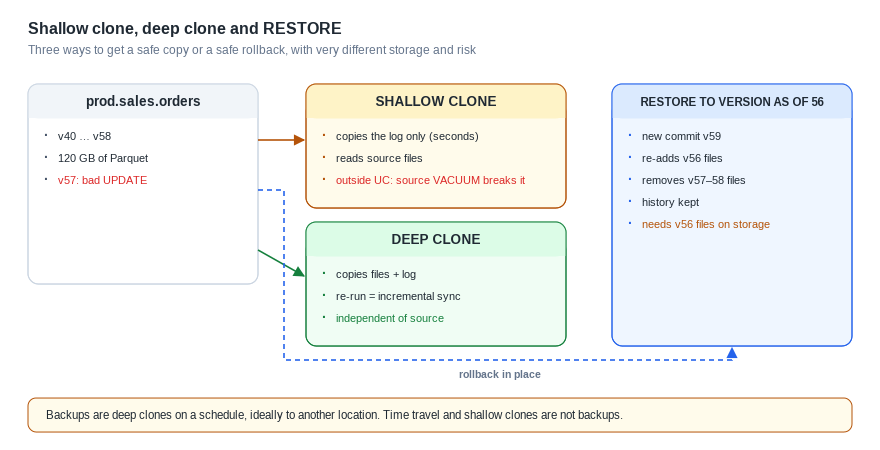 Two ways to copy, one way to roll back.
Shallow clone: test against production data
-- Databricks Runtime 16.4 LTS+, Unity Catalog managed tables
CREATE TABLE northbridge_dev.sandbox.orders_test
SHALLOW CLONE northbridge.silver.orders;

-- Or as of a specific version
CREATE TABLE northbridge_dev.sandbox.orders_v56
SHALLOW CLONE northbridge.silver.orders VERSION AS OF 56;
What you get:
- A new table with its own history, starting at version 0. Writes to the clone create new files in the clone's location and never touch the source.
- Reads of unchanged data go to the source's files.
- Independent permissions: the clone's owner controls access to the clone.
Good for: testing a MERGE or schema change, giving a data scientist a sandbox, reproducing a bug at a specific version.
Rules worth knowing in Unity Catalog:
- Managed sources clone to managed targets; external to external.
VACUUMis clone-aware: vacuuming the source doesn't delete files a shallow clone still references.- You can't make a shallow clone of a shallow clone.
- Dropping a managed source breaks its shallow clones (Databricks blocks the drop by default while clones exist; during the
UNDROPwindow they keep working). - To refresh a UC shallow clone, drop and recreate it;
CREATE OR REPLACEisn't supported for that.
Outside Unity Catalog (Hive metastore or path-based tables), VACUUM on the source only considers the source's log. It can delete files your shallow clone still points to, which is exactly incident 1. There, keep shallow clones short-lived, or recreate them after the source is vacuumed.
Deep clone: backups and migrations
CREATE OR REPLACE TABLE northbridge_backup.silver.orders
DEEP CLONE northbridge.silver.orders;
The first run copies every active data file. Re-running the same statement copies only files added since the previous clone and records removals, so a nightly deep clone of a large, mostly-append table takes minutes, not hours.
# A nightly backup task in a Lakeflow Job
tables = ["silver.orders", "silver.customers", "gold.daily_revenue"]
for t in tables:
    spark.sql(f"""
      CREATE OR REPLACE TABLE northbridge_backup.{t}
      DEEP CLONE northbridge.{t}
    """)
What's copied: data files, schema, partitioning or clustering, constraints, and most table properties. What's not: the source's history. The clone's DESCRIBE HISTORY starts at its own creation. So a deep clone is a snapshot backup, not a time machine.
For a backup to be a backup:
- put it in a different catalog, with different permissions, ideally backed by a different storage account or region,
- give it its own retention, and
- test a restore from it at least once a quarter.
Deep clone is also the simplest way to migrate a table between workspaces, storage accounts, or from external to managed.
RESTORE: roll back in place
DESCRIBE HISTORY northbridge.gold.daily_revenue LIMIT 20;

RESTORE TABLE northbridge.gold.daily_revenue TO VERSION AS OF 311;
-- or TO TIMESTAMP AS OF '2026-11-13 09:00:00'
RESTORE writes a new commit (say v315) that re-adds the files active at v311 and removes the files added since. History is preserved, so if the restore was wrong, RESTORE ... TO VERSION AS OF 314 undoes it.
The restore window is bounded by retention: you can only restore to versions whose files still exist. On Databricks Runtime 18+, versions older than delta.deletedFileRetentionDuration are blocked outright. See Delta Lake Time Travel in 12 Minutes.
The runbook that would have prevented incident 2
- Stop writers. Pause the jobs that write to the table.
- Find the bad version in
DESCRIBE HISTORY(operation, user,operationParameters). - List what came after it. Anything good committed later?
- Choose:
- nothing good after →
RESTOREto the version before the bad one; - good commits after → don't restore; fix with a targeted
MERGEorINSERTfrom the old version; - not sure → shallow clone the old version, compare, then decide.
- nothing good after →
- Validate counts and key metrics against the known-good version.
- Decide what downstream does. Streaming readers see a
RESTOREas a data change. Plan whether they reprocess or skip. - Restart writers.
For incident 2, step 3 would have shown four late-data MERGEs after the bad deployment. The right fix was re-running the corrected gold logic for the affected dates, not a restore.
Choosing quickly
| Need | Use |
|---|---|
| Test a change against real data, today | Shallow clone |
| Reproduce a bug at version 56 | Shallow clone VERSION AS OF 56 |
| Nightly backup | Deep clone to another catalog/storage, re-run incrementally |
| Move a table to new storage or workspace | Deep clone |
| Undo the last bad write, nothing good since | RESTORE |
| Undo a bad write with good writes since | Targeted MERGE/INSERT from the old version |
Undo a DROP TABLE (UC managed) |
UNDROP TABLE within the window |
From production: gotchas and lessons
-
Symptom: Shallow clone in a Hive metastore workspace failed after a week. Cause: Source
VACUUMremoved files the clone referenced. Fix: Recreate the clone, or move to Unity Catalog where vacuum is clone-aware. -
Symptom: Nightly deep clone suddenly took 5 hours instead of 10 minutes. Cause: An
OPTIMIZEwith Z-ORDER on the source rewrote every file, so the "incremental" clone copied everything. Fix: Expected after big rewrites. Schedule major source rewrites before a weekend, or use liquid clustering, which rewrites less. -
Symptom: A restored table looked right, but a downstream gold table doubled some rows. Cause: The gold stream treated the re-added files as new appends. Fix: Pause downstream streams during a restore; afterwards, rebuild or reprocess the affected range deliberately.
-
Symptom: Restoring a 30-day-old version failed on Runtime 18. Cause: File retention was 7 days. Fix: For anything beyond the retention window, restore from the deep-clone backup instead.
Performance and cost notes
Shallow clones cost only the log copy and any new files you write to them. Deep clones cost a full copy once, then incremental copies; storage doubles. RESTORE is mostly metadata, unless deletion vectors need to be rewritten, and is usually fast.
When not to use this
Don't use shallow clones for anything long-lived. Don't use time travel as your only recovery plan. And don't run RESTORE on a table with active writers; it will conflict, or worse, succeed while new data is landing.
Checklist
- Shallow clones used for short-lived testing only
- Deep-clone backups to a separate catalog and storage, on a schedule
- Backup restore tested at least quarterly
- Restore runbook written down, including the "anything good after?" check
- Downstream streams considered before any restore
- Retention window known for every critical table
Practice
- Try: Delta Lake Interview Questions: 25 Scenario Problems
- Build it yourself: shallow clone a table,
VACUUMthe source, and check the clone in Unity Catalog. Then deep clone the same table twice and compare the second run's metrics.
Further reading
Keep going
Delta Lake Time Travel in 12 Minutes: Query, Compare and Recover Old Versions
Query old Delta versions, compare them, recover from a bad write, and set retention correctly now that Runtime 18 changed the rules.
OPTIMIZE, VACUUM and Z-ORDER Explained: What Each One Actually Does
OPTIMIZE compacts, Z-ORDER sorts, VACUUM deletes. How each works, how to schedule them, and what predictive optimization and Runtime 18 changed.
Inside the Delta Transaction Log: Commits, Checkpoints and Optimistic Concurrency
Read _delta_log yourself: what commits and checkpoints contain, how readers build snapshots, and how concurrent writers avoid corruption.
One practical note a week
Get new articles, problems and guides in your inbox.
Thanks! You're on the list. (Local demo — no email provider is wired up yet.)