Identity, Generated and Default Columns in Delta: What They Guarantee
Identity keys, computed columns and defaults in Delta: what each guarantees, what it doesn't, and the concurrency trade-off that bites.
TL;DR
- Identity columns (
GENERATED ALWAYS AS IDENTITY) give unique, increasingBIGINTvalues. They're not consecutive, and a table with one doesn't support concurrent write transactions. - Generated columns (
GENERATED ALWAYS AS (expr)) are computed from other columns on every write. Their best use is deriving a partition column so filters on the source column still prune. - Default columns (
DEFAULT 'new') fill a value only when a write omits the column. An explicitNULLstaysNULL. - All three are defined at table creation in practice. Adding identity or generated columns to an existing table means recreating it.
- For surrogate keys in multi-writer pipelines, use hash keys instead of identity.
The problem
NorthBridge built gold.dim_product with an identity surrogate key. It worked for a year. Then the team split the load into two parallel jobs, one for grocery and one for apparel, to hit an SLA. Both failed intermittently with concurrent modification errors.
Nothing was wrong with either job. Identity columns and concurrent writers don't mix, and the documentation says so. Nobody had read it, because the column "just worked" for a year.
Key concepts
| Concept | What it means | Why it matters here |
|---|---|---|
| Identity column | Delta assigns a value from an internal high-water mark | Convenient surrogate keys, single writer |
ALWAYS vs BY DEFAULT |
Can users supply their own value? | ALWAYS rejects explicit values |
| Generated column | Value computed from a deterministic expression of other columns | Consistency without application code |
| Default value | Value used when the column is omitted from a write | Simplifies inserts and evolving schemas |
| High-water mark | The last assigned identity value, stored in table metadata | Explains gaps and sync behaviour |
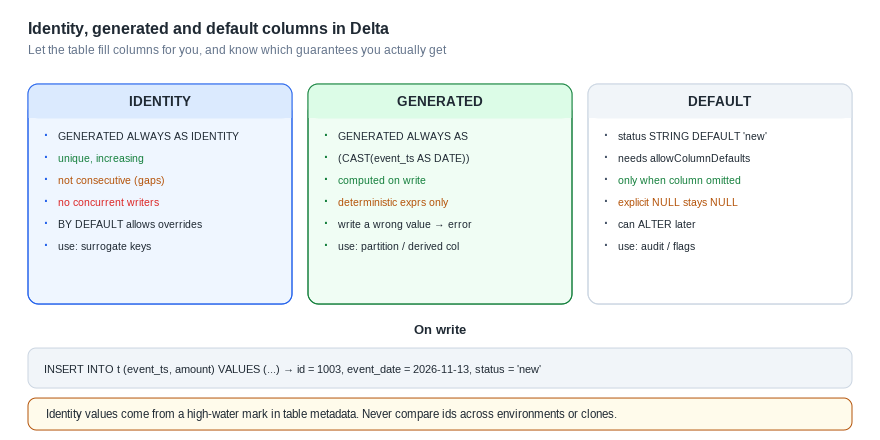 Three ways to let the table fill a column, each with a different guarantee.
Identity columns
-- Databricks Runtime 16.4 LTS+, Unity Catalog
CREATE TABLE northbridge.gold.dim_product (
  product_key   BIGINT GENERATED ALWAYS AS IDENTITY (START WITH 1 INCREMENT BY 1),
  product_id    STRING NOT NULL,
  product_name  STRING,
  category      STRING,
  valid_from    TIMESTAMP,
  is_current    BOOLEAN
)
CLUSTER BY (product_id);

INSERT INTO northbridge.gold.dim_product (product_id, product_name, category, valid_from, is_current)
VALUES ('SKU-1001', 'Filter coffee 500g', 'Grocery', current_timestamp(), true);
What's guaranteed
- Unique within the table.
- Increasing in the direction of
INCREMENT BYacross commits. - Assigned automatically, including inside
MERGE ... WHEN NOT MATCHED THEN INSERT, which is how it's used in SCD Type 2 with Delta MERGE.
What's not
- Consecutive values. Spark assigns ranges per task, so you'll see gaps (1, 2, 3, 1001, 1002…). Never use identity values to count rows or detect missing records.
- Concurrent writes. Declaring an identity column disables concurrent write transactions on the table. Two jobs writing at the same time will conflict. Run writers sequentially.
- Stability across environments. A dev table and a prod table loaded from the same data will assign different keys. Never join across environments on identity values, and don't expect a rebuilt table to reproduce old keys.
ALWAYS vs BY DEFAULT
product_key BIGINT GENERATED BY DEFAULT AS IDENTITYBY DEFAULT lets you insert explicit values, which is useful for special members like -1 for "unknown" or for migrating existing keys. After explicit inserts, bring the high-water mark in line:
ALTER TABLE northbridge.gold.dim_product ALTER COLUMN product_key SYNC IDENTITY;Prefer ALWAYS unless you have a reason; it stops accidental manual keys.
Other limits
- You can't add an identity column to an existing table with
ALTER TABLE ADD COLUMN. Create a new table andINSERT ... SELECT. - You can't partition by an identity column.
- Writers must support the identity columns feature; check external engines before relying on them.
Generated columns
CREATE TABLE northbridge.silver.web_events (
  event_id    STRING,
  event_ts    TIMESTAMP,
  event_date  DATE GENERATED ALWAYS AS (CAST(event_ts AS DATE)),
  user_id     STRING,
  page        STRING
)
PARTITIONED BY (event_date);
On every write, Delta computes event_date from event_ts. If a write supplies event_date and it doesn't match the expression, the write fails, so the derived value can never drift from its source.
Why it's useful: partition pruning for free
Users naturally filter on the timestamp:
SELECT COUNT(*) FROM northbridge.silver.web_events
WHERE event_ts >= '2026-11-12 00:00:00' AND event_ts < '2026-11-13 00:00:00';
Because Delta knows event_date is generated from event_ts, it can derive a filter on event_date and prune partitions, even though the query never mentions it. Without the generated column, users would have to remember to filter on both.
Rules
- The expression must be deterministic and use only built-in functions: no UDFs, aggregates, window functions or non-deterministic functions like
rand()orcurrent_timestamp(). - Define them at creation. Adding a generated column to an existing table generally means recreating it.
- With liquid clustering, you usually don't need one: cluster on
event_tsdirectly rather than on a generated date. Generated columns earn their keep mainly on partitioned tables. See Liquid Clustering vs Partitioning vs Z-Order.
Other good uses: GENERATED ALWAYS AS (upper(trim(country_code))) for normalised codes, or GENERATED ALWAYS AS (year(order_date) * 100 + month(order_date)) for a year-month key.
Default columns
ALTER TABLE northbridge.silver.orders
SET TBLPROPERTIES ('delta.feature.allowColumnDefaults' = 'supported');

ALTER TABLE northbridge.silver.orders
ADD COLUMN status STRING DEFAULT 'new';

ALTER TABLE northbridge.silver.orders
ALTER COLUMN status SET DEFAULT 'received';
INSERT INTO northbridge.silver.orders (order_id, amount) VALUES ('O-1', 499.00);
-- status = 'received'
INSERT INTO northbridge.silver.orders (order_id, amount, status) VALUES ('O-2', 120.00, NULL);
-- status = NULL: an explicit NULL is not "omitted"You can also write DEFAULT explicitly in INSERT and UPDATE: UPDATE ... SET status = DEFAULT.
Defaults are good for audit flags, status columns and new columns added to tables whose writers haven't been updated yet. Unlike identity and generated columns, defaults can be added and changed on existing tables. Enabling them adds a table feature, so check client support.
Identity or hash key?
| Identity | Hash key (xxhash64, sha2) |
|
|---|---|---|
| Size | 8-byte BIGINT |
BIGINT or long string |
| Concurrent writers | No | Yes |
| Reproducible on rebuild | No | Yes |
| Collisions | Never | Possible at very high cardinality (with 64-bit hashes) |
| Works in parallel jobs | No | Yes |
NorthBridge's fix for the two-job dim_product load: keep identity, but make one job own the dimension and run the category loads as sequential tasks. For the newer dim_supplier, written by three regional pipelines, they chose hash keys from the start. More detail in Surrogate Keys in a Lakehouse.
From production: gotchas and lessons
-
Symptom: Parallel loads into a dimension failed with concurrent modification errors. Cause: The table had an identity column. Fix: One writer per identity table, or switch to hash keys.
-
Symptom: A reconciliation report flagged "missing" keys 1001–1999. Cause: Identity values have gaps by design. Fix: Reconcile on business keys and row counts, never on key ranges.
-
Symptom: Inserts started failing on a partitioned events table. Cause: A new upstream job wrote
event_datein UTC whileevent_tswas in local time, so the supplied value didn't match the generated expression. Fix: Stop writing generated columns explicitly; let Delta compute them. -
Symptom: After a migration with explicit keys, new identity values collided with old ones. Cause: The high-water mark wasn't updated after
BY DEFAULTexplicit inserts. Fix:ALTER COLUMN ... SYNC IDENTITYafter any explicit-key load.
When not to use this
Don't use identity columns on tables written by more than one job at a time, or where keys must be identical across environments. Don't use generated columns where the expression might change; changing it means recreating the table. And don't use defaults to hide missing upstream data that should fail loudly.
Checklist
- Identity tables have exactly one writer at a time
- Nothing relies on identity values being consecutive or reproducible
-
SYNC IDENTITYrun after explicit-key loads intoBY DEFAULTcolumns - Generated columns used to derive partition columns from timestamps
- Generated columns not written explicitly by pipelines
- Column defaults enabled deliberately, with client support checked
Practice
- Try: Delta Lake Interview Questions: 25 Scenario Problems
- Try: Data Modeling Interview Questions: 20 Design Problems
- Build it yourself: insert 1,000 rows into an identity table from a 16-partition DataFrame and look at the gaps.
Further reading
Keep going
Surrogate Keys in a Lakehouse: Identity, Hashes or Sequences
Identity columns, hash keys and ROW_NUMBER sequences all produce surrogate keys on Delta Lake. They differ on concurrency, collisions, reproducibility and join cost. Here's how to choose.
SCD Type 2 with Delta MERGE: One Atomic Statement, SQL and PySpark
Expire the old version and insert the new one in a single Delta MERGE. The staged-union pattern, a PySpark version, the tests that catch broken history, and when to hand it to AUTO CDC.
Liquid Clustering vs Partitioning vs Z-Order: Which Layout and When
Three ways to make Delta skip files, compared on cost and flexibility, with a decision order, migration steps and when partitioning still wins.
One practical note a week
Get new articles, problems and guides in your inbox.
Thanks! You're on the list. (Local demo — no email provider is wired up yet.)