PySpark Interview Questions: 50 Coding and Scenario Problems
50 PySpark interview questions across transforms, joins, windows, partitioning, performance, streaming, Delta Lake, and system design — with answers, not just questions.
TL;DR
- 50 questions, grouped into 8 topic clusters that mirror how PySpark interviews are actually structured: fundamentals, joins, windows, partitioning/shuffle, performance/debugging, streaming, Delta Lake, and system design.
- Every question has a real answer here, not just a prompt — this is meant to be studied from, not just used as a checklist.
- Weighted toward the questions that separate "has used PySpark" from "understands why PySpark behaves the way it does" — lazy evaluation, shuffle cost, and skew show up more than once on purpose.
- The four system design questions at the end are the ones candidates most often lose points on, because they require combining several of the earlier topics at once.
- Treat the short answers here as a starting point for your own words in an interview, not a script to recite.
The problem
Most PySpark interview-question lists online are exactly that — a list of questions with no answers, or answers that are one sentence too short to actually teach anything. A candidate preparing from one of those either has to already know the material (in which case the list isn't doing much work) or has to go find the answer somewhere else for every single question, which defeats the purpose of having a consolidated set.
This set is built the other way around: every question includes an answer worth reading on its own, organized the way an interviewer actually samples from this material — a handful of fundamentals to establish a baseline, then joins and windows to check hands-on fluency, then the performance and debugging questions that tend to separate candidates, and a short run of scenario questions at the end that ask you to reason about a system rather than recall a fact.
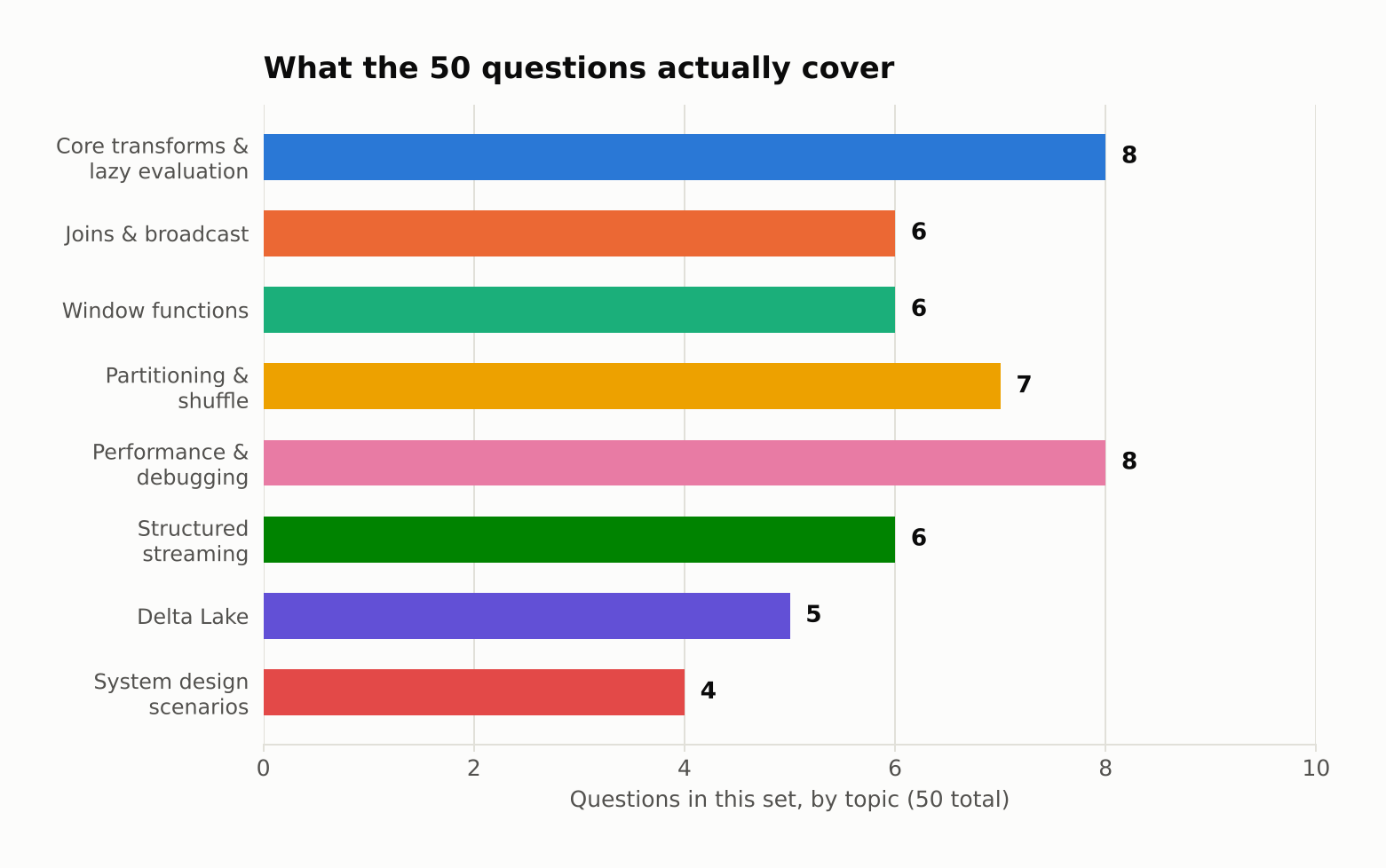 Performance/debugging and core transforms get the most questions on purpose — they're where most real interviews spend their time.
Core transforms and lazy evaluation (8)
1. What does it mean that Spark transformations are lazy?
Calling .filter(), .select(), or .withColumn() doesn't run anything — it builds up a logical plan. Computation only happens when an action (.collect(), .count(), .write(), etc.) is called, which lets Catalyst see the whole chain and optimize it as one plan instead of executing each step in isolation.
2. Why does df.count() after ten chained .withColumn() calls still run reasonably fast?
Because none of the withColumn calls executed anything on their own — Catalyst combines the whole chain into one optimized physical plan by the time count() triggers execution, often fusing operations into a single stage.
3. What's the difference between a transformation and an action?
A transformation returns a new DataFrame and is lazy (select, filter, join, groupBy). An action triggers actual computation and returns a non-DataFrame result or writes output (collect, count, show, write).
4. Why is .collect() dangerous on a large DataFrame?
It pulls the entire result set into the driver's memory as a local Python object. On anything beyond a small result, this can crash the driver even if the cluster handled the distributed computation fine.
5. What's the difference between narrow and wide transformations?
A narrow transformation (filter, select, map) computes each output partition from a single input partition, with no shuffle. A wide transformation (groupBy, join, distinct) requires data to move between partitions, triggering a shuffle.
6. Why does df.cache() sometimes not seem to help performance?
cache() is also lazy — it only marks the DataFrame for caching, and caching only actually happens the first time an action materializes it. Calling cache() and then immediately checking memory usage, before any action, shows nothing cached yet.
7. What's the difference between select and selectExpr?
select takes Column objects or column names; selectExpr takes SQL expression strings, letting you write "col1 + col2 as total" directly without building the expression with F.col(...) and F.expr(...).
8. How does Spark's Catalyst optimizer use predicate pushdown?
When reading from a source that supports it (Parquet, Delta, many JDBC sources), Catalyst pushes filter conditions down to the data source itself, so only matching rows (or row groups) are read off disk in the first place, rather than reading everything and filtering in Spark.
Joins and broadcast (6)
9. What is a broadcast join and when does Spark use one automatically?
A broadcast join sends a full copy of the smaller table to every executor, avoiding a shuffle of the larger table entirely. Spark does this automatically when a table's estimated size is under spark.sql.autoBroadcastJoinThreshold (10 MB by default).
10. How do you force a broadcast join when Spark's size estimate is wrong?
from pyspark.sql.functions import broadcast
result = large_df.join(broadcast(small_df), "customer_id")
11. What happens if you broadcast a table that's actually too large? Every executor tries to hold the full table in memory, which can cause out-of-memory errors across the cluster — broadcast is only safe for genuinely small tables, typically under a few hundred MB depending on cluster memory.
12. What's the difference between a sort-merge join and a broadcast join? Sort-merge join shuffles and sorts both sides of the join by key, then merges them — used for large-to-large joins. Broadcast join avoids shuffling the large side entirely by replicating the small side — used for large-to-small joins.
13. Why can a join produce more rows than either input table? If the join key isn't unique on one or both sides, matching rows multiply — a classic fan-out. This is expected behavior for a one-to-many or many-to-many join, not a bug, but it surprises people who assume joins are always row-preserving.
14. How do you handle a join where the key has null values on both sides?
Standard equi-joins never match null = null — nulls are excluded from both sides. If you specifically need null-to-null matches, use eqNullSafe (df1.join(df2, df1.key.eqNullSafe(df2.key))).
Window functions (6)
15. What are the three components of a window specification?
partitionBy (which rows group together), orderBy (the sequence within each partition), and the frame (rowsBetween/rangeBetween, which neighbors are visible to each row).
16. What's the difference between rank(), dense_rank(), and row_number()?
row_number() always gives unique, sequential numbers, breaking ties arbitrarily. rank() gives tied rows the same number and skips the next rank(s) accordingly. dense_rank() gives tied rows the same number with no gap afterward.
17. How do you get the previous row's value without a self-join?
from pyspark.sql import Window
from pyspark.sql.functions import lag
w = Window.partitionBy("store_id").orderBy("week_ending")
df.withColumn("prior_week_sales", lag("weekly_sales", 1).over(w))
18. What happens if you forget partitionBy on a window?
Spark treats the entire DataFrame as a single partition, forcing all data to one executor for that computation — a severe performance problem on any non-trivial dataset.
19. What's the difference between rowsBetween and rangeBetween?
rowsBetween defines the frame by physical row position (e.g., 2 rows before the current one). rangeBetween defines it by the value of the order column (e.g., all rows within a value range of the current row) — they behave identically only when the order column has no duplicate values.
20. How would you compute a 7-day moving average per store?
from pyspark.sql.functions import avg
w = Window.partitionBy("store_id").orderBy("day").rowsBetween(-6, 0)
df.withColumn("moving_avg_7d", avg("daily_sales").over(w))
Partitioning and shuffle (7)
21. What's the difference between repartition() and coalesce()?
repartition() does a full shuffle and can increase or decrease partition count, producing evenly sized partitions. coalesce() avoids a full shuffle by merging existing partitions, can only decrease partition count, and may produce uneven sizes.
22. Why would you use coalesce() before writing output files?
To reduce the number of output files without paying for a full shuffle — useful after a filter has drastically reduced row count and left many small, mostly-empty partitions.
23. What is data skew and how do you detect it? Skew is an uneven distribution of data across partitions, usually from a join or group-by key with a few very common values. It shows up in the Spark UI as one or a few tasks in a stage taking far longer than the rest.
24. What's a common fix for join skew on a hot key? Salting: append a random suffix to the skewed key on both sides of the join (splitting the hot key's rows across multiple synthetic keys), join on the salted key, then aggregate the results back together.
25. What does spark.sql.shuffle.partitions control, and why does the default matter?
It sets the number of partitions used after a shuffle (default 200). Too few partitions for a large shuffle creates oversized partitions; too many for a small dataset creates excessive tiny-task overhead — Adaptive Query Execution can adjust this automatically at runtime in recent Spark versions.
26. How does Adaptive Query Execution (AQE) help with shuffle partitions?
AQE can coalesce small shuffle partitions after seeing actual runtime statistics, rather than relying solely on the static spark.sql.shuffle.partitions setting, reducing the overhead of too many tiny tasks.
27. Why might two DataFrames with the same row count have very different partition counts? Partition count is a property of how data was read or shuffled, not of row count — a DataFrame read from many small files can have far more partitions than one produced by an aggregation, independent of how many rows each contains.
Performance and debugging (8)
28. Where do you look first when a Spark job is slower than expected? The Spark UI's Stages tab — specifically, looking for one stage with a long duration, and within it, whether a few tasks are taking far longer than the rest (a skew signal) versus all tasks being uniformly slow (a true scale or config problem).
29. What does "spill to disk" mean in the Spark UI, and why does it hurt performance? It means an operation (commonly a shuffle or a sort) didn't fit in allotted executor memory and wrote intermediate data to disk. Disk I/O is far slower than memory, so spill is a strong signal to either increase memory, reduce partition size, or reduce the data being processed.
30. What's the difference between cache() and persist()?
cache() is shorthand for persist() with the default storage level (MEMORY_AND_DISK in recent Spark versions). persist() lets you specify a different storage level explicitly, such as memory-only or disk-only, trading memory usage against recomputation cost.
31. When should you NOT cache a DataFrame? When it's only used once — caching has a cost (memory pressure, time to materialize) that only pays off if the cached result is reused across multiple actions. Caching a DataFrame used exactly once is pure overhead.
32. What's the risk of calling .explain() versus actually running the job?
.explain() shows the plan Spark intends to execute, including whether a broadcast or sort-merge join was chosen — but it doesn't reveal runtime issues like skew, which only show up once the job actually executes and you check the Spark UI's task-level timing.
33. Why can adding more executors sometimes make a job slower? If the bottleneck is a small number of skewed partitions, extra executors sit idle waiting on the few overloaded tasks — more parallelism doesn't help when the work isn't evenly divisible in the first place.
34. What's a common cause of an executor OOM (out-of-memory) error? Collecting too much data to the driver, a broadcast join against a table that turned out to be too large, or an operation (like a large sort or aggregation) that needs more memory per partition than the executor has available.
35. How do you debug a job that's stuck on one task for a very long time? Check the Spark UI for that task's input size relative to others in the same stage — a single oversized partition from a skewed key is the most common cause, followed by a slow external call (like an API lookup inside a UDF) on that partition's data.
Structured streaming (6)
36. What is a watermark and what does it protect against? A watermark bounds how long Spark waits for late-arriving event-time data before finalizing and clearing state for a window — without one, state for stateful aggregations would grow unbounded.
37. What's the difference between append, update, and complete output modes?
append writes only finalized new rows (requires a watermark for aggregations). update writes rows that changed since the last micro-batch. complete rewrites the entire result table every micro-batch — only feasible for small aggregated results.
38. Why must every streaming query have its own checkpoint directory? A checkpoint stores offsets and state specific to one query's logic. Two queries sharing a checkpoint path will corrupt each other's state and offsets, even if they read from the same source.
39. What happens to a streaming query if you change its checkpoint-dependent logic (like the aggregation key) after it has already run? It can fail to restart or restart with inconsistent state, since the checkpoint was built for the previous logic. Significant logic changes to a stateful query usually require a new checkpoint path, which means reprocessing from scratch (or from a defined starting offset).
40. What's the difference between trigger(processingTime=...) and the default (no trigger set)?
With no trigger set, Spark starts the next micro-batch as soon as the previous one finishes, maximizing throughput but also keeping the cluster continuously busy. An explicit processingTime trigger runs batches on a fixed cadence, trading latency for a more predictable, often lower cluster cost.
41. Can a streaming DataFrame use the same transformation code as a batch DataFrame?
Yes — that's the core design of Structured Streaming. The same .select(), .filter(), .groupBy() calls work on both; what differs is how the result is written (writeStream with a trigger and checkpoint, versus a single write).
Delta Lake (5)
42. What does MERGE INTO let you do that a plain overwrite can't?
Row-level upserts — inserting new rows, updating matching rows, and optionally deleting others, all in one atomic operation, without rewriting the entire table.
43. What is time travel in Delta Lake, and how do you query an older version?
Delta keeps a transaction log of every write, letting you query the table as of a previous version or timestamp: spark.read.format("delta").option("versionAsOf", 12).load(path).
44. Why does OPTIMIZE matter for a table that gets frequent small writes (like a streaming sink)?
Frequent small writes (especially from streaming micro-batches) create many small files, which hurts read performance. OPTIMIZE compacts them into fewer, larger files.
45. What's the difference between Delta Lake's schema enforcement and schema evolution?
Schema enforcement rejects writes that don't match the table's existing schema, preventing silent corruption. Schema evolution (mergeSchema option) explicitly allows a write to add new columns to the table's schema when that's the intended behavior.
46. What is Change Data Feed (CDF) used for? It exposes row-level inserts, updates, and deletes for a Delta table as a readable stream of changes, which downstream consumers can process incrementally instead of re-reading the entire table on every run.
System design scenarios (4)
47. You need to ingest 500 small JSON files per hour from an external API into a lakehouse. How would you design the pipeline?
Land the raw files as-is in a bronze layer (preserving the source of truth), batch-process on a schedule or trigger rather than per-file, and compact small files regularly — either via Auto Loader-style incremental file detection or a scheduled OPTIMIZE — since many small files is the dominant performance risk at this volume.
48. A nightly batch job needs to become a near-real-time pipeline with a 2-minute latency requirement. What changes?
Move from spark.read to spark.readStream on the same source where possible, add a watermark sized to the source's actual lateness, choose an output mode matching the sink, and size the trigger interval to the 2-minute requirement rather than running as fast as possible — plus plan for a dedicated, documented checkpoint path.
49. How would you design a pipeline that needs to deduplicate records arriving from multiple upstream systems with slightly different schemas?
Normalize each source to a common schema in its own ingestion path (don't force a premature union), then deduplicate on a well-defined business key using MERGE INTO or a window-based row_number() approach keyed on a reliable "most recent" column, rather than relying on exact row equality.
50. A table used by both analysts (ad hoc queries) and a nightly automated job is getting slower over time. How do you investigate?
Check file count and average file size (small-file problem from frequent writes), check whether statistics/OPTIMIZE/ZORDER are stale, check whether the analysts' queries are missing partition pruning or predicate pushdown due to how filters are written, and separate "slow for everyone" (a storage/compaction problem) from "slow for one workload" (a query-pattern problem) before changing anything.
Performance and cost notes
If you're using this set to prepare for an interview rather than to study the topics themselves, don't just read the answers — reproduce questions 10, 17, 20, 24, and 42 in an actual notebook. Interviewers can tell the difference between someone who memorized an answer and someone who has actually typed the code, especially on the join, window, and MERGE questions.
When not to use this
If you're brand new to PySpark, this set assumes working familiarity with DataFrames, so it's better used after the fundamentals than instead of them — start with the window functions and nested-JSON articles in this series first if any of questions 15–20 feel unfamiliar, then come back here.
Checklist
- Can explain lazy evaluation and narrow vs. wide transformations without notes
- Can write a broadcast join, a window function, and a
MERGE INTOfrom memory - Can describe how to diagnose skew from the Spark UI
- Can explain watermarks and checkpointing without conflating the two
- Comfortable reasoning through at least one of the four system design scenarios out loud
Practice
- Try: PySpark Window Functions with Practical Examples
- Try: Flatten Nested JSON and Arrays in PySpark
Further reading
Keep going
PySpark UDF vs Pandas UDF vs Built-in Functions: Pick the Right One
A field guide to when built-ins, Pandas UDFs and plain Python UDFs actually make sense, with the serialization cost that explains the gap between them.
PySpark Window Functions with Practical Examples
Running totals, rankings, lag/lead comparisons, and moving averages in PySpark — what a window actually is under the hood and where it gets expensive.
Flatten Nested JSON and Arrays in PySpark
A practical pattern for turning deeply nested structs, arrays, and maps into flat, queryable tables — without hardcoding every field path.
One practical note a week
Get new articles, problems and guides in your inbox.
Thanks! You're on the list. (Local demo — no email provider is wired up yet.)