SCD Type 2 with Delta MERGE: One Atomic Statement, SQL and PySpark
Expire the old version and insert the new one in a single Delta MERGE. The staged-union pattern, a PySpark version, the tests that catch broken history, and when to hand it to AUTO CDC.
TL;DR
- SCD Type 2 needs two writes per changed key: close the current row, insert a new one. Do them as two statements and a failure in between leaves you with zero current rows or two.
- The fix is a single
MERGEfed by a staged source that contains each changed row twice: once with the real key (to expire the old version) and once with aNULLkey (so it can never match, and gets inserted). - Detect changes with a hash of the tracked columns, and build that hash so
NULLs can't collide. - Deduplicate the source to one row per key per batch, or
MERGEfails. - If you're already in Lakeflow Declarative Pipelines,
AUTO CDC ... STORED AS SCD TYPE 2does all of this, including out-of-order events.
The problem
NorthBridge's first Type 2 customer dimension was written as two steps in a notebook: an UPDATE to expire changed rows, then an INSERT for the new versions. It worked in testing.
In week three, the cluster was preempted between the two statements. 41,000 customers had their current row closed and no new row inserted. The next morning's fact load couldn't find a current version for them, mapped their sales to the "unknown customer" key, and the loyalty team's dashboard showed a sudden 9% drop in identified revenue.
The root cause wasn't the preemption. It was that one logical change was written as two transactions. Delta gives you an atomic MERGE; the trick is getting it to do two things to the same key.
Key concepts
| Concept | What it means | Why it matters here |
|---|---|---|
| Staged union | Source rows duplicated with a real merge_key and a NULL merge_key |
Lets one MERGE both update and insert for the same customer |
| Row hash | A hash of every Type 2 tracked column | One comparison instead of a long OR chain |
merge_key |
The column the MERGE joins on, separate from customer_id |
NULL never equals anything, so those rows always fall to NOT MATCHED |
| Atomic commit | All changes in a MERGE land in one Delta version |
Readers never see the half-applied state |
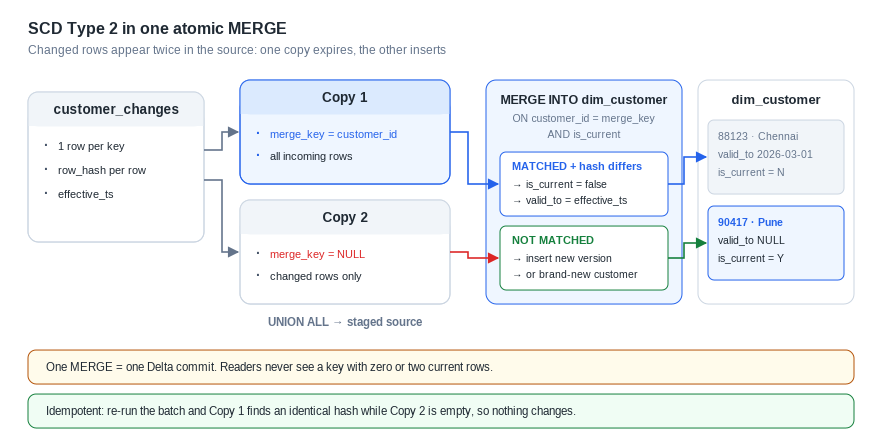 Changed customers appear twice in the source. The keyed copy closes the old row; the NULL-keyed copy inserts the new one.
Step-by-step implementation
Step 1 — Create the dimension
-- Databricks Runtime 16.4 LTS, Unity Catalog
CREATE TABLE IF NOT EXISTS northbridge.gold.dim_customer (
  customer_key  BIGINT GENERATED ALWAYS AS IDENTITY,
  customer_id   STRING    NOT NULL,
  full_name     STRING,
  city          STRING,
  loyalty_tier  STRING,
  row_hash      STRING    NOT NULL,
  valid_from    TIMESTAMP NOT NULL,
  valid_to      TIMESTAMP,              -- NULL = open
  is_current    BOOLEAN   NOT NULL
)
CLUSTER BY (customer_id);
Clustering on the natural key matters. The MERGE looks up every incoming customer_id, and clustering lets Delta skip files that can't contain them.
Step 2 — Stage the incoming changes
CREATE OR REPLACE TEMP VIEW customer_changes AS
SELECT
  customer_id,
  full_name,
  city,
  loyalty_tier,
  change_ts AS effective_ts,
  sha2(concat_ws('|',
         coalesce(full_name,    '<null>'),
         coalesce(city,         '<null>'),
         coalesce(loyalty_tier, '<null>')), 256) AS row_hash
FROM northbridge.silver.customer_updates          -- this batch's changes
QUALIFY ROW_NUMBER() OVER (PARTITION BY customer_id ORDER BY change_ts DESC) = 1;
Two details are doing real work here.
The coalesce before hashing isn't decoration. concat_ws skips NULL arguments, so ('Pune', NULL, 'Gold') and ('Pune', 'Gold', NULL) both become Pune|Gold and hash identically. A customer losing a city and gaining a tier would look unchanged.
The QUALIFY keeps one row per customer. If two source rows match the same target row, Delta refuses to guess and fails the MERGE. Keeping only the latest change per batch is the simple fix. If you need every intermediate version, see the AUTO CDC section below.
Step 3 — The MERGE
MERGE INTO northbridge.gold.dim_customer AS t
USING (
  -- Copy 1: every incoming row with its real key.
  --   changed customer   -> matches current row -> expire it
  --   brand-new customer -> no match            -> insert it
  --   unchanged customer -> matches, same hash  -> no-op
  SELECT c.customer_id AS merge_key, c.*
  FROM customer_changes c

  UNION ALL

  -- Copy 2: only changed customers, with a NULL key.
  --   NULL never matches, so these always insert the new version.
  SELECT CAST(NULL AS STRING) AS merge_key, c.*
  FROM customer_changes c
  JOIN northbridge.gold.dim_customer d
    ON c.customer_id = d.customer_id
   AND d.is_current
  WHERE c.row_hash <> d.row_hash
) AS s
ON  t.customer_id = s.merge_key
AND t.is_current

WHEN MATCHED AND t.row_hash <> s.row_hash THEN
  UPDATE SET t.is_current = false,
             t.valid_to   = s.effective_ts

WHEN NOT MATCHED THEN
  INSERT (customer_id, full_name, city, loyalty_tier, row_hash,
          valid_from, valid_to, is_current)
  VALUES (s.customer_id, s.full_name, s.city, s.loyalty_tier, s.row_hash,
          s.effective_ts, NULL, true);
Walk through Priya, who moved from Chennai to Pune. Copy 1 matches her open Chennai row, sees a different hash, and closes it at the change timestamp. Copy 2 has a NULL key, doesn't match anything, and inserts her Pune row with a fresh customer_key from the identity column. Both happen in the same Delta commit.
This statement is also idempotent. Run the same batch twice and the second run finds Pune as the current row with an identical hash: Copy 1 does nothing and Copy 2 is empty. That property is worth more than any performance tweak, because it means a retry after failure is always safe.
Step 4 — The same thing in PySpark
# Databricks Runtime 16.4 LTS, PySpark 3.5, delta-spark
from delta.tables import DeltaTable
from pyspark.sql import functions as F

dim      = DeltaTable.forName(spark, "northbridge.gold.dim_customer")
changes  = spark.table("customer_changes")
current  = dim.toDF().filter("is_current")

new_versions = (
    changes.alias("c")
    .join(current.alias("d"), F.col("c.customer_id") == F.col("d.customer_id"))
    .where("c.row_hash <> d.row_hash")
    .select("c.*")
    .withColumn("merge_key", F.lit(None).cast("string"))
)

staged = changes.withColumn("merge_key", F.col("customer_id")).unionByName(new_versions)

(
    dim.alias("t")
    .merge(staged.alias("s"), "t.customer_id = s.merge_key AND t.is_current")
    .whenMatchedUpdate(
        condition="t.row_hash <> s.row_hash",
        set={"is_current": "false", "valid_to": "s.effective_ts"},
    )
    .whenNotMatchedInsert(values={
        "customer_id": "s.customer_id",  "full_name": "s.full_name",
        "city": "s.city",                "loyalty_tier": "s.loyalty_tier",
        "row_hash": "s.row_hash",        "valid_from": "s.effective_ts",
        "valid_to": "null",              "is_current": "true",
    })
    .execute()
)
Use whichever your team reads more easily. The SQL version is easier to review in a pull request; the PySpark version is easier to unit test with pytest and a local Spark session.
Step 5 — Test the history, not just the row count
-- 1. Exactly one current row per customer
SELECT customer_id, COUNT(*) AS n
FROM northbridge.gold.dim_customer
WHERE is_current
GROUP BY customer_id
HAVING COUNT(*) <> 1;

-- 2. No gaps or overlaps between versions
SELECT customer_id, valid_to, next_from
FROM (
  SELECT customer_id, valid_to,
         LEAD(valid_from) OVER (PARTITION BY customer_id ORDER BY valid_from) AS next_from
  FROM northbridge.gold.dim_customer
)
WHERE next_from IS NOT NULL AND valid_to <> next_from;
Both queries should return zero rows. Run them after every load and fail the job if they don't. They would have caught the two-statement bug from "The problem" within minutes instead of the next morning.
Step 6 — Or let AUTO CDC do it
-- Lakeflow Spark Declarative Pipelines
CREATE OR REFRESH STREAMING TABLE northbridge.gold.dim_customer_scd2;

CREATE FLOW dim_customer_cdc AS AUTO CDC INTO northbridge.gold.dim_customer_scd2
FROM STREAM(northbridge.silver.customer_cdc)
KEYS (customer_id)
APPLY AS DELETE WHEN operation = 'DELETE'
SEQUENCE BY change_ts
COLUMNS * EXCEPT (operation)
STORED AS SCD TYPE 2;
AUTO CDC (called APPLY CHANGES before 2025) uses SEQUENCE BY to put events in order, so late and out-of-order changes land in the right place in history. It also keeps every intermediate version within a batch, which the hand-written MERGE above drops. The trade-off is less control over the output: you get __START_AT and __END_AT columns and no identity-based surrogate key, so you usually add that in a downstream gold table.
From production: gotchas and lessons
-
Symptom:
MERGEfailed with "multiple source rows matched and attempted to modify the same target row". Cause: A customer updated their profile twice within one hourly batch. Fix: TheQUALIFY ROW_NUMBER()dedup in Step 2. Decide deliberately whether losing the intermediate version is acceptable. For loyalty tier, it was. For a credit-limit dimension, it wasn't, and that one went toAUTO CDC. -
Symptom: A replayed backfill created versions with
valid_fromearlier than the current row'svalid_from. Cause: TheMERGEassumes changes arrive in order. A backfill doesn't. Fix: AddAND s.effective_ts > t.valid_fromto the matched condition and route older changes to a separate correction process. Rewriting the middle of a history is a different problem from appending to its end; see late-arriving dimensions. -
Symptom: Two pipelines writing the dimension started failing with concurrent modification errors. Cause: Delta tables with identity columns don't support concurrent write transactions. Fix: One writer per dimension, scheduled as a task in a Lakeflow Job. If you genuinely need multiple writers, use hash-based surrogate keys instead; see surrogate keys in a lakehouse.
-
Symptom: Source deletes left customers marked current forever. Cause: The
MERGEonly handled inserts and updates. Fix: Carry anis_deletedflag from silver, addWHEN MATCHED AND s.is_deleted THEN UPDATE SET is_current = false, valid_to = s.effective_ts, and exclude deleted rows from Copy 2.
Performance and cost notes
The expensive part of an SCD2 MERGE is finding target files that contain the incoming keys. Clustering on customer_id keeps that to a small set of files. Deletion vectors (on by default for new tables on recent runtimes) mean expiring a row marks it rather than rewriting the whole file, which makes frequent small MERGEs much cheaper. Keep batches reasonably sized: thousands of tiny MERGEs per hour create more commits and small files than they save in latency.
When not to use this
If nobody will ever report on history for these attributes, Type 1 is simpler and cheaper. And if your source is already a CDC feed and you're inside a declarative pipeline, AUTO CDC is less code to own and handles ordering better than this pattern does.
Frequently asked questions
Why not just run an UPDATE and then an INSERT?
Because they're two transactions. A failure between them leaves keys with no current row, and concurrent readers can see the half-finished state. A single MERGE commits both changes as one Delta version.
Why is the merge key NULL for the second copy?
NULL never equals anything in a join condition, so those rows are guaranteed to fall into WHEN NOT MATCHED and get inserted as the new version.
Does this work with Structured Streaming?
Yes. Run the same MERGE inside foreachBatch, with the batch DataFrame as the source. Dedupe within each micro-batch first.
Checklist
- Source deduplicated to one row per key per batch
- Row hash built with
coalescesentinels so NULLs can't collide - Expire and insert happen in one
MERGE - Re-running a batch is a confirmed no-op
- One-current-row and no-overlap tests fail the job when violated
- Single writer per dimension if it has an identity column
- Deletes handled explicitly
Practice
- Try: Data Modeling Interview Questions: 20 Design Problems
- Try: PySpark Interview Questions: 50 Coding and Scenario Problems
- Build it yourself: run the
MERGEwith three batches, then run batch two again. Confirm the row count doesn't change and both Step 5 tests return nothing.
Further reading
Keep going
Slowly Changing Dimensions: Types 1, 2, 3 and 6 with SQL
One customer moves city. Four SCD types record it four different ways. See the rows each type produces, the SQL that writes them, and how to choose per column.
Surrogate Keys in a Lakehouse: Identity, Hashes or Sequences
Identity columns, hash keys and ROW_NUMBER sequences all produce surrogate keys on Delta Lake. They differ on concurrency, collisions, reproducibility and join cost. Here's how to choose.
Handling Late-Arriving Dimensions and Facts in a Lakehouse
Facts that show up before their customer exists, and facts that show up weeks after the event. Inferred members, point-in-time joins and re-keying jobs on Delta Lake, with the trade-offs of each.
One practical note a week
Get new articles, problems and guides in your inbox.
Thanks! You're on the list. (Local demo — no email provider is wired up yet.)