Inside the Delta Transaction Log: Commits, Checkpoints and Optimistic Concurrency
Read _delta_log yourself: what commits and checkpoints contain, how readers build snapshots, and how concurrent writers avoid corruption.
TL;DR
- A Delta table is a folder of Parquet files plus
_delta_log/, an ordered sequence of commits. The log, not the folder, decides which files are part of the table. - Each commit is a JSON file (
00000000000000000012.json) of actions:addandremovefiles,metaData(schema, properties),protocol(required features),commitInfo(who, what, when), and a few others. - Every so often Delta writes a checkpoint: the full table state in Parquet, so readers don't replay thousands of JSON files.
- Writers use optimistic concurrency: read a snapshot, write data files, then atomically create the next commit file. If someone else got there first, check for conflicts and retry or fail.
- Once you understand this, time travel,
VACUUM,RESTORE, data skipping and concurrency errors all stop being magic.
Why bother
Most Delta issues that look mysterious have a one-line explanation in the log:
- "Why can't I time travel to version 40?" Its files were vacuumed.
- "Why did my job fail with
ConcurrentAppendException?" Another commit added files your operation needed to see. - "Why is this query reading files I deleted?" It's not; those files are on storage but not in the log.
This article is the mental model behind every other piece in the Delta Lake deep dive series.
Key concepts
| Concept | What it means | Why it matters here |
|---|---|---|
| Version | The number in a commit file's name | Strictly sequential: 0, 1, 2… |
| Action | One line in a commit file | The unit of change: add a file, remove a file, change schema… |
| Snapshot | The table's state at a version | Reconstructed by replaying actions |
| Checkpoint | A Parquet file with the full state at a version | Bounds how much replay is needed |
| Optimistic concurrency | Assume no conflict; check at commit time | No locks during the write itself |
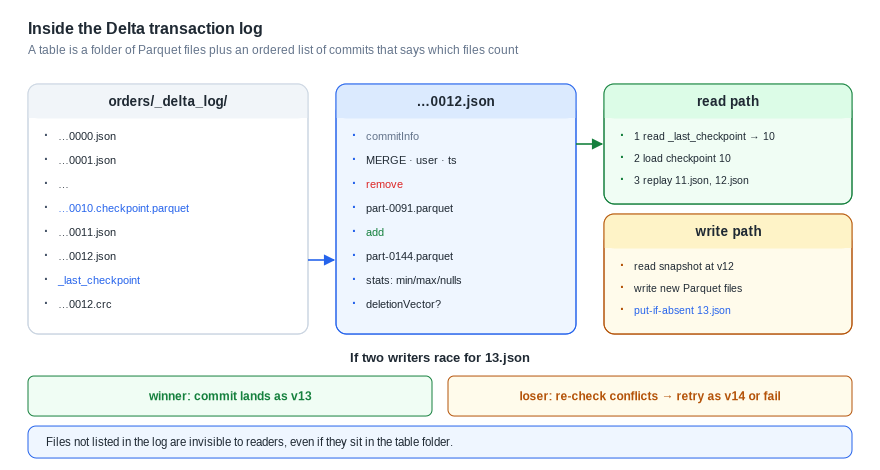 The table is whatever the log says it is.
Look at a real log
# Databricks Runtime 16.4 LTS+, PySpark. Run on a test table.
spark.sql("""
  CREATE OR REPLACE TABLE northbridge.sandbox.log_demo (id INT, city STRING)
""")
spark.sql("INSERT INTO northbridge.sandbox.log_demo VALUES (1,'Chennai'),(2,'Pune')")
spark.sql("UPDATE northbridge.sandbox.log_demo SET city = 'Goa' WHERE id = 2")

location = spark.sql("DESCRIBE DETAIL northbridge.sandbox.log_demo").first().location
display(dbutils.fs.ls(f"{location}/_delta_log"))
You'll see something like:
00000000000000000000.json
00000000000000000000.crc
00000000000000000001.json
00000000000000000001.crc
00000000000000000002.json
00000000000000000002.crc
For Unity Catalog managed tables, you may not have direct storage access; the same structure exists, and DESCRIBE HISTORY exposes most of it. Use an external table or a local Delta install to explore freely.
Inside a commit
log = spark.read.json(f"{location}/_delta_log/00000000000000000002.json")
log.printSchema()
display(log)
Each line is one action. For the UPDATE, the important ones are:
{"commitInfo": {"timestamp": 1763025300000, "operation": "UPDATE",
                "operationParameters": {"predicate": "[\"(id#12 = 2)\"]"},
                "operationMetrics": {"numUpdatedRows": "1", "numAddedFiles": "1", "numRemovedFiles": "1"},
                "isBlindAppend": false}}
{"remove": {"path": "part-00000-1a2b....snappy.parquet", "deletionTimestamp": 1763025300000,
            "dataChange": true}}
{"add":    {"path": "part-00000-9f8e....snappy.parquet", "size": 812,
            "modificationTime": 1763025300000, "dataChange": true,
            "stats": "{\"numRecords\":2,\"minValues\":{\"id\":1,\"city\":\"Chennai\"},\"maxValues\":{\"id\":2,\"city\":\"Goa\"},\"nullCount\":{\"id\":0,\"city\":0}}"}}
(Output shortened. With deletion vectors on, you'd see the old file re-added with a deletionVector descriptor instead of a full rewrite.)
The full set of actions you'll meet:
| Action | Purpose |
|---|---|
protocol |
Minimum reader/writer versions and the table features in use (deletion vectors, column mapping…) |
metaData |
Table ID, schema, partition columns, table properties |
add |
A data file that is now part of the table, with size, partition values and column stats |
remove |
A data file that's no longer part of the table, with a deletion timestamp |
commitInfo |
Audit information: operation, parameters, metrics, user, engine |
txn |
Application transaction IDs, used for idempotent streaming and foreachBatch writes |
cdc |
Change data files written for Change Data Feed |
domainMetadata |
Feature-specific configuration, for example liquid clustering columns |
Three things fall straight out of this table:
- Data skipping uses the
statsin eachadd. No stats (past the first 32 columns by default) means no skipping. VACUUMlooks for files whoseremoveis older than the retention window. ThedeletionTimestampis what it compares.- Time travel to version n means "replay actions up to n". If any file it lists is gone, the read fails.
How a reader builds a snapshot
Replaying every JSON file from version 0 would get slow on a table with 200,000 commits. Delta bounds it:
- Read
_delta_log/_last_checkpoint, which says "the latest checkpoint is version 190,000". - Load
00000000000000190000.checkpoint.parquet: one row per active file plus metadata and protocol. (Large tables use multi-part or V2 checkpoints with sidecar files.) - List and replay JSON commits after 190,000.
- The result is the active file list with stats, the schema and the protocol.
Checkpoints are written automatically, by default every 10 commits in open-source Delta (Databricks tunes this). Recent Delta versions also write .crc checksum files, so readers can validate state, and log compaction files that merge ranges of JSON commits.
Old JSON files and checkpoints are removed once they're older than delta.logRetentionDuration (30 days by default). That's why history in DESCRIBE HISTORY has a horizon.
How a writer commits
Take a MERGE that starts at version 12:
- Read the snapshot at v12. Record which files were read and with what predicates.
- Write new Parquet files to the table folder. Readers can't see them: they're not in the log yet.
- Commit by creating
00000000000000000013.jsonwith put-if-absent semantics. Exactly one writer can create that file. - If the create succeeds, the transaction is committed. Readers that list the log now see v13.
- If v13 already exists, another writer won. Delta reads the commits that landed since v12 and checks whether they conflict with what this transaction read or changed. If not, it retries as v14. If they do, it throws.
The atomic "create if absent" is the hard part on object stores. Databricks provides it through its commit service; open-source Delta on S3 historically needed a DynamoDB-backed log store. Newer Delta versions also support catalog-managed commits, where the catalog coordinates commits instead of the file system.
Conflict exceptions, decoded
| Exception | What happened | Typical fix |
|---|---|---|
ConcurrentAppendException |
Another commit added files in the region your operation read | Make conditions disjoint (explicit partition/cluster predicates), or serialise the jobs |
ConcurrentDeleteReadException |
Another commit removed a file you read | Same as above |
ConcurrentDeleteDeleteException |
Two commits removed the same file | Usually two OPTIMIZEs or merges on the same data; serialise |
MetadataChangedException |
Schema or properties changed concurrently | One owner for schema changes |
ProtocolChangedException |
A table feature was enabled concurrently | Enable features during a quiet window |
Pure appends (isBlindAppend: true) almost never conflict with each other. Tables with deletion vectors get row-level conflict detection on recent Databricks runtimes, so two merges touching different rows in the same file can both succeed.
The default isolation level is WriteSerializable, which allows more concurrency than strict Serializable by not treating appends as conflicts for writes. You can tighten it with delta.isolationLevel, but rarely should.
What this explains
| Feature | Explained by |
|---|---|
| ACID | The single atomic commit file per version |
| Time travel | Replaying to an older version |
RESTORE |
A new commit that re-adds old files and removes newer ones |
OPTIMIZE |
A commit with many removes and a few adds, dataChange: false |
| Streaming exactly-once | txn actions recording which batch was written |
| Shallow clone | A new log whose adds point at another table's files |
| Change Data Feed | cdc actions and files |
| Table features | The protocol action, which old clients check before reading |
From production: gotchas and lessons
-
Symptom: Someone copied Parquet files into a Delta table's folder and they never appeared in queries. Cause: Files not in the log aren't part of the table. Fix: Load through Delta (
COPY INTO,INSERT, Auto Loader). Never write to a Delta folder directly. -
Symptom: Someone deleted old JSON files to "save space" and the table broke. Cause: Readers need the latest checkpoint plus every commit after it. Fix: Never touch
_delta_logby hand. Retention is a table property. -
Symptom: Two nightly
MERGEjobs on different regions conflicted every night. Cause: NeitherONclause mentioned region, so each read the whole table. Fix:AND t.region = 'SOUTH'in one,AND t.region = 'WEST'in the other. Conflict detection uses what you read, so tell it. -
Symptom: An old Spark client failed to read a table with a protocol error. Cause: Someone enabled deletion vectors, which raised the table's protocol. Fix: Check client compatibility before enabling table features. In Delta 4.0+,
ALTER TABLE ... DROP FEATUREcan remove some features while keeping history.
Performance and cost notes
Log size grows with the number of commits and the number of files. Very frequent tiny commits (streaming every few seconds) and millions of small files both make snapshots slower to load. Compaction and sensible trigger intervals help the log as much as the data; see The Small Files Problem.
When not to use this
You don't need to read the log to use Delta day to day. Reach for it when debugging conflicts, missing data or time travel failures, or when evaluating table formats; see Delta Lake vs Apache Iceberg vs Hudi.
Checklist
- Can name the main actions and what each records
- Can explain how a reader finds the current state using a checkpoint
- Can explain put-if-absent and what happens when two writers race
- Can map each conflict exception to a fix
- Never write to or delete from
_delta_logor the table folder directly
Practice
- Try: Delta Lake Interview Questions: 25 Scenario Problems
- Build it yourself: on a test table, run an
INSERT,UPDATE,OPTIMIZEandRESTORE, and read each JSON commit. Predict the actions before opening the file.
Further reading
Keep going
Delta Lake Time Travel in 12 Minutes: Query, Compare and Recover Old Versions
Query old Delta versions, compare them, recover from a bad write, and set retention correctly now that Runtime 18 changed the rules.
OPTIMIZE, VACUUM and Z-ORDER Explained: What Each One Actually Does
OPTIMIZE compacts, Z-ORDER sorts, VACUUM deletes. How each works, how to schedule them, and what predictive optimization and Runtime 18 changed.
Deletion Vectors and Row Tracking in Delta: What They Change and What They Cost
Deletion vectors mark rows instead of rewriting files; row tracking gives rows stable IDs. How both work, what they cost, and how to purge.
One practical note a week
Get new articles, problems and guides in your inbox.
Thanks! You're on the list. (Local demo — no email provider is wired up yet.)