OPTIMIZE, VACUUM and Z-ORDER Explained: What Each One Actually Does
OPTIMIZE compacts, Z-ORDER sorts, VACUUM deletes. How each works, how to schedule them, and what predictive optimization and Runtime 18 changed.
TL;DR
OPTIMIZErewrites many small files into fewer large ones. It's a new commit; old files are marked removed but stay on storage.ZORDER BYis an option onOPTIMIZEthat sorts rows across files so min/max statistics let queries skip files. On new tables, prefer liquid clustering.VACUUMphysically deletes files that the log marked removed longer ago than the retention window, plus files that were never committed. It can't be undone.- On Unity Catalog managed tables, predictive optimization runs
OPTIMIZEandVACUUMfor you. Turn it on before writing a maintenance job. - On Databricks Runtime 18+,
VACUUM's retention comes fromdelta.deletedFileRetentionDuration, not theRETAINclause.
The problem
NorthBridge's silver.pos_transactions table receives a micro-batch every two minutes from 600 stores. After three months it had 410,000 files averaging 3 MB, a dashboard query took 90 seconds (most of it planning), and storage was 2.6× the table's logical size.
The team ran OPTIMIZE. The query dropped to 11 seconds. Storage went up. That's the moment most people learn these are three different commands.
Key concepts
| Concept | What it means | Why it matters here |
|---|---|---|
| Compaction | Rewriting small files into large ones | Fewer files to list, open and plan |
| File statistics | Min, max and null counts per column per file, stored in the log | What data skipping uses |
| Data skipping | Ignoring files whose min/max can't match the filter | Only works if values are clustered |
| Removed file | A file the log no longer references | Still on storage until VACUUM |
| Retention window | How old a removed file must be before VACUUM deletes it |
Protects time travel and running readers |
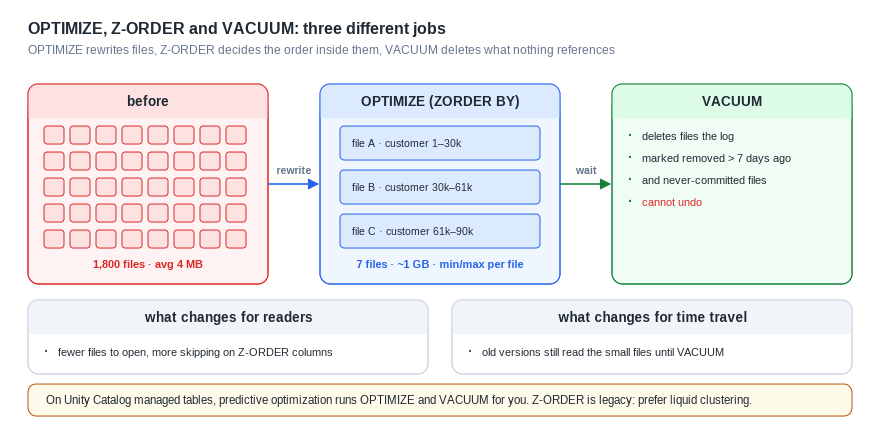 Three jobs, three commands. Only one of them deletes anything.
OPTIMIZE: compaction
-- Databricks Runtime 16.4 LTS+, Unity Catalog
OPTIMIZE northbridge.silver.pos_transactions;
OPTIMIZE reads small files and writes larger ones, targeting about 1 GB by default (Databricks may autotune smaller targets for smaller tables). The result is a single commit with many remove actions and a few add actions.
What it reports:
SELECT operationMetrics['numRemovedFiles']  AS removed,
       operationMetrics['numAddedFiles']    AS added,
       operationMetrics['numRemovedBytes']  AS removed_bytes,
       operationMetrics['numAddedBytes']    AS added_bytes
FROM (DESCRIBE HISTORY northbridge.silver.pos_transactions)
WHERE operation = 'OPTIMIZE'
ORDER BY version DESC LIMIT 1;
Three properties worth knowing:
- It's incremental. Files already at the target size are skipped, so running it again on an unchanged table does nothing.
- It's safe to run alongside readers. Readers see either the old file set or the new one, never a mix.
- It can conflict with writers that update or delete the same files at the same time. Appends are fine. Schedule it away from big
MERGEjobs on the same table.
On a partitioned table, you can scope it:
OPTIMIZE northbridge.silver.pos_transactions
WHERE txn_date >= current_date() - INTERVAL 7 DAYS;
The WHERE clause only accepts partition columns.
Z-ORDER: putting similar values together
Compaction alone doesn't help a filter like WHERE store_id = 417, because store 417's rows are spread across every file. Each file's min/max for store_id covers 1–600, so nothing can be skipped.
OPTIMIZE northbridge.silver.pos_transactions
ZORDER BY (store_id, product_id);
Z-ordering sorts rows along a space-filling curve over the chosen columns, so each output file covers a narrow range of store_id and product_id. Now the min/max stats let a store_id = 417 query skip most files.
What to know before using it:
- Z-order columns must have statistics. By default Delta collects stats on the first 32 columns (
delta.dataSkippingNumIndexedCols), or the list indelta.dataSkippingStatsColumns. - Effectiveness drops with each extra column. Two or three is usually the sweet spot.
- Z-ordering isn't truly incremental: re-running it rewrites data already ordered, which costs more each time.
- The Z-order columns aren't stored as a table property. The next person running
OPTIMIZEhas to know them.
The last two points are why Databricks now recommends liquid clustering for new tables. It's covered in Liquid Clustering vs Partitioning vs Z-Order. Z-order still works and still makes sense on existing partitioned tables.
VACUUM: the only one that deletes
After OPTIMIZE, the 410,000 small files were still on storage, which is why the bill went up. VACUUM removes them:
-- See what would be deleted
VACUUM northbridge.silver.pos_transactions DRY RUN;

-- Delete it
VACUUM northbridge.silver.pos_transactions;
VACUUM deletes:
- Files the log marked as removed longer ago than
delta.deletedFileRetentionDuration(7 days by default). - Files in the table directory that no commit ever referenced, such as leftovers from failed jobs, once they're older than the same window.
It doesn't touch the transaction log; log cleanup happens automatically at checkpoints based on delta.logRetentionDuration.
Retention, and what changed
ALTER TABLE northbridge.silver.pos_transactions SET TBLPROPERTIES (
  'delta.deletedFileRetentionDuration' = 'interval 14 days',
  'delta.logRetentionDuration'         = 'interval 30 days'
);
On Databricks Runtime 18.0 and above (and earlier for Unity Catalog managed tables), the table property is the source of truth:
VACUUM t RETAIN 24 HOURSignores the 24. OnlyRETAIN 0 HOURSis honoured, and only with the retention safety check disabled.- Time travel to versions older than
deletedFileRetentionDurationis blocked. logRetentionDurationmust be at leastdeletedFileRetentionDuration.
Don't shorten retention below 7 days. Long-running jobs can be writing files that aren't committed yet, and a short window lets VACUUM delete them mid-flight.
LITE vs FULL
VACUUM northbridge.silver.pos_transactions LITE;The default (FULL) lists every file in the table directory to find what to delete. On large tables, listing is most of the cost. LITE (Public Preview on recent runtimes) uses the transaction log instead and skips the listing. The trade-off: it can't find never-committed files, and it needs a successful FULL vacuum within the log retention window. A common schedule is LITE daily and FULL weekly.
Scheduling: or don't
For Unity Catalog managed tables, check predictive optimization first:
DESCRIBE TABLE EXTENDED northbridge.silver.pos_transactions;   -- look for "Predictive Optimization"
ALTER CATALOG northbridge ENABLE PREDICTIVE OPTIMIZATION;
With it on, Databricks decides when OPTIMIZE and VACUUM are worth running and runs them on serverless compute. You stop maintaining a maintenance job.
For external tables or anything outside Unity Catalog, a reasonable starting schedule:
| Table pattern | OPTIMIZE | VACUUM |
|---|---|---|
| Streaming appends every few minutes | Daily (or auto compaction) | Weekly FULL, daily LITE |
| Hourly MERGE | Daily | Weekly |
| Daily batch overwrite of a partition | After the load | Weekly |
| Rarely written dimension | Weekly or never | Monthly |
Run maintenance as its own task in a Lakeflow Job on right-sized compute, not inline at the end of every ingestion run.
From production: gotchas and lessons
-
Symptom: Storage grew 40% after the first
OPTIMIZE. Cause:OPTIMIZEwrites new files; the old ones stay untilVACUUM. Fix: Pair them. Expect a temporary storage spike for one retention window. -
Symptom: A three-day backfill job failed with missing files halfway through. Cause: Someone had set
RETAIN 1 HOURSwith the safety check disabled to "save storage".VACUUMdeleted the backfill's uncommitted files. Fix: Never go below 7 days. On Runtime 18+, theRETAINvalue is ignored anyway. -
Symptom: Z-ordered on
customer_id, but queries filtering on it didn't skip anything. Cause:customer_idwas the 41st column, past the 32-column stats limit, so no min/max existed. Fix: Setdelta.dataSkippingStatsColumnsto include it, then recompute stats (ANALYZE TABLE ... COMPUTE DELTA STATISTICS) before re-optimizing. -
Symptom:
VACUUMon a 40 TB table took six hours. Cause: Listing hundreds of millions of objects. Fix:LITEmode for routine runs, and a cluster of a few 8-core workers.VACUUM's deletion phase runs mostly on the driver, so more workers don't help much.
Performance and cost notes
OPTIMIZE costs compute proportional to the bytes it rewrites; VACUUM costs listing and delete calls. Both are cheap relative to querying a badly laid-out table every day. Deletion vectors add a third reason to run OPTIMIZE: it materialises soft-deleted rows, which keeps reads fast. See Deletion Vectors and Row Tracking.
When not to use this
Don't OPTIMIZE a table that's written once and read rarely, or a tiny lookup table: the rewrite costs more than it saves. Don't VACUUM with short retention on tables you might need to recover. And don't start a new Z-ORDER design today; use liquid clustering.
Checklist
- Predictive optimization checked before writing any maintenance job
-
OPTIMIZEscheduled away from heavyMERGEwindows - Z-order columns (if any) have statistics and are documented
- Retention set via table properties, never below 7 days
-
VACUUM DRY RUNused before the first real run on a table -
LITE/FULLsplit for very large tables
Practice
- Try: Delta Lake Interview Questions: 25 Scenario Problems
- Build it yourself: append 500 tiny batches to a table, record a filtered query's time and
numFiles, thenOPTIMIZE,ZORDER BYthe filter column, and compare.
Further reading
Keep going
The Small Files Problem in Delta Lake: Causes, Diagnosis and Compaction Strategies
Why Delta tables collect tiny files, how to measure it, and the writer fixes and compaction strategies that stop it coming back.
Liquid Clustering vs Partitioning vs Z-Order: Which Layout and When
Three ways to make Delta skip files, compared on cost and flexibility, with a decision order, migration steps and when partitioning still wins.
Delta Lake Time Travel in 12 Minutes: Query, Compare and Recover Old Versions
Query old Delta versions, compare them, recover from a bad write, and set retention correctly now that Runtime 18 changed the rules.
One practical note a week
Get new articles, problems and guides in your inbox.
Thanks! You're on the list. (Local demo — no email provider is wired up yet.)