Deletion Vectors and Row Tracking in Delta: What They Change and What They Cost
Deletion vectors mark rows instead of rewriting files; row tracking gives rows stable IDs. How both work, what they cost, and how to purge.
TL;DR
- Without deletion vectors, changing one row rewrites the whole Parquet file it lives in. Cost scales with file size, not with rows changed.
- With deletion vectors (DVs),
DELETE,UPDATEandMERGEwrite a small bitmap that marks rows as removed; the original file stays. Readers skip marked rows. This is merge-on-read. - DVs make frequent small changes far cheaper and enable row-level concurrency on recent runtimes. The cost: reads do a little more work until the file is rewritten by
OPTIMIZEorREORG ... PURGE. - Row tracking gives every row a stable
_metadata.row_idand arow_commit_versionthat survive compaction and updates. It powers efficient incremental refreshes and change feeds. - Both are table features: enabling them upgrades the table protocol, and clients that don't support them can no longer read (or write) the table.
The problem
NorthBridge's silver.loyalty_members table (180 million rows in ~700 files of 1 GB) received an hourly MERGE of about 20,000 changes. Those 20,000 rows were spread across roughly 650 files. Every hour, Delta rewrote 650 GB to change 20,000 rows. The job took 22 minutes and cost more than everything else in the pipeline combined.
Clustering on the merge key helped a bit. Deletion vectors cut it to 3 minutes.
Key concepts
| Concept | What it means | Why it matters here |
|---|---|---|
| Copy-on-write | Rewrite a file to change any row in it | Simple, fast reads, expensive writes |
| Merge-on-read | Record changes separately; apply them when reading | Cheap writes, slightly more read work |
| Deletion vector | A compressed bitmap (RoaringBitmap) of row positions removed from one file | The merge-on-read mechanism in Delta |
| Purge | Rewriting files to physically drop soft-deleted rows | Needed for erasure and read performance |
| Row ID | A stable identifier for a row across versions | Lets engines match rows between versions |
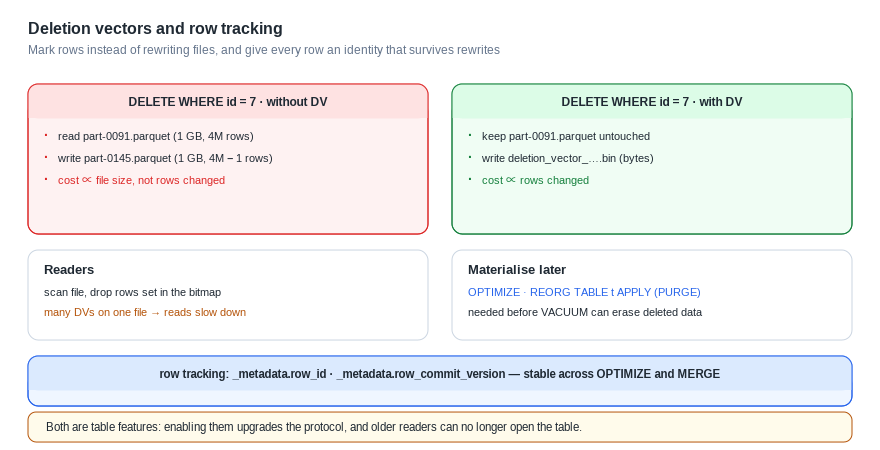 Without DVs the cost follows the file. With DVs it follows the rows.
How deletion vectors work
When a DELETE, UPDATE or MERGE changes rows in a file:
- Delta writes a deletion vector, a bitmap of the affected row positions, either inline in the log (if tiny) or as a small
.binfile in the table folder. - The commit re-adds the same data file with a
deletionVectordescriptor attached, instead of removing it and adding a rewritten copy. - For an
UPDATEorMERGEupdate, the new versions of the changed rows go into a new, small data file.
Readers load the bitmap and skip marked positions. In the transaction log, you'll see add actions with a deletionVector field.
Enable them
-- Databricks Runtime 14.3 LTS+ recommended for writes; 16.4 LTS+ used here
ALTER TABLE northbridge.silver.loyalty_members
SET TBLPROPERTIES ('delta.enableDeletionVectors' = true);

-- New tables
CREATE TABLE northbridge.silver.loyalty_events (...)
TBLPROPERTIES ('delta.enableDeletionVectors' = true);
A workspace admin setting can auto-enable DVs for new tables; the default varies by workspace and region, so check SHOW TBLPROPERTIES rather than assuming.
What gets faster
DELETE,UPDATE,MERGEon large files with scattered changes: often several times faster, because they write kilobytes instead of gigabytes.- Concurrency. Tables with DVs get row-level conflict detection on recent runtimes: two merges touching different rows of the same file can both commit, instead of one failing with
ConcurrentAppendException. - On Photon, predictive I/O for updates uses DVs to speed up DML further.
What gets slower
Each read of a file with a DV has to apply the bitmap. One DV per file is cheap. A table where most files carry large DVs reads noticeably slower than a clean one. OPTIMIZE (and predictive optimization) rewrites files with many deleted rows, materialising the deletes and dropping the DVs.
Purging: deletes that must really delete
A DV hides a row; the row's bytes are still in the Parquet file. For GDPR erasure or any "this data must be gone" requirement, that's not enough.
-- 1. Logically delete
DELETE FROM northbridge.silver.loyalty_members WHERE member_id = 'M-88213';

-- 2. Rewrite every file that has soft-deleted rows (or dropped columns)
REORG TABLE northbridge.silver.loyalty_members APPLY (PURGE);

-- 3. After the retention window, remove the old files from storage
VACUUM northbridge.silver.loyalty_members;
Until step 3, the data is still recoverable through time travel. That's the point of retention, and also why erasure takes a retention window to complete. Document that in your data protection process.
Row tracking
Row tracking assigns each row:
_metadata.row_id: stable acrossOPTIMIZE,UPDATEandMERGE. The same logical row keeps its ID even when it's physically rewritten._metadata.row_commit_version: the version that last inserted or changed the row.
ALTER TABLE northbridge.silver.loyalty_members
SET TBLPROPERTIES ('delta.enableRowTracking' = true);

SELECT member_id, tier,
       _metadata.row_id              AS row_id,
       _metadata.row_commit_version  AS last_changed_in
FROM northbridge.silver.loyalty_members
WHERE member_id = 'M-10042';
Hidden metadata columns aren't returned by SELECT *; you ask for them by name.
What it's for:
- Incremental materialized views. The engine can tell exactly which rows changed between versions, instead of recomputing. This is a big part of why declarative pipeline MVs refresh incrementally.
- Cheaper change data feeds. Row identity lets the engine compute changes without writing as much extra data.
- Your own incremental logic. "Give me rows changed since version 340" is
WHERE _metadata.row_commit_version > 340.
Row tracking can be enabled on existing tables (Delta 3.3+ / recent runtimes backfill IDs). Iceberg v3 has the equivalent concept, row lineage, and the two are designed to be compatible.
The compatibility trade-off
Both are table features. Enabling them:
- upgrades the table's protocol, recorded in the log's
protocolaction, - means any reader or writer that doesn't support the feature fails on that table: older Databricks runtimes, older open-source Delta, some third-party engines, and
- for DVs, rules out a few older integrations (for example incrementally generated symlink manifests, and UniForm with Iceberg v2; Iceberg v3 UniForm does support DVs).
Check every consumer of a table before turning them on. Databricks runtimes have been able to read DVs since 12.2 LTS and write them fully since 14.3 LTS; external engines vary.
Removing a feature is possible with ALTER TABLE ... DROP FEATURE. For DVs, Delta first purges them from the current version; in Delta 4.0 and recent runtimes, history is preserved.
From production: gotchas and lessons
-
Symptom: After enabling DVs, an external reporting tool's Delta connector failed. Cause: The connector didn't support the deletion vectors reader feature. Fix: Upgrade the connector, or serve that tool through a SQL warehouse or Delta Sharing instead of direct file access. Check first next time.
-
Symptom: Reads on a heavily updated table got 30% slower over a month. Cause: Most files carried large DVs and nothing was compacting them. Fix: Predictive optimization, or a regular
OPTIMIZE. -
Symptom: An audit found "deleted" customer data still in storage. Cause: DVs hide rows; they don't erase them. Fix:
REORG ... APPLY (PURGE)plusVACUUMin the erasure runbook. -
Symptom: A team assumed
_metadata.row_idwas a business key. Cause: It's stable within a table, not across clones, rebuilds or environments. Fix: Use it for incremental processing, never as an identifier you publish.
Performance and cost notes
DVs are almost always a win for tables with frequent MERGE/UPDATE/DELETE and large files. For append-only tables they change nothing. Row tracking adds a small amount of metadata per file and is worth it on tables feeding materialized views or incremental jobs.
When not to use this
- Tables read directly by engines that don't support the features.
- Append-only tables where nothing is ever updated (DVs have nothing to do).
- When you're about to share a table with an external partner whose reader version you don't control, unless you go through Delta Sharing.
Checklist
- Every reader and writer of the table supports the features
- DVs enabled on tables with frequent DML
- Compaction in place so DVs don't accumulate
- Erasure runbook includes
REORG ... APPLY (PURGE)andVACUUM - Row tracking enabled on sources of incremental MVs and CDF consumers
- Row IDs never exposed as business keys
Practice
- Try: Delta Lake Interview Questions: 25 Scenario Problems
- Build it yourself: run the same scattered
UPDATEon two copies of a table, one with DVs and one without, and comparenumRemovedFiles,numAddedFilesand runtime inDESCRIBE HISTORY.
Further reading
Keep going
Inside the Delta Transaction Log: Commits, Checkpoints and Optimistic Concurrency
Read _delta_log yourself: what commits and checkpoints contain, how readers build snapshots, and how concurrent writers avoid corruption.
Delta Lake MERGE: Five Upsert Patterns and How to Make Them Fast
The five Delta MERGE patterns (upsert, insert-only, newer-wins, deletes, full sync), the errors that break them, and how to make them fast.
Delta Change Data Feed: CDC Downstream Without Extra Tooling
Enable Change Data Feed and read row-level inserts, updates and deletes by version to refresh downstream Delta tables incrementally.
One practical note a week
Get new articles, problems and guides in your inbox.
Thanks! You're on the list. (Local demo — no email provider is wired up yet.)