Liquid Clustering vs Partitioning vs Z-Order: Which Layout and When
Three ways to make Delta skip files, compared on cost and flexibility, with a decision order, migration steps and when partitioning still wins.
TL;DR
- All three exist to let queries skip files. They differ in what happens when your data grows unevenly or your query patterns change.
- Partitioning creates a folder per value. Great for one low-cardinality column on very large tables; harmful almost everywhere else.
- Z-ORDER sorts data within files at
OPTIMIZEtime. It works, but rewrites a lot and the keys aren't recorded on the table. - Liquid clustering (
CLUSTER BY) records keys on the table, clusters incrementally, lets you change keys without rewriting, and handles high cardinality. It's the default choice for new tables. - On Unity Catalog managed tables,
CLUSTER BY AUTOlets Databricks pick and evolve the keys from your actual queries.
The problem
NorthBridge's gold.fact_sales was created in 2022 as PARTITIONED BY (sale_date, store_id). It seemed sensible: almost every query filtered on both.
By 2026 it had 1,350 days × 600 stores = 810,000 partitions, most holding a single 2 MB file. Queries by date were fine. Queries by product, which the merchandising team started running last year, scanned everything. And the nightly MERGE of late returns touched files in thousands of folders.
The fix wasn't a better partition key. It was not partitioning.
Key concepts
| Concept | What it means | Why it matters here |
|---|---|---|
| Partition pruning | Skipping whole folders from a filter on the partition column | Fast, but only for that one column |
| Data skipping | Skipping files using min/max stats in the log | Works for any column with stats, if values are clustered |
| Clustering | Physically co-locating rows with similar key values | Turns stats into effective skipping |
| Cardinality | Number of distinct values | Decides whether partitioning is viable |
| Incremental clustering | Only reorganising new or unclustered data | Keeps maintenance cost flat as the table grows |
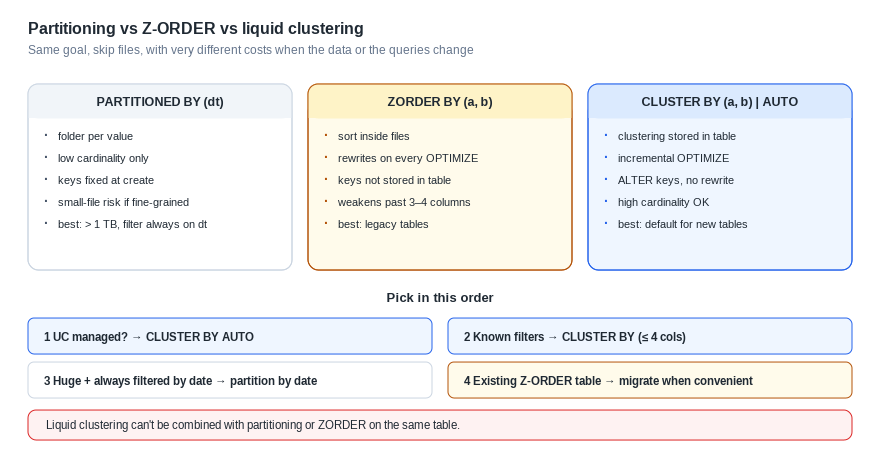 Same goal. Very different costs when the data or the queries change.
Side by side
| Partitioning | Z-ORDER | Liquid clustering | |
|---|---|---|---|
| Declared with | PARTITIONED BY (col) |
OPTIMIZE ... ZORDER BY (cols) |
CLUSTER BY (cols) or AUTO |
| Physical effect | Folder per value | Rows sorted across rewritten files | Rows clustered across files |
| Good cardinality | Low (tens to low thousands) | Any | Any, including very high |
| Change keys | Rewrite the table | Next OPTIMIZE uses new keys, rewrites everything |
ALTER TABLE ... CLUSTER BY, no rewrite needed |
| Maintenance cost | Low | High, grows with table | Incremental |
| Keys stored on table | Yes | No | Yes |
| Small-file risk | High if fine-grained | Low | Low |
| Combine with others | With Z-ORDER | With partitioning | Neither |
Partitioning: when it still wins
Databricks' guidance is simple: most tables under about 1 TB shouldn't be partitioned, and each partition should hold at least ~1 GB. Partitioning still earns its place when:
- the table is many terabytes,
- one low-cardinality column (usually a date) appears in nearly every query and every delete, and
- you manage data by that column, for example dropping or replacing whole days.
-- Databricks Runtime 16.4 LTS+
CREATE TABLE northbridge.bronze.clickstream_raw (
  event_id   STRING,
  event_ts   TIMESTAMP,
  event_date DATE,
  payload    STRING
)
PARTITIONED BY (event_date);
Even here, partition by date, not hour or minute. Hourly partitions on a modest stream produce exactly the small-file problem described in The Small Files Problem.
Z-ORDER: what it's still for
OPTIMIZE northbridge.silver.pos_transactions
WHERE txn_date >= current_date() - INTERVAL 7 DAYS
ZORDER BY (store_id, product_id);
Z-ORDER is the way to add multi-column skipping within a partitioned table, and it's the only option for tables that must stay partitioned (for example, because an external reader depends on the folder layout). It weakens past three or four columns, rewrites already-ordered data on every run, and depends on whoever runs OPTIMIZE remembering the columns. Mechanics are in OPTIMIZE, VACUUM and Z-ORDER Explained.
Liquid clustering: the default
Create
-- Databricks Runtime 15.2+ (GA for Delta), Unity Catalog recommended
CREATE TABLE northbridge.gold.fact_sales_v2 (
  sale_id     BIGINT,
  sale_date   DATE,
  store_key   BIGINT,
  product_key BIGINT,
  customer_key BIGINT,
  quantity    INT,
  net_amount  DECIMAL(12,2)
)
CLUSTER BY (sale_date, store_key);
Keep it clustered
OPTIMIZE northbridge.gold.fact_sales_v2;OPTIMIZE on a clustered table only clusters data that isn't clustered yet, so its cost tracks the amount of new data, not the table size. Some writes (CTAS, large INSERTs) cluster on write. Updated rows aren't re-clustered until the next OPTIMIZE. With predictive optimization on, you don't schedule this at all.
Change your mind
ALTER TABLE northbridge.gold.fact_sales_v2 CLUSTER BY (sale_date, product_key);Existing data keeps its old layout; new OPTIMIZE runs cluster by the new keys. Use OPTIMIZE ... FULL if you want to recluster everything now (it rewrites the whole table, so budget for it).
Let Databricks choose
-- Unity Catalog managed tables, Databricks Runtime 15.4 LTS+, predictive optimization on
ALTER TABLE northbridge.gold.fact_sales_v2 CLUSTER BY AUTO;
With AUTO, predictive optimization looks at the filters and joins your queries actually use, and changes keys only when the predicted skipping savings beat the cost of reclustering. It's the right default for most gold tables, where query patterns drift as new dashboards appear.
Choosing keys manually
- Start from real filters: query history or the
WHEREclauses of your top dashboards. - Up to four keys. Order doesn't matter, unlike partitioning or sort keys.
- Prefer the raw column to a derived one: cluster on
event_ts, not on a generatedevent_date. - Include the
MERGEjoin key for tables that are upserted heavily. It turns a full-table merge into a few files. - Keys must have statistics (first 32 columns by default).
Migrating a partitioned table
You can't ALTER a partitioned table to liquid clustering; the layouts are incompatible. Rebuild it:
CREATE TABLE northbridge.gold.fact_sales_v2
CLUSTER BY (sale_date, store_key)
AS SELECT * FROM northbridge.gold.fact_sales;
Then validate counts and sums, switch readers (a view in front of the table makes this one CREATE OR REPLACE VIEW), and keep the old table for one retention window. For NorthBridge, the rebuild turned 810,000 files into about 2,100, merchandising queries went from 4 minutes to 12 seconds, and the nightly returns MERGE dropped from 38 minutes to 6.
An unpartitioned table, including one that was Z-ordered, can switch in place with ALTER TABLE ... CLUSTER BY.
From production: gotchas and lessons
-
Symptom: After enabling liquid clustering, queries were no faster. Cause: Nothing had run
OPTIMIZEsince theALTER. Existing data wasn't clustered. Fix: RunOPTIMIZE(orOPTIMIZE FULLonce), or confirm predictive optimization is running. -
Symptom: A clustered table with six keys performed worse than with two. Cause: Each extra key dilutes clustering on the others. Fix: Fewer keys, chosen from real query filters, or
CLUSTER BY AUTO. -
Symptom: A downstream tool reading the folder structure broke after migration. Cause: It relied on
event_date=folders, which liquid tables don't have. Fix: Have external readers go through the catalog or Delta protocol, never folder names. Where that's impossible, keep the table partitioned.
Performance and cost notes
Over-partitioning is the most expensive layout mistake in the lakehouse: it multiplies files, planning time and MERGE cost. Liquid clustering's incremental OPTIMIZE keeps maintenance cost roughly proportional to ingestion volume. Z-ORDER's cost grows with the data it touches each run.
When not to use this
- Don't cluster tiny tables (a few hundred MB). One or a handful of files already gives perfect skipping.
- Don't migrate a working, well-sized partitioned table just because liquid is newer. Migrate when it hurts: small files, slow merges, or new query patterns.
- If external engines write to the table, check their support for clustered tables first.
Checklist
- Table size and query filters known before choosing a layout
- No partitioning below ~1 TB unless there's a clear reason
- At most four clustering keys, drawn from real filters and merge keys
-
CLUSTER BY AUTOconsidered for UC managed gold tables -
OPTIMIZEor predictive optimization confirmed after enabling clustering - Migration validated with counts and sums before switching readers
Practice
- Try: Delta Lake Interview Questions: 25 Scenario Problems
- Try: Data Modeling Interview Questions: 20 Design Problems
- Build it yourself: load the same data three ways (partitioned by date, Z-ordered, liquid clustered) and compare files read for a filter on a non-date column.
Further reading
Keep going
OPTIMIZE, VACUUM and Z-ORDER Explained: What Each One Actually Does
OPTIMIZE compacts, Z-ORDER sorts, VACUUM deletes. How each works, how to schedule them, and what predictive optimization and Runtime 18 changed.
The Small Files Problem in Delta Lake: Causes, Diagnosis and Compaction Strategies
Why Delta tables collect tiny files, how to measure it, and the writer fixes and compaction strategies that stop it coming back.
Delta Lake MERGE: Five Upsert Patterns and How to Make Them Fast
The five Delta MERGE patterns (upsert, insert-only, newer-wins, deletes, full sync), the errors that break them, and how to make them fast.
One practical note a week
Get new articles, problems and guides in your inbox.
Thanks! You're on the list. (Local demo — no email provider is wired up yet.)