Testing PySpark Code with pytest
A test pyramid that actually fits a Spark pipeline — fast unit tests for transform logic, a shared local SparkSession, and a pattern for Delta-backed integration tests.
TL;DR
- Separate transform logic (pure functions, DataFrame in → DataFrame out) from I/O (reads, writes, cluster config) — only the former is cheap and easy to unit test.
- A single, session-scoped local
SparkSessionfixture, shared across a test run, avoids the biggest cost in PySpark testing: starting a new Spark context per test. - Compare DataFrames by collecting small, known datasets and asserting on the result, not by eyeballing
.show()output. - Integration tests that exercise real reads/writes belong in a smaller, slower tier that doesn't run on every save — but should still run on every commit.
- Schema assertions catch a whole category of bugs (wrong types, unexpected nulls, dropped columns) that row-level assertions miss.
The problem
A transformation module in NorthBridge Retail Group's pipeline computed customer lifetime value from three joined tables, with maybe a dozen business rules layered in — excluding refunded orders, capping outlier transactions, handling customers with no purchase history. It had no tests. Every change to the logic meant running the whole pipeline against a sample of production data and manually checking a handful of customer IDs by eye, which took fifteen minutes per iteration and depended entirely on whoever was checking remembering what "correct" looked like.
The team that eventually added tests didn't start by testing the whole pipeline — that would have meant spinning up a cluster for every test run. They started by pulling the business logic out into a plain function that took a DataFrame and returned a DataFrame, with no reads, no writes, no cluster-specific configuration inside it. That one separation is most of what makes PySpark code testable at all — everything else in this article builds on it.
Key concepts
| Concept | What it means | Why it matters here |
|---|---|---|
| Transform vs. I/O separation | Pure functions that take and return DataFrames, with reads/writes kept in a separate, thin layer | Only pure transform functions are cheap to unit test — I/O requires real (or fake) external systems |
| Session-scoped SparkSession fixture | A SparkSession created once per test run, not once per test |
Starting a SparkSession is slow; sharing one across tests is the single biggest speed win available |
| Schema assertion | Comparing df.schema against an expected StructType, not just row values |
Catches type drift and dropped/renamed columns that a value-only comparison would miss |
| Local vs. cluster parity | How closely a local test SparkSession's behavior matches the real cluster's | Close enough for logic correctness; not a substitute for testing actual cluster-scale performance |
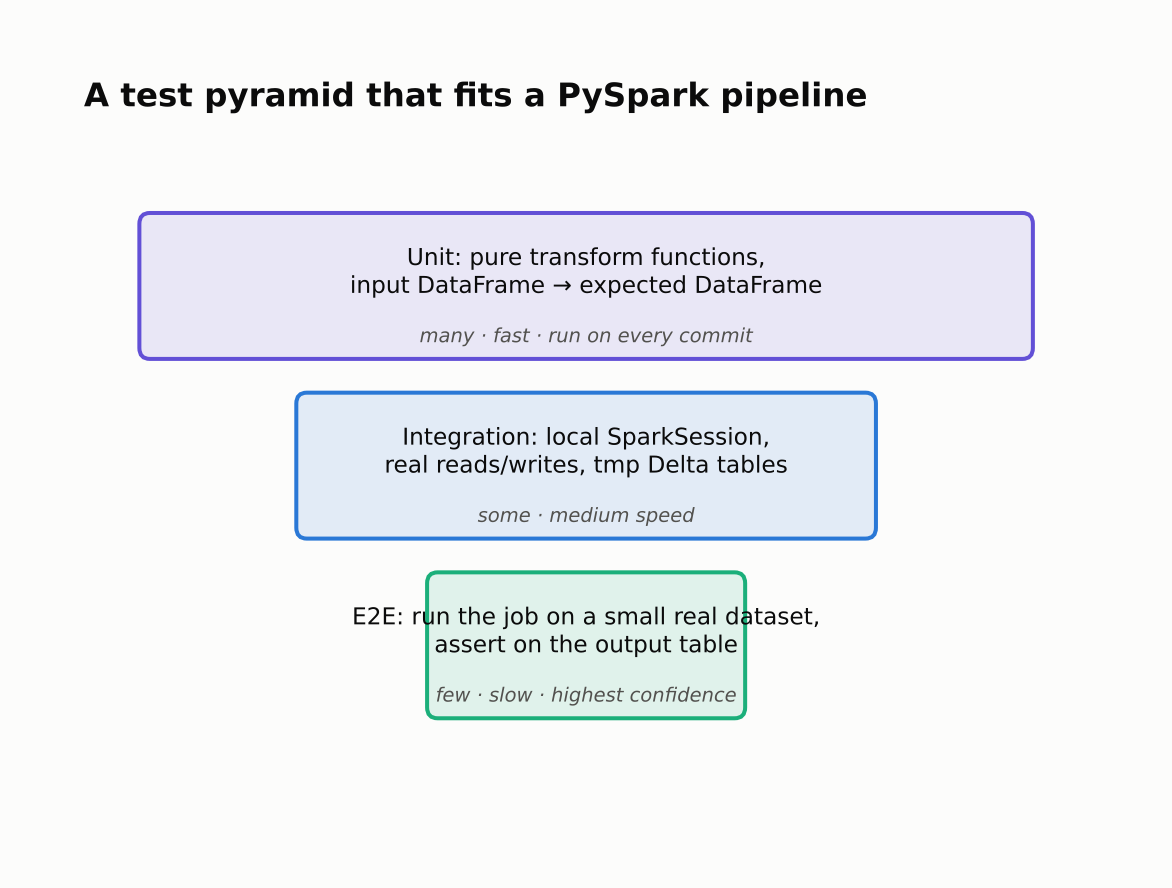 Put logic in the bottom layer wherever possible — it's the only layer cheap enough to run on every save.
Step-by-step implementation
Step 1 — A shared local SparkSession fixture
# Environment: pytest 8.x, PySpark 3.5, Python 3.11
# conftest.py
import pytest
from pyspark.sql import SparkSession

@pytest.fixture(scope="session")
def spark():
    session = (
        SparkSession.builder
        .master("local[2]")
        .appName("pytest-pyspark")
        .config("spark.sql.shuffle.partitions", "2")  # small, fast shuffles for tests
        .config("spark.ui.enabled", "false")
        .getOrCreate()
    )
    yield session
    session.stop()
scope="session" means every test in the run shares this one Spark context instead of paying startup cost per test — on a typical laptop, that's the difference between a test suite that runs in seconds and one that takes minutes. spark.sql.shuffle.partitions set low keeps even the shuffle-heavy tests fast, since there's no need for 200 partitions on a test DataFrame with a few dozen rows.
Step 2 — Unit test the transform function directly
# test_customer_ltv.py
from pyspark.sql import Row
from transforms.customer_ltv import compute_ltv

def test_excludes_refunded_orders(spark):
    orders = spark.createDataFrame([
        Row(customer_id="C1", order_total=100.0, is_refunded=False),
        Row(customer_id="C1", order_total=50.0, is_refunded=True),
    ])

    result = compute_ltv(orders).collect()

    assert len(result) == 1
    assert result[0]["customer_id"] == "C1"
    assert result[0]["lifetime_value"] == 100.0  # refunded order excluded


def test_customer_with_no_orders_returns_zero(spark):
    orders = spark.createDataFrame([], schema="customer_id string, order_total double, is_refunded boolean")
    result = compute_ltv(orders).collect()
    assert result == []
compute_ltv here is a plain function — def compute_ltv(orders: DataFrame) -> DataFrame — with no reads or writes inside it. That's what makes constructing a tiny, known input DataFrame and asserting on the exact output possible; there's no table to seed, no cluster config to fight.
Step 3 — Assert on schema, not just values
from pyspark.sql.types import StructType, StructField, StringType, DoubleType

def test_output_schema(spark):
    orders = spark.createDataFrame([], schema="customer_id string, order_total double, is_refunded boolean")
    result = compute_ltv(orders)

    expected_schema = StructType([
        StructField("customer_id", StringType(), True),
        StructField("lifetime_value", DoubleType(), True),
    ])
    assert result.schema == expected_schema
This catches the case where a refactor accidentally changes lifetime_value from a double to a decimal, or silently drops a column — both of which can pass a values-only test if the test data happens not to exercise the affected column, and both of which can quietly break a downstream consumer.
Step 4 — Keep integration tests in a separate, marked tier
import pytest

@pytest.mark.integration
def test_full_pipeline_writes_delta_table(spark, tmp_path):
    output_path = str(tmp_path / "customer_ltv")
    orders = spark.read.format("delta").load("tests/fixtures/sample_orders")

    compute_ltv(orders).write.format("delta").save(output_path)

    written = spark.read.format("delta").load(output_path)
    assert written.count() > 0
# pytest.ini
[pytest]
markers =
integration: slower tests that read/write real Delta tablesRunning pytest -m "not integration" gives a fast loop for everyday development; a CI job runs the full suite, integration tests included, on every commit.
From production: gotchas and lessons
-
Symptom: The test suite took over three minutes to run, even though it only had thirty tests. Cause: Each test file created its own
SparkSessioninstead of sharing one session-scoped fixture. Fix: Consolidated to a singleconftest.pyfixture scoped to the test session; runtime dropped to under ten seconds. -
Symptom: A test passed locally but failed in CI with a cryptic
py4jerror. Cause: The CI container's Java version didn't match what PySpark expected, unrelated to the test logic itself. Fix: Pinned the CI image to the same Java and PySpark versions used locally and in the Databricks Runtime. -
Symptom: A refactor that silently changed a column's type from
doubletofloatpassed every existing test. Cause: All existing tests asserted on row values only, never on schema. Fix: Added schema assertions to the core transform tests, as shown in Step 3. -
Symptom: Tests that compared two DataFrames for equality were flaky — passing or failing inconsistently. Cause:
collect()does not guarantee row order; the comparison assumed it did. Fix: Sorted both the actual and expected results by a stable key before comparing, or compared as sets/multisets of rows. -
Symptom: Integration tests against Delta tables occasionally failed with file-already-exists errors. Cause: Tests wrote to a shared, hardcoded path instead of a fresh temporary directory per test. Fix: Used pytest's built-in
tmp_pathfixture so every test gets its own isolated write location.
Performance and cost notes
Local-mode SparkSession tests run on the machine executing the test suite, not on a Databricks cluster — there's no DBU cost, but also no signal about how the logic performs at real data volume or real cluster parallelism. Keep that boundary explicit: unit and integration tests validate correctness, and a separate, much smaller set of performance tests (or simply watching metrics after a real deployment) validates speed and cost. Conflating the two — trying to make local tests prove a job will run fast on a thousand-node cluster — wastes effort in both directions.
When not to use this
If a piece of logic is a single, trivial one-line transformation with no branching and no business rules (a straight column rename, say), a dedicated test may be more overhead than it's worth — the integration or end-to-end test covering the pipeline around it is probably sufficient. Reserve focused unit tests for logic that actually has decisions in it: conditionals, edge cases, anything a future change could plausibly get wrong.
Checklist
- Transform logic separated from I/O into plain, testable functions
- A single session-scoped
SparkSessionfixture shared across the test run - Schema assertions included alongside value assertions
- DataFrame comparisons account for row-order non-determinism
- Integration tests marked and runnable separately from the fast unit suite
Practice
Further reading
Keep going
PySpark Window Functions with Practical Examples
Running totals, rankings, lag/lead comparisons, and moving averages in PySpark — what a window actually is under the hood and where it gets expensive.
Flatten Nested JSON and Arrays in PySpark
A practical pattern for turning deeply nested structs, arrays, and maps into flat, queryable tables — without hardcoding every field path.
PySpark UDF vs Pandas UDF vs Built-in Functions: Pick the Right One
A field guide to when built-ins, Pandas UDFs and plain Python UDFs actually make sense, with the serialization cost that explains the gap between them.
One practical note a week
Get new articles, problems and guides in your inbox.
Thanks! You're on the list. (Local demo — no email provider is wired up yet.)