PySpark Window Functions with Practical Examples
Running totals, rankings, lag/lead comparisons, and moving averages in PySpark — what a window actually is under the hood and where it gets expensive.
TL;DR
- A window function computes a value per row using a set of other rows related to it — without collapsing the result to one row per group, unlike
groupBy. - Every window has three parts:
partitionBy(which rows belong together),orderBy(how they're sequenced), and a frame (which neighbors are visible to each row). rank,dense_rank, androw_numbersolve "which position is this row in" — and they are not interchangeable.lag/leadsolve "what was the previous/next value" without a self-join.- Unbounded or misdefined frames are the most common source of both wrong answers and runaway shuffle cost.
The problem
NorthBridge Retail Group's finance team wanted a simple-sounding report: for every store, show each week's sales next to the prior week's sales, a running year-to-date total, and that store's rank against its region for the week. Three asks, and the instinctive approach — self-joining the sales table to itself on week - 1, then grouping for the running total, then grouping again for the rank — took four stages, three shuffles, and produced a wrong running total the first time, because the join silently dropped a store's first week of the year (nothing to join to).
Window functions solve all three asks in one pass over correctly partitioned data, with no self-join. The report that took an afternoon of join debugging became about fifteen lines once it was framed as a window problem instead of a join problem. The hard part isn't the syntax — it's recognizing "value relative to other rows in context" as the signal that you want a window, not a join or a groupBy.
Key concepts
| Concept | What it means | Why it matters here |
|---|---|---|
partitionBy |
Splits rows into independent groups the window never crosses | Gets rows for the same store (or region) together before anything else happens |
orderBy (within the window) |
Defines the sequence used for ranking, lag/lead, and running calculations |
Without it, lag/lead and running totals have no defined "previous row" |
Frame (rowsBetween / rangeBetween) |
The slice of ordered, partitioned rows visible to the function for the current row | Controls whether a sum is "running," "trailing N rows," or "all rows in the partition" |
| Ranking functions | row_number, rank, dense_rank — each handles ties differently |
Picking the wrong one silently changes which row "wins" a tie |
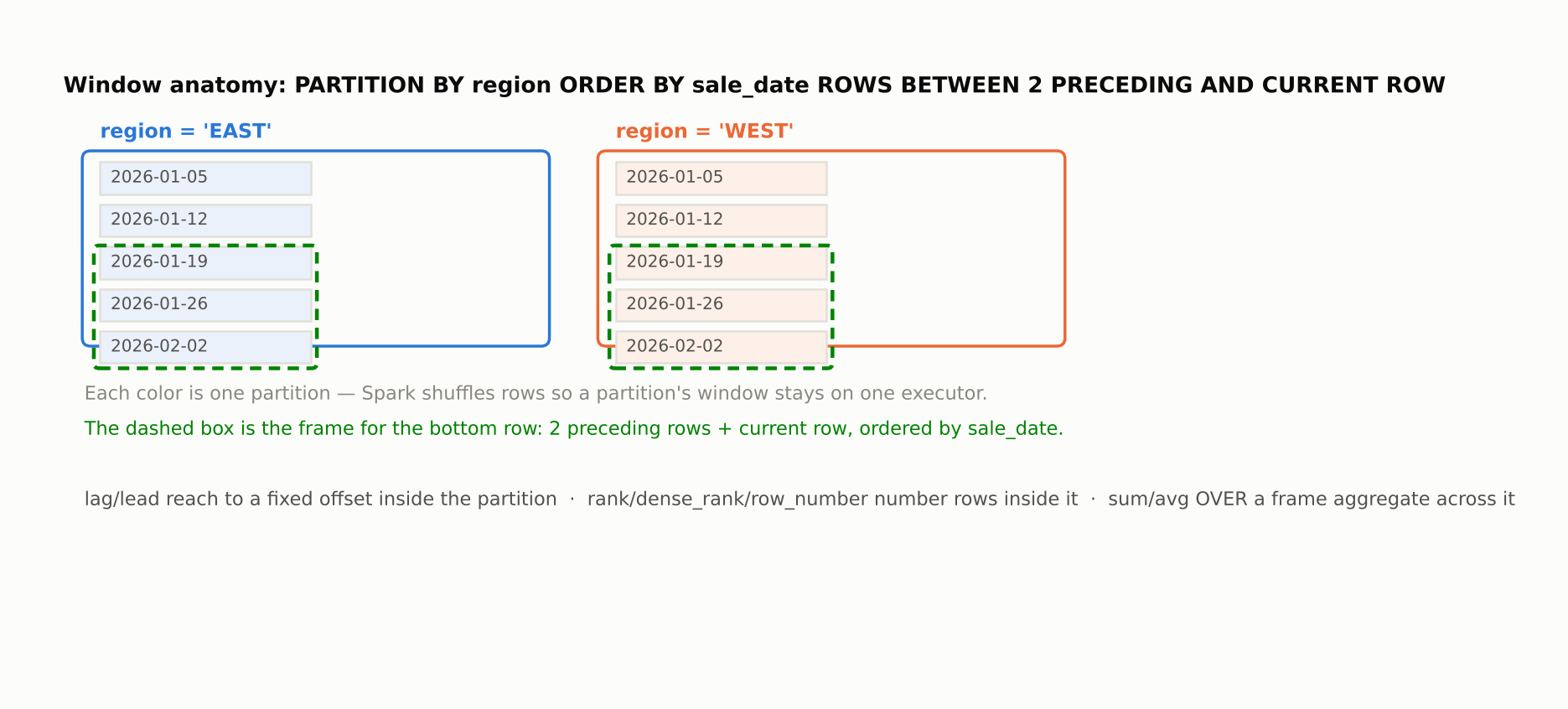 A frame is defined per row — the diagram shows the frame for the last row in each partition.
Step-by-step implementation
Step 1 — Define the window spec once, reuse it
# Environment: Databricks Runtime 15.x LTS, PySpark 3.5
from pyspark.sql import Window
from pyspark.sql import functions as F

store_week_window = Window.partitionBy("store_id").orderBy("week_ending")

sales = sales.withColumn(
    "prior_week_sales",
    F.lag("weekly_sales", 1).over(store_week_window)
)
Window.partitionBy("store_id").orderBy("week_ending") is the whole window — everything after .over(...) just picks which function reads from it. Defining it once and reusing it across columns keeps the plan consistent and the code readable.
Step 2 — Running totals need an explicit frame, not just an order
-- Equivalent Spark SQL, same effect as the PySpark version below
SELECT
  store_id,
  week_ending,
  weekly_sales,
  SUM(weekly_sales) OVER (
    PARTITION BY store_id, year(week_ending)
    ORDER BY week_ending
    ROWS BETWEEN UNBOUNDED PRECEDING AND CURRENT ROW
  ) AS ytd_sales
FROM sales
ytd_window = (
Window.partitionBy("store_id", F.year("week_ending"))
.orderBy("week_ending")
.rowsBetween(Window.unboundedPreceding, Window.currentRow)
)
sales = sales.withColumn("ytd_sales", F.sum("weekly_sales").over(ytd_window))Without rowsBetween(...), Spark's default frame for an ordered window is (unboundedPreceding, currentRow) for aggregate functions anyway — but naming it explicitly is worth the extra line. The next engineer (or you, in six months) shouldn't have to know Spark's default to understand what the column means.
Step 3 — Rank stores within their region, picking the right ranking function
region_rank_window = Window.partitionBy("region", "week_ending").orderBy(F.desc("weekly_sales"))

ranked = sales.withColumn("rank_in_region", F.rank().over(region_rank_window)) \
              .withColumn("dense_rank_in_region", F.dense_rank().over(region_rank_window)) \
              .withColumn("row_num_in_region", F.row_number().over(region_rank_window))
Two stores tied at $50,000 for the week, both ranked 3rd: rank() gives them both 3 and skips to 5 for the next store; dense_rank() gives them both 3 and the next store gets 4; row_number() breaks the tie arbitrarily (or by a secondary orderBy) and gives 3 and 4. Finance asked for dense_rank — "rank" in their vocabulary meant "how many distinct performance tiers are above this store," not "how many rows."
From production: gotchas and lessons
-
Symptom: A running total column was correct for every store except ones with exactly one week of history. Cause:
rangeBetweenwas used instead ofrowsBetweenwith a date column that had duplicate values in test data, producing an unexpected frame boundary. Fix: Switched torowsBetweenonce row-based framing was confirmed to be what the business actually wanted (date ties should not be summed together). -
Symptom: A job that used to finish in ten minutes started taking over an hour after adding one window column. Cause:
partitionBywas left off a window, which Spark defaulted to a single partition for the entire dataset — one executor did all the work. Fix: Added a real partition key; runtime dropped back to baseline immediately. -
Symptom:
rank()produced gaps in the sequence that confused a downstream dashboard. Cause: This is correctrank()behavior with ties, not a bug — the dashboard logic assumed consecutive integers. Fix: Switched todense_rank()once the actual requirement ("no gaps") was clarified with the stakeholder. -
Symptom:
lag()returned null for far more rows than expected. Cause: The partition key was more granular than intended (partitioned bystore_id, week_endinginstead of juststore_id), so most "previous rows" didn't exist within their own partition. Fix: Removedweek_endingfrompartitionBy— it belongs inorderBy, notpartitionBy, for this use case. -
Symptom: Adding a second window function on the same partition and order doubled the shuffle cost unnecessarily. Cause: Two separately defined
Windowobjects with identicalpartitionBy/orderBywere each triggering their own shuffle. Fix: Reused a singleWindowSpecvariable across both.over()calls — Spark can then share the shuffle/sort across functions that use the exact same window.
Performance and cost notes
Every windowed computation requires Spark to shuffle data so that all rows in a partition land on the same executor, then sort them by the order column. A skewed partition key — one store with ten times the rows of any other — means one task does ten times the work and the whole stage waits on it. Check partition key cardinality and skew before trusting a window-heavy job's runtime, and prefer rowsBetween over rangeBetween when the ordering column has duplicates and you want row-based framing instead of value-based framing — they are not the same thing and the difference rarely shows up until production data has ties that test data didn't.
When not to use this
If you only need one aggregate value per group with no need to retain row-level detail, a plain groupBy is simpler, clearer, and often cheaper — don't reach for a window just because it can also produce aggregates. And if "the previous row" means something that crosses a very large, un-partitionable set (say, a global sequence with no natural partition key), a window will force a full shuffle into one partition; at that point, a different approach — pre-sorted file layout, or restructuring the question — is worth considering before you spend cluster time on a single-partition window.
Checklist
- Every window has an explicit
partitionBywith a real key (never left to default to one giant partition) - Frame type (
rowsBetweenvsrangeBetween) chosen deliberately, not left to Spark's default - Ranking function matches the actual business definition of "rank" (gaps allowed or not)
- Reused identical
WindowSpecobjects across columns that share a partition/order - Checked partition key cardinality for skew before trusting runtime
Practice
Further reading
Keep going
PySpark UDF vs Pandas UDF vs Built-in Functions: Pick the Right One
A field guide to when built-ins, Pandas UDFs and plain Python UDFs actually make sense, with the serialization cost that explains the gap between them.
Flatten Nested JSON and Arrays in PySpark
A practical pattern for turning deeply nested structs, arrays, and maps into flat, queryable tables — without hardcoding every field path.
Testing PySpark Code with pytest
A test pyramid that actually fits a Spark pipeline — fast unit tests for transform logic, a shared local SparkSession, and a pattern for Delta-backed integration tests.
One practical note a week
Get new articles, problems and guides in your inbox.
Thanks! You're on the list. (Local demo — no email provider is wired up yet.)