PySpark UDF vs Pandas UDF vs Built-in Functions: Pick the Right One
A field guide to when built-ins, Pandas UDFs and plain Python UDFs actually make sense, with the serialization cost that explains the gap between them.
TL;DR
- Built-in functions (
pyspark.sql.functions) should be your default — Catalyst can plan, push down, and whole-stage-codegen them. Nothing else gets this. - A Python UDF pays for row-by-row serialization across the JVM/Python boundary — on our test transform it ran roughly 11x slower than the built-in equivalent.
- A Pandas UDF (vectorized, Arrow-backed) batches rows into pandas Series, which gets you most of the way back to built-in speed — about 3x slower in the same test, not 11x.
- Reach for a UDF only when there's genuinely no built-in or combination of built-ins that does the job — a custom parsing rule, a legacy scoring function, a call into a Python library with no Spark equivalent.
- Always benchmark on your own cluster and data shape before trusting someone else's multiplier, mine included.
The problem
A few months into building out the bronze-to-gold pipeline for NorthBridge Retail Group's loyalty program, one of the junior engineers on the team added a @udf-decorated Python function to clean up phone numbers: strip punctuation, pad with a country code, validate length. It worked. It also added four minutes to a job that used to take ninety seconds, on a table that hadn't grown by more than a few percent.
Nobody had done anything wrong, exactly. The function was correct, the tests passed, and in a notebook running against a thousand rows it was instant. The problem only showed up at the million-row scale the nightly job actually ran at, and by then it had already been merged and scheduled.
This is the single most common performance mistake in PySpark code, and it has nothing to do with cluster sizing or shuffle partitions. It's a question people don't think to ask: does this line of code run inside the JVM, or does it leave the JVM to run in a Python process and then come back? Built-in functions never leave. Python UDFs leave for every single row. Pandas UDFs leave, but in batches. That one fact explains almost the entire performance story in this article.
Key concepts
| Concept | What it means | Why it matters here |
|---|---|---|
| Catalyst optimizer | Spark's query planner, which can inspect, reorder, and push down built-in expressions | A built-in function is visible to Catalyst as structured logic; a UDF is an opaque black box it can't optimize around |
| Row-at-a-time UDF | A regular Python function registered with @udf, called once per row |
Every call means serializing one row out of the JVM, running Python, and serializing the result back |
| Vectorized (Pandas) UDF | A function registered with @pandas_udf that receives a batch of rows as a pandas.Series or DataFrame |
Apache Arrow batches thousands of rows into one transfer, so the per-row serialization cost nearly disappears |
| Whole-stage code generation | Catalyst compiling a chain of built-in operations into a single JVM bytecode loop | This is what makes built-ins fast — there's no round trip and no boxing of individual values |
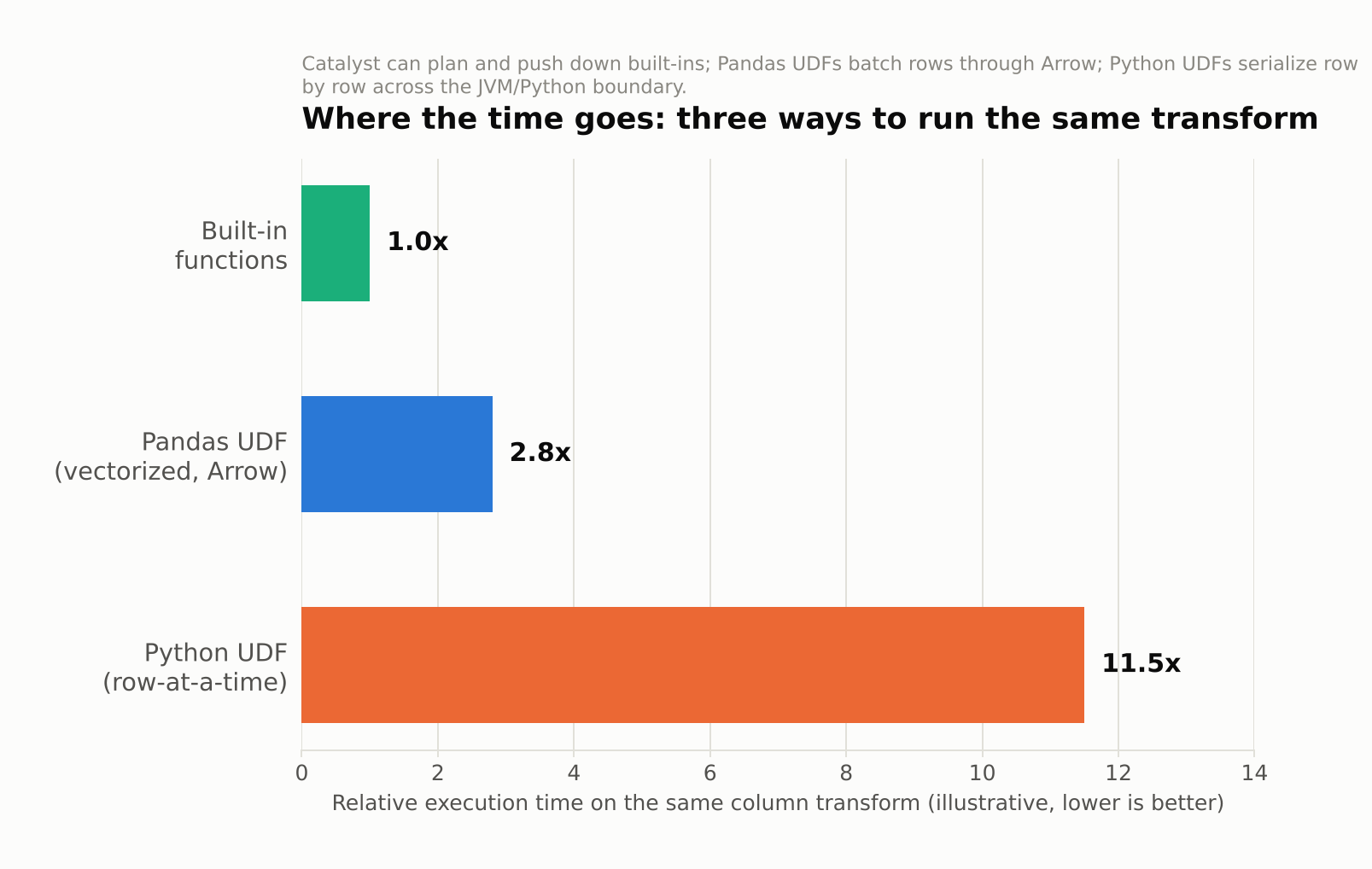 Illustrative numbers from one test transform — the ordering generalizes, the exact multipliers won't.
Step-by-step implementation
Step 1 — Start from the built-in, every time
Before writing any UDF, spend five minutes checking whether pyspark.sql.functions already covers it, often in combination. String handling, date math, conditional logic, array operations, even JSON parsing all have built-in coverage most engineers underestimate.
# Environment: Databricks Runtime 15.x LTS, PySpark 3.5
from pyspark.sql import functions as F

# Phone number cleanup — no UDF needed
cleaned = df.withColumn(
    "phone_clean",
    F.when(
        F.length(F.regexp_replace("phone_raw", r"[^0-9]", "")) == 10,
        F.concat(F.lit("+1"), F.regexp_replace("phone_raw", r"[^0-9]", ""))
    ).otherwise(F.lit(None))
)
That one withColumn replaced the entire UDF from the loyalty pipeline, ran in the same stage as everything around it, and needed no separate benchmarking to trust.
Step 2 — When you genuinely need custom logic, reach for a Pandas UDF first
Some logic really can't be expressed as built-ins — calling a fitted scikit-learn model, applying a domain-specific scoring rule with branching too complex for when/otherwise, or wrapping an existing Python library. In those cases, a Pandas UDF is almost always the better starting point over a plain UDF.
import pandas as pd
from pyspark.sql.functions import pandas_udf

@pandas_udf("double")
def loyalty_score(spend: pd.Series, visits: pd.Series) -> pd.Series:
    # vectorized pandas/numpy operations — this runs on a whole batch at once
    base = spend.clip(upper=5000) / 100
    frequency_bonus = visits.clip(upper=50) * 1.5
    return (base + frequency_bonus).round(2)

scored = df.withColumn("loyalty_score", loyalty_score("total_spend", "visit_count"))
The function body looks almost identical to plain pandas code, which is exactly the point — spend and visits arrive as full pandas.Series for a batch of rows (typically a few thousand at a time, controlled by spark.sql.execution.arrow.maxRecordsPerBatch), not one scalar per call.
Step 3 — Reserve plain Python UDFs for the cases that truly need row-at-a-time logic
A regular UDF still has a place — usually for things that are inherently row-local and awkward to vectorize, like calling an external API per row (which you shouldn't do inside Spark anyway) or working through deeply nested, irregular business rules where vectorizing the logic would take longer to write than the job takes to run.
from pyspark.sql.functions import udf
from pyspark.sql.types import StringType

@udf(returnType=StringType())
def classify_legacy_segment(spend: float, tenure_days: int) -> str:
    # mirrors a scoring rule from a retired on-prem system, kept intentionally literal
    if tenure_days > 1000 and spend > 10000:
        return "LEGACY_PLATINUM"
    if tenure_days > 365:
        return "LEGACY_STANDARD"
    return "LEGACY_NEW"

segmented = df.withColumn("legacy_segment", classify_legacy_segment("total_spend", "tenure_days"))
Keep these narrow and well-tested — they're the part of the pipeline most likely to surprise whoever profiles it next.
From production: gotchas and lessons
-
Symptom: A job's runtime roughly quadrupled after a seemingly small UDF was added, with no change in data volume. Cause: The UDF forced row-at-a-time serialization across the Python/JVM boundary on every row in a wide table. Fix: Rewrote the logic as built-ins (
when/regexp_replace); runtime returned to baseline. -
Symptom: A Pandas UDF intermittently failed with cryptic Arrow-related errors after a Databricks Runtime upgrade. Cause:
spark.sql.execution.arrow.pyspark.enabledinteracting with a pandas version bump that changed nullable-integer handling. Fix: Pinned the pandas version in the cluster's library spec and added explicit.fillna()before type casts inside the UDF. -
Symptom: A type-hinted Pandas UDF silently returned nulls for an entire column. Cause: The declared return type (
"double") didn't match what the function actually returned (a pandasInt64nullable array in one branch). Fix: Cast explicitly inside the function body rather than relying on implicit coercion. -
Symptom: Registering many small per-column UDFs made a wide transformation pipeline hard to read and slow to plan. Cause: Each UDF is an opaque node to Catalyst, so a chain of ten UDFs can't be fused or reordered the way ten built-ins can. Fix: Consolidated related per-row logic into a single Pandas UDF operating on multiple input columns at once.
-
Symptom: A scalar Pandas UDF worked fine locally but was far slower than expected on the full cluster. Cause:
maxRecordsPerBatchwas left at a tiny default for a wide table, so Arrow batching barely kicked in. Fix: Tuned the batch size config for the table's column count and row size, cutting overhead noticeably.
Performance and cost notes
The multipliers in the chart above are illustrative — run from a single column transform repeated across a few million rows on a small cluster, not a guarantee for your workload. What does generalize is the ordering: built-ins first, Pandas UDFs second, Python UDFs last. On DBU-billed clusters, that ordering maps directly to dollars — a job that runs 10x longer because of unnecessary UDFs burns roughly 10x the compute cost for the exact same output. If you inherit a pipeline full of row-at-a-time UDFs and can't rewrite them all at once, converting the ones on your largest tables first gives you most of the win for the least effort.
When not to use this
Built-ins aren't always an option, and chasing them past the point of readability is its own mistake. If a Pandas UDF makes a genuinely complex rule clear in fifteen lines where a nested when/otherwise chain would take eighty and still be wrong at the edges, take the UDF — a correct, maintainable Pandas UDF beats a built-in expression nobody can verify by reading it. And if you're calling into a model or library that has no Spark equivalent at all, a UDF isn't a workaround, it's simply the mechanism.
Checklist
- Checked
pyspark.sql.functions(and combinations of it) before writing any UDF - Chose
@pandas_udfover@udfwhenever the logic could be vectorized - Declared explicit, tested return types for every Pandas UDF
- Benchmarked on representative data volume, not a notebook sample
- Documented why a UDF was necessary, for whoever reviews the pipeline next
Practice
Further reading
Keep going
PySpark Window Functions with Practical Examples
Running totals, rankings, lag/lead comparisons, and moving averages in PySpark — what a window actually is under the hood and where it gets expensive.
Flatten Nested JSON and Arrays in PySpark
A practical pattern for turning deeply nested structs, arrays, and maps into flat, queryable tables — without hardcoding every field path.
Testing PySpark Code with pytest
A test pyramid that actually fits a Spark pipeline — fast unit tests for transform logic, a shared local SparkSession, and a pattern for Delta-backed integration tests.
One practical note a week
Get new articles, problems and guides in your inbox.
Thanks! You're on the list. (Local demo — no email provider is wired up yet.)