Flatten Nested JSON and Arrays in PySpark
A practical pattern for turning deeply nested structs, arrays, and maps into flat, queryable tables — without hardcoding every field path.
TL;DR
- Structs flatten with dot notation (
col("customer.address.city")); arrays of structs needexplode()first. explode()turns one row with an array into N rows, one per array element — know this before you join on anything downstream.- Maps flatten with
explode(map_entries(...)), which gives youkey/valuecolumns to pivot or filter on. - For schemas with unpredictable nesting (common with upstream API payloads), a recursive flattening function beats hand-written
selectstatements that break every time a field is added. - Flattening early, in the bronze-to-silver step, keeps every downstream query simple — don't make every analyst re-learn the nested schema.
The problem
NorthBridge Retail Group's e-commerce platform sends order events as JSON, and like most real API payloads, the structure is not flat: an order_id at the top level, a nested customer struct with its own nested address struct inside it, and an items field that's an array of structs, each with its own sku, qty, and price. The raw landing table in bronze stores this exactly as it arrives, which is correct — bronze should be a faithful copy of the source.
The trouble starts in silver, when every analyst who wants "revenue per SKU" has to know that items is an array and that explode() has to come before anything else, or they get an error about ambiguous array operations that doesn't obviously point at the real problem. Multiply that by a dozen nested fields and three levels of depth, and onboarding someone new to the schema becomes a half-day conversation instead of a five-minute read of a table's columns. The fix isn't cleverer SQL from each analyst — it's flattening the structure once, in the pipeline, so every table past that point is just rows and columns.
Key concepts
| Concept | What it means | Why it matters here |
|---|---|---|
| Struct | A nested group of named fields, like a row within a row | Accessed with dot notation: col("customer.address.city") — no explode needed |
array<struct> |
A list where each element is itself a struct | Needs explode() to turn each array element into its own row before you can dot into its fields |
map<string, *> |
Key-value pairs with a variable, non-fixed set of keys | Flattened with explode(map_entries(col("m"))), producing key and value columns |
| Schema drift | New or renamed nested fields appearing without warning | A hardcoded flattening select silently drops new fields; a schema-driven approach catches them |
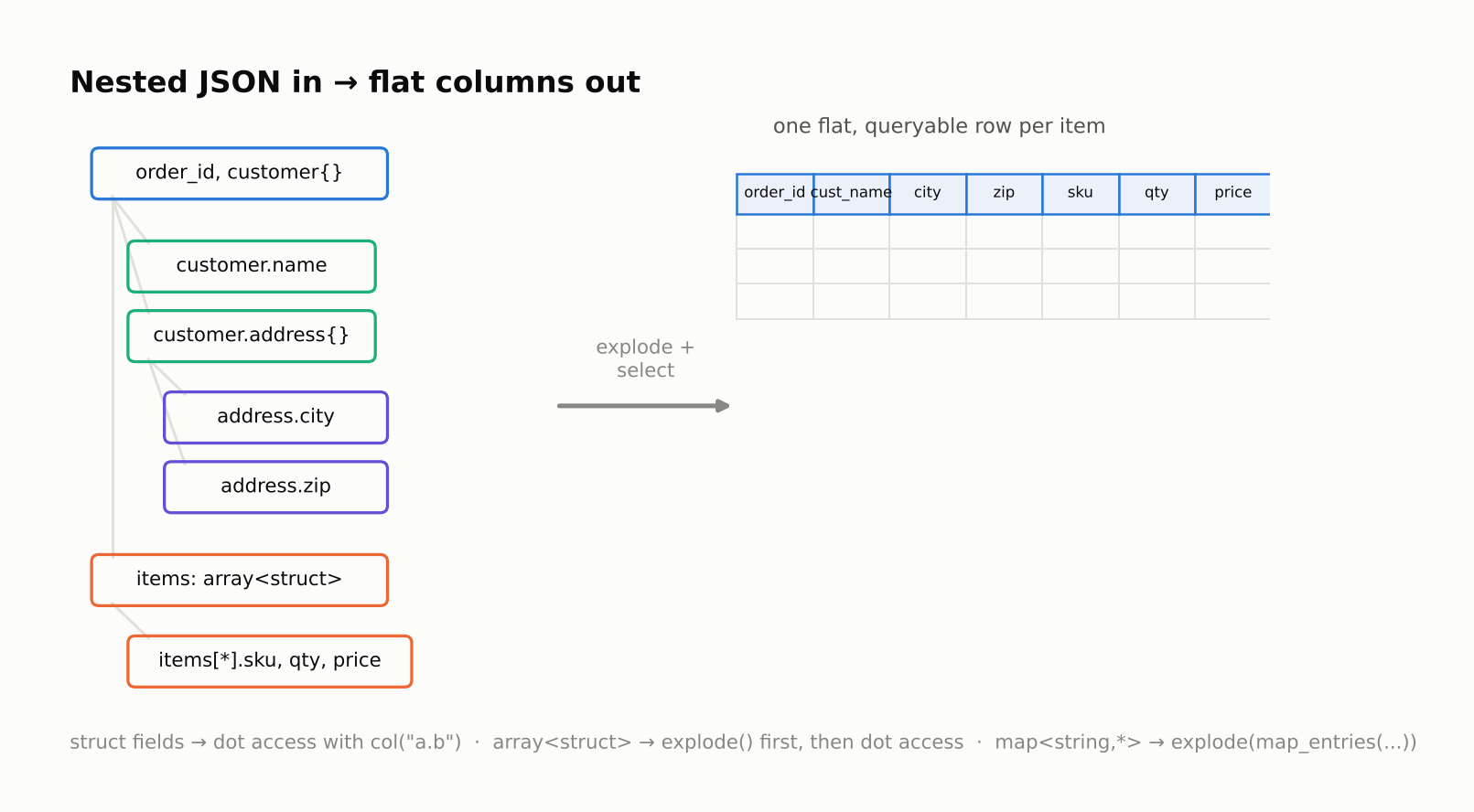 Struct fields are reached with dot access. Array fields need
explode() before anything else works.
Step-by-step implementation
Step 1 — Flatten plain structs with dot notation
# Environment: Databricks Runtime 15.x LTS, PySpark 3.5
from pyspark.sql import functions as F

orders_bronze = spark.read.json("/mnt/raw/orders/")

orders_flat = orders_bronze.select(
    "order_id",
    F.col("customer.name").alias("customer_name"),
    F.col("customer.address.city").alias("city"),
    F.col("customer.address.zip").alias("zip"),
    "items"  # still nested — handled next
)
No explode is needed yet — struct fields are just nested columns, and Spark resolves customer.address.city the same way it resolves any other column reference.
Step 2 — Explode the array, then flatten the struct inside it
orders_items = orders_flat.withColumn("item", F.explode("items")).drop("items")

orders_items = orders_items.select(
    "order_id", "customer_name", "city", "zip",
    F.col("item.sku").alias("sku"),
    F.col("item.qty").alias("qty"),
    F.col("item.price").alias("price"),
)
A ten-item order becomes ten rows after explode, each carrying the same order_id and customer fields — this is the expected, correct behavior, but it's worth saying out loud the first time, because joining this table to something keyed on order_id without accounting for the fan-out is the single most common bug that follows.
Step 3 — Handle unpredictable or deeply nested schemas with a recursive flattener
API payloads evolve — a field gets added, a struct gets one more level of nesting, and a hardcoded select quietly stops surfacing the new data. For tables where the nesting shape isn't stable, a small recursive helper does the job and keeps working as the schema changes.
from pyspark.sql.types import StructType, ArrayType

def flatten_df(df):
    complex_fields = {
        field.name: field.dataType
        for field in df.schema.fields
        if isinstance(field.dataType, (StructType, ArrayType))
    }
    while complex_fields:
        col_name, dtype = next(iter(complex_fields.items()))
        if isinstance(dtype, StructType):
            expanded = [F.col(f"`{col_name}`.`{nested.name}`").alias(f"{col_name}_{nested.name}")
                        for nested in dtype.fields]
            df = df.select("*", *expanded).drop(col_name)
        elif isinstance(dtype, ArrayType):
            df = df.withColumn(col_name, F.explode_outer(col_name))

        complex_fields = {
            field.name: field.dataType
            for field in df.schema.fields
            if isinstance(field.dataType, (StructType, ArrayType))
        }
    return df

orders_silver = flatten_df(orders_bronze)
explode_outer instead of plain explode keeps orders with an empty items array in the output, with nulls for the item fields — explode silently drops those rows entirely, which has caused more than one "missing orders" investigation that turned out to be a zero-item order, not a pipeline bug.
From production: gotchas and lessons
-
Symptom: A revenue report was double-counting orders after a join. Cause:
itemshad been exploded upstream, so the table had one row per line item; a later join onorder_idfanned that out again against another exploded table. Fix: Aggregated to order grain before the join, or joined on a compound key that accounted for the item-level grain explicitly. -
Symptom: A handful of orders disappeared from the silver table entirely. Cause:
explode()on an empty array drops the row rather than keeping it with nulls. Fix: Switched toexplode_outer(). -
Symptom: A new nested field added by the upstream API never showed up downstream, with no error raised anywhere. Cause: A hardcoded
selectonly listed the fields known at the time it was written. Fix: Moved that table to the recursive flattening pattern, which surfaces new fields automatically on the next schema read. -
Symptom: Column names collided after flattening two sibling structs that both had a field called
id. Cause: The flattening logic used only the leaf field name (id) instead of a path-qualified name (customer_id,address_id). Fix: Prefixed flattened column names with their parent path, as in the recursive example above. -
Symptom: Flattening a deeply nested payload (six levels) produced a very wide, hard-to-review table. Cause: Not every nested field needs to exist at the top level of silver — some are only ever used together. Fix: Kept a couple of rarely-queried nested structs as structs in silver, and flattened only the fields analysts actually queried.
Performance and cost notes
explode() on a large array column can produce a dramatic row-count increase — a table of a million orders averaging five items each becomes five million rows after exploding items, which changes partition sizing and downstream shuffle costs. If you only need aggregate item-level metrics (total items, total item value) and not every individual line item, consider computing those with aggregate() or a Pandas UDF over the array before exploding, and keep the exploded, fully flattened version as a separate, clearly-named table rather than the default.
When not to use this
If a nested field is write-once and read-once by a single downstream job that already understands the nested shape, flattening it is just extra pipeline work for no one's benefit — leave it nested and let that one consumer dot into it directly. And if the schema truly never changes and has only one or two levels of nesting, a hardcoded select is more readable than a recursive flattener; reach for the recursive pattern when the nesting is either deep or genuinely unpredictable, not as a default for every JSON source.
Checklist
- Distinguished struct fields (dot notation) from array fields (
exploderequired) - Used
explode_outerinstead ofexplodewherever empty arrays are valid data - Prefixed flattened column names to avoid collisions between sibling structs
- Confirmed downstream joins account for the row fan-out from any
explode - Considered a recursive flattener for sources with unstable or deep nesting
Practice
Further reading
Keep going
PySpark Window Functions with Practical Examples
Running totals, rankings, lag/lead comparisons, and moving averages in PySpark — what a window actually is under the hood and where it gets expensive.
PySpark UDF vs Pandas UDF vs Built-in Functions: Pick the Right One
A field guide to when built-ins, Pandas UDFs and plain Python UDFs actually make sense, with the serialization cost that explains the gap between them.
Testing PySpark Code with pytest
A test pyramid that actually fits a Spark pipeline — fast unit tests for transform logic, a shared local SparkSession, and a pattern for Delta-backed integration tests.
One practical note a week
Get new articles, problems and guides in your inbox.
Thanks! You're on the list. (Local demo — no email provider is wired up yet.)