Lakeflow Spark Declarative Pipelines (Formerly DLT): Getting Started
Build your first declarative pipeline end to end — streaming tables, materialized views, flows and the pipeline graph — using the pyspark.pipelines API that replaced import dlt.
TL;DR
- A declarative pipeline is a set of dataset definitions. You never write the order of execution; the engine derives the graph from what each dataset reads.
- Three object types do almost everything: a streaming table for incremental append, a materialized view for a recomputed result, and a temporary view for intermediate logic that shouldn't be persisted.
- The forward-looking import is
from pyspark import pipelines as dp. Your existingimport dltcode still runs — this is a rename with new capabilities, not a migration deadline. - Source files live in a
transformations/folder under a pipeline root. Every.pyand.sqlfile there is part of the pipeline, which is both convenient and a footgun. - The thing that actually changes how you work isn't the syntax. It's that checkpoints, retries, ordering and table creation stop being your code.
The problem
NorthBridge Retail Group's order pipeline was eleven notebooks in a Lakeflow Job, chained by task dependencies that somebody drew in the UI eighteen months ago. Each notebook did roughly the same five things: work out a high-water mark, read the new rows, transform them, MERGE into the target, and write a row to a custom audit table so the next notebook knew it could start.
The code that did the actual business logic — the joins, the currency conversion, the deduplication — was maybe fifteen percent of each file. The rest was plumbing: checkpoint bookkeeping, "has the upstream finished?" checks, idempotency guards, and a try/except block that nobody could explain but everybody was afraid to remove.
The failure mode was always the same shape. Someone adds a new silver table, forgets to wire its dependency into the job graph, and it runs against yesterday's data for a week before anyone notices the numbers are stale.
A declarative pipeline deletes that entire category of bug, because you don't maintain the graph. You declare that silver_orders reads from bronze_orders, and the engine works out that one has to run before the other — every time, including the times you forgot to tell it.
Key concepts
| Concept | What it means | Why it matters here |
|---|---|---|
| Pipeline | The top-level unit that groups datasets and transformations into one project | The unit of deployment, monitoring and lineage |
Streaming table (@dp.table) |
A table built incrementally from an append-only source | Each row is processed once; the engine owns the checkpoint |
Materialized view (@dp.materialized_view) |
A table whose contents are the result of a query, refreshed by the engine | Recomputed as needed — the right shape for aggregates and dimensions |
Temporary view (@dp.temporary_view) |
A named query that exists only during the pipeline run | Intermediate logic that doesn't deserve a table in the catalog |
| Flow | The thing that moves data into a dataset | Usually implicit; becomes explicit when you need backfills or fan-in |
| Pipeline graph | The DAG the engine derives from your dataset definitions | Not written by you, not stored in a config file — derived from the code |
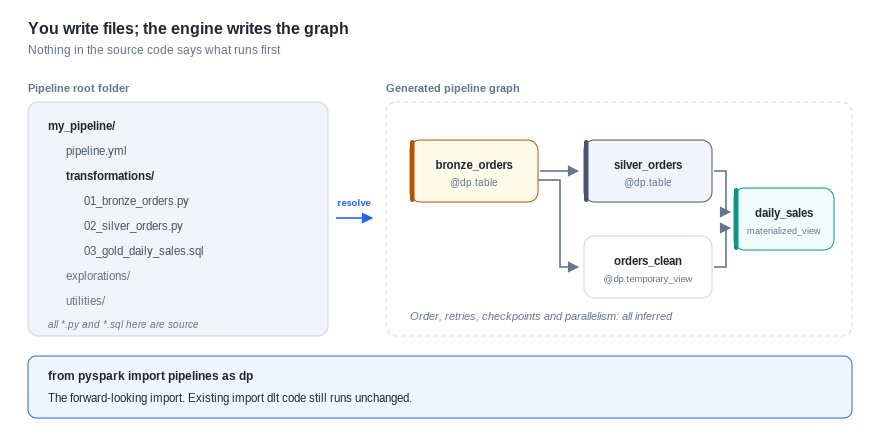 You write files. The engine writes the graph. Nothing in the source code states what runs first.
Step-by-step implementation
Step 1 — Understand the folder before you write a line
Create a new ETL pipeline in the workspace and you get a root folder with a particular shape. By default, every .py and .sql file in the transformations/ folder is pipeline source. Not the ones you import, not the ones listed somewhere — all of them.
orders_pipeline/
├── pipeline.yml              # pipeline settings
├── transformations/          # everything here is pipeline source
│   ├── 01_bronze_orders.py
│   ├── 02_silver_orders.py
│   └── 03_gold_daily_sales.sql
├── explorations/             # scratch notebooks, not source
└── utilities/                # shared helpers, not source
The numeric prefixes are a readability habit, not an execution order — the engine ignores them completely and resolves dependencies from the queries. I still use them, because a folder sorted in rough data-flow order is kinder to the next person than one sorted alphabetically.
The reason explorations/ exists is worth saying out loud: it's where your half-finished display(df) experiments go so they don't get picked up as pipeline datasets. Dropping a scratch notebook into transformations/ and wondering why the pipeline is suddenly trying to create a table called df_test_2 is a rite of passage.
Step 2 — Bronze: a streaming table fed by Auto Loader
# Environment: Databricks Runtime 16.4 LTS, serverless pipeline, Unity Catalog
# transformations/01_bronze_orders.py
from pyspark import pipelines as dp
from pyspark.sql import functions as F


@dp.table(
    name="bronze_orders",
    comment="Raw partner order events, exactly as they landed.",
    table_properties={"quality": "bronze"},
)
def bronze_orders():
    return (
        spark.readStream.format("cloudFiles")
        .option("cloudFiles.format", "json")
        .option("cloudFiles.inferColumnTypes", "true")
        .load("/Volumes/northbridge/landing/partner_orders/")
        .withColumn("_ingest_ts", F.current_timestamp())
        .withColumn("_source_file", F.col("_metadata.file_path"))
    )
Notice what isn't here. No cloudFiles.schemaLocation. No checkpointLocation. No CREATE TABLE. No writeStream. Inside a pipeline, Auto Loader's schema and checkpoint are managed for you, which is the single biggest reason Databricks recommends this shape for new ingestion.
@dp.table with a streaming DataFrame gives you a streaming table — the direct equivalent of a writeStream with append output mode. The decorator is doing a lot of quiet work: it declares the dataset, registers an implicit append flow into it, and hands the engine enough information to place it in the graph.
Step 3 — Silver: clean in a view, persist in a table
# transformations/02_silver_orders.py
from pyspark import pipelines as dp
from pyspark.sql import functions as F


@dp.temporary_view
def orders_cleaned():
    """Not persisted. Exists only for the duration of the run."""
    return (
        spark.readStream.table("bronze_orders")
        .withColumn("order_ts", F.to_timestamp("order_timestamp"))
        .withColumn("total_amount", F.col("total_amount").cast("decimal(12,2)"))
        .withColumnRenamed("cust_id", "customer_id")
        .drop("order_timestamp", "cust_id")
    )


@dp.table(
    name="silver_orders",
    comment="Typed, renamed order events ready for business logic.",
    table_properties={"quality": "silver"},
)
def silver_orders():
    return spark.readStream.table("orders_cleaned")
The split between a temporary view and a table is a judgement call people get wrong in both directions. My rule: if nobody outside the pipeline would ever query it, and it exists only to make the next step readable, it's a temporary view. Persisting every intermediate step produces a catalog full of tables that look like real assets and aren't.
Note spark.readStream.table("bronze_orders") — an unqualified name, resolved within the pipeline. That reference is the dependency declaration. There is no separate place where you say "silver depends on bronze."
Step 4 — Gold: a materialized view, in SQL
-- transformations/03_gold_daily_sales.sql
CREATE OR REFRESH MATERIALIZED VIEW gold_daily_sales
COMMENT 'Daily revenue and order counts by region.'
TBLPROPERTIES ('quality' = 'gold')
AS
SELECT
  date(order_ts)        AS sales_date,
  region,
  count(*)              AS order_count,
  sum(total_amount)     AS revenue,
  avg(total_amount)     AS avg_order_value
FROM silver_orders
GROUP BY date(order_ts), region;
Mixing languages inside one pipeline is fine and often correct: each file is one language, but a pipeline can hold as many files as you like. Ingestion and anything fiddly goes in Python; aggregates that analysts will read and modify go in SQL.
The choice between a streaming table and a materialized view comes down to one question: can this result change for rows you've already written? A daily aggregate can — a late-arriving order changes yesterday's total — so it's a materialized view. An append-only log of events can't, so it's a streaming table.
Step 5 — Flows, for the two cases decorators don't cover
# Backfill from history once, then let the live stream take over.
dp.create_streaming_table("bronze_orders")


@dp.append_flow(target="bronze_orders", once=True)
def backfill_legacy_orders():
    return spark.read.format("parquet").load("/Volumes/northbridge/archive/orders/")


@dp.append_flow(target="bronze_orders")
def stream_live_orders():
    return (
        spark.readStream.format("cloudFiles")
        .option("cloudFiles.format", "json")
        .load("/Volumes/northbridge/landing/partner_orders/")
    )
When you use @dp.table, the engine creates an append flow for you. Declaring the table with dp.create_streaming_table() and then attaching flows explicitly is how you handle the two cases the decorator can't express: a one-time backfill alongside an ongoing stream, and fan-in from several sources into one table.
For change data capture there's a dedicated path — dp.create_auto_cdc_flow(), which replaces the old dlt.apply_changes() and handles SCD Type 1 and Type 2 against a streaming table target. That's a whole article of its own; the thing to know now is that you declare the target table first and attach the CDC flow to it, exactly like the pattern above.
Step 6 — Run it, then read the graph
Click Run pipeline and the editor shows the dependency graph it derived, node by node, with row counts as each dataset completes. That graph is the artefact worth staring at on your first run — not because it's pretty, but because it's the first time you'll see whether the engine understood your intent.
Two run modes, and the choice is about latency and money:
- Triggered — the pipeline processes available data and stops. Scheduled from a job, this is the cheap default and what most pipelines should be.
- Continuous — the pipeline stays up and processes data as it arrives. Use it when the business genuinely cares about seconds.
Both read from the same code. Switching between them is a pipeline setting, not a rewrite, which is a real improvement over hand-rolled streaming where batch and streaming versions tend to diverge into two codebases.
From production: gotchas and lessons
-
Symptom: A pipeline failed on first run with an error about a dataset named
scratch_df. Cause: An exploratory notebook had been saved intotransformations/. Everything in that folder is source, including the file you meant to throw away. Fix: Moved it toexplorations/. Now part of the team's PR checklist: anything intransformations/is a production dataset definition, full stop. -
Symptom: Gold aggregates were missing late-arriving orders that were clearly present in silver. Cause: The gold layer had been built as a streaming table because "streaming is faster." Streaming tables append; they don't revisit rows already written, so a late order never updated yesterday's total. Fix: Changed gold to a materialized view. The general rule — if a late row should change an existing output row, you need a materialized view — now lives in the team's design notes.
-
Symptom: A developer spent an afternoon trying to work out why their new table ran before its upstream dependency. Cause: They'd used a fully qualified
catalog.schema.tablereference instead of the pipeline-local dataset name. The engine treated it as an external table and saw no dependency, so ordering was arbitrary. Fix: Use unqualified names for datasets defined inside the same pipeline. Fully qualified names are for genuinely external tables, and when you use one, you're opting out of the dependency tracking that's the entire point. -
Symptom: Every pipeline run recomputed a large dimension that changed roughly monthly. Cause: A materialized view with no incremental refresh path, sitting in the graph as a dependency of several downstream datasets. Fix: Split it out into its own pipeline on a separate schedule. One pipeline does not have to contain everything, and coupling a monthly dimension to an hourly fact pipeline means paying monthly-dimension cost hourly.
-
Symptom: A team migrating from DLT changed every
@dlt.tableto@dp.tablein one commit and broke their gold layer. Cause:@dlt.tablemeant two different things depending on whether the DataFrame was streaming or batch. In the new API those are separate decorators:@dp.tablefor streaming tables,@dp.materialized_viewfor batch. A blanket find-and-replace turns every materialized view into a streaming table. Fix: Migrated file by file, checking the DataFrame type each time. There's no deadline forcing this —import dltstill runs — so a rushed rename buys nothing.
Performance and cost notes
Serverless pipelines are the path of least resistance and usually the cheaper one for triggered workloads, because you're not paying for a cluster to spin up, sit idle through a short run, and shut down. Continuous mode is where costs can surprise you: the pipeline is up the whole time, so the question to ask before enabling it is whether anyone downstream would actually notice the difference between thirty-second and thirty-minute freshness.
Pipeline granularity matters more than most people expect. A pipeline is refreshed as a unit, so datasets with very different update cadences shouldn't share one. Splitting by cadence — hourly facts here, daily dimensions there — is usually the single biggest cost lever available.
The event log is where performance work actually happens. Every run writes dataset-level metrics, expectation results and lineage, and it's queryable as a table. Build a dashboard over it early; the alternative is clicking through run histories in the UI while something is on fire.
When not to use this
Declarative pipelines want a dependency graph of datasets. If your work is a sequence of operations rather than a set of datasets — call an API, land a file, trigger an external system, send a report — that's a Lakeflow Job with tasks, not a pipeline. Databricks frames this distinction directly: Jobs are the procedural approach, declarative pipelines the declarative one.
If you need fine control over exactly how data is written — custom partitioning strategies, unusual merge semantics, writing to a non-Delta sink with specific transactional behaviour — hand-written Structured Streaming with foreachBatch gives you control the declarative layer deliberately abstracts away.
And if you have a large, working, well-understood DLT codebase, there is no urgency here. The old module still works. Migrate when you want a capability the new API has, not because the docs changed the heading.
Checklist
- Only real dataset definitions live in
transformations/ - Streaming table vs materialized view chosen by asking whether late rows change existing output
- Intermediate logic is a temporary view, not a persisted table nobody queries
- Dataset references inside the pipeline are unqualified, so the graph resolves
- Pipeline scoped by update cadence, not by subject area
- Triggered mode unless someone can name who needs continuous
- Event log queried by a dashboard, not by clicking through the UI
Practice
- Try: PySpark Interview Questions: 50 Coding and Scenario Problems
- Build it yourself: create a three-dataset pipeline — bronze streaming table from Auto Loader, silver streaming table, gold materialized view. Then deliberately change gold to a streaming table, add a late-arriving row to the source, and watch the aggregate fail to update. That one experiment teaches the distinction better than any diagram.
Further reading
- Databricks: Lakeflow Spark Declarative Pipelines
- Databricks: Lakeflow pipelines Python language reference
- Databricks: Tutorial — create your first pipeline using the Lakeflow Pipelines Editor
Keep going
DLT, Lakeflow and Spark Declarative Pipelines: The Naming Decoded
Four names, one engine, four years. A short map of what got renamed, what got open-sourced, what your old code still does, and which word to use in an interview.
Data Quality Expectations in Declarative Pipelines
Warn, drop or fail — the three expectation actions, the quarantine pattern that's better than all of them, and how to keep quality rules out of your pipeline code.
Auto Loader: Schema Evolution, Notifications and Checkpoints
The three settings that decide whether Auto Loader is cheap and boring or expensive and surprising — file discovery mode, schema evolution mode, and what actually lives in the checkpoint.
One practical note a week
Get new articles, problems and guides in your inbox.
Thanks! You're on the list. (Local demo — no email provider is wired up yet.)