Data Quality Expectations in Declarative Pipelines
Warn, drop or fail — the three expectation actions, the quarantine pattern that's better than all of them, and how to keep quality rules out of your pipeline code.
TL;DR
- An expectation is three things: a name, a SQL boolean, and an action. The constraint is the easy part; the action is the decision.
- Three actions, wildly different blast radii: warn keeps the row and counts it, drop removes it, fail stops the whole update.
failrecords no metrics — because the update dies before it can write them. If you want to know how bad things are, you need warn or drop.- The best answer is usually the fourth one: quarantine. Tag bad rows, route them to a side table, keep the pipeline green, and let a human look on Monday.
- Keep rules in data, not in decorators. A dictionary of rules loaded from a table beats expectations scattered across twelve files.
The problem
NorthBridge Retail Group's gold revenue table was wrong for nine days before anyone noticed, and when they traced it back, every pipeline run in those nine days had been green.
The cause was dull: a partner's integration started sending total_amount as a string with a currency prefix — "USD 42.50" instead of 42.50. The cast to decimal produced nulls. Nulls summed to zero. Revenue for one supplier quietly flatlined while every job in the chain reported success, because "the job ran" and "the data is right" are completely different claims and only one of them was being checked.
The usual reaction is to write validation code: a count(*) here, a WHERE amount IS NULL check there, a raise if the number looks bad. It works, briefly. Then it's a hundred lines of defensive code scattered through transformations that are supposed to be about business logic, nobody knows which checks exist, and the checks that fail loudest get commented out first.
Expectations make the quality rule a declared property of the dataset — visible in the UI, counted in the event log, and separate from the transformation it guards.
Key concepts
| Concept | What it means | Why it matters here |
|---|---|---|
| Expectation | A named constraint — a SQL boolean — attached to a dataset definition | Declared, not coded; the engine evaluates and counts it for you |
| Action | What happens to a violating row: warn, drop, or fail | The only part of the design that needs real thought |
expect_all |
Apply a dictionary of named constraints at once | How rules stop being hardcoded decorators and start being data |
| Quarantine | Tag invalid rows instead of dropping them, and split downstream | Keeps bad data inspectable rather than silently gone |
| Event log | The pipeline's own table of run metrics, including expectation results | Where quality trends live; the thing to build a dashboard on |
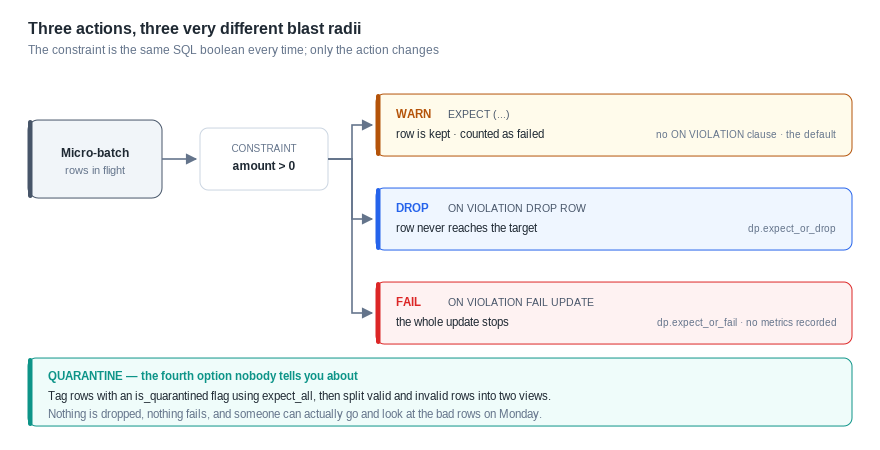 Same constraint every time. Only the action changes, and the action is the whole design decision.
Step-by-step implementation
Step 1 — The three actions, both syntaxes
# Environment: Databricks Runtime 16.4 LTS, Lakeflow Spark Declarative Pipelines
from pyspark import pipelines as dp


@dp.table(name="silver_orders")
@dp.expect("recent_order", "order_ts > '2020-01-01'")                 # warn: keep + count
@dp.expect_or_drop("has_customer", "customer_id IS NOT NULL")         # drop the row
@dp.expect_or_fail("positive_amount", "total_amount > 0")             # stop the update
def silver_orders():
    return spark.readStream.table("bronze_orders")
-- The same three, in SQL
CREATE OR REFRESH STREAMING TABLE silver_orders (
CONSTRAINT recent_order EXPECT (order_ts > '2020-01-01'),
CONSTRAINT has_customer EXPECT (customer_id IS NOT NULL) ON VIOLATION DROP ROW,
CONSTRAINT positive_amount EXPECT (total_amount > 0) ON VIOLATION FAIL UPDATE
)
AS SELECT * FROM STREAM(bronze_orders);Reading that SQL carefully pays off: no ON VIOLATION clause means warn, which is the default. Retaining invalid records is the default behaviour of expectations, and plenty of people write their first expectation assuming it blocks something. It doesn't. It counts.
The three actions in plain terms:
- warn — the row is written to the target and counted as failed. You get a metric and no behaviour change. This is the right starting point for a rule you don't trust yet.
- drop — the row never reaches the target, and the count of dropped records is logged alongside other dataset metrics. Use it for noise you've consciously decided is noise: test events, system pings, records from a decommissioned source.
- fail — the update doesn't succeed. Manual intervention is required before reprocessing. Use it only where a bad row is worse than no pipeline.
One detail that saves a lot of confusion: because fail kills the update when an invalid record is detected, metrics are not recorded for it. You can see warn and drop counts in the pipeline UI; a failing expectation gives you an error, not a number. And if your pipeline has multiple parallel flows, the failure of one flow doesn't cascade into the others.
Step 2 — Choose the action by asking what happens next
The decision isn't really about data quality. It's about who gets woken up.
| Situation | Action | Reasoning |
|---|---|---|
| A new rule you're still calibrating | warn | Measure before you enforce. Promote it later |
| Known, expected junk from the source | drop | It was never going to be useful. Count it and move on |
| A downstream financial report would be wrong | fail | Better a missing table than a confidently wrong number |
| Anything in bronze | warn, mostly | Bronze should be a faithful copy of the source, warts included |
| A field a human needs to investigate | quarantine | See step 4 |
The most common production mistake by some distance is expect_or_fail on a rule that turns out to be occasionally, legitimately violated. One malformed row in ten million stops an entire pipeline at 3 a.m. and someone has to decide, half-awake, whether to delete a source file. Applying strict rules in bronze and reaching for expect_or_fail everywhere are both well-known antipatterns, and both come from the same instinct: treating every quality rule as equally urgent.
Step 3 — Put rules in data, not in decorators
from pyspark import pipelines as dp

# Rules live in one place. In a real pipeline, load this from a Delta table
# so analysts can change a threshold without a deployment.
RULES = {
    "orders": {
        "valid_order_id":   "order_id IS NOT NULL",
        "valid_customer":   "customer_id IS NOT NULL",
        "positive_amount":  "total_amount > 0",
        "plausible_amount": "total_amount < 1000000",
        "known_currency":   "currency IN ('USD', 'EUR', 'GBP', 'INR')",
    },
    "shared": {
        "has_ingest_ts":    "_ingest_ts IS NOT NULL",
    },
}


def get_rules(*groups: str) -> dict:
    """Merge one or more named rule groups into a single dict."""
    merged = {}
    for g in groups:
        merged.update(RULES.get(g, {}))
    return merged


@dp.table(name="silver_orders")
@dp.expect_all_or_drop(get_rules("orders", "shared"))
def silver_orders():
return spark.readStream.table("bronze_orders")expect_all, expect_all_or_drop and expect_all_or_fail each take a dictionary of name-to-constraint and apply a collective action. This is the pattern Databricks itself recommends: store expectation definitions separately from pipeline logic so you can apply them across multiple datasets, and update or audit them without touching pipeline source code.
Taken a step further, the rules dictionary comes from a Delta table that a data steward owns. That's the version that actually changes team behaviour, because the person who knows what a plausible order amount is stops having to file a pull request to say so.
Step 4 — Quarantine: the pattern that fits most real problems
from pyspark import pipelines as dp
from pyspark.sql import functions as F

quarantine_rules = "NOT({})".format(
    " AND ".join(f"({c})" for c in get_rules("orders", "shared").values())
)


@dp.table(temporary=True, partition_cols=["is_quarantined"])
@dp.expect_all(get_rules("orders", "shared"))          # warn — so we get metrics
def orders_tagged():
    return (
        spark.readStream.table("bronze_orders")
        .withColumn("is_quarantined", F.expr(quarantine_rules))
    )


@dp.temporary_view
def orders_valid():
    return spark.read.table("orders_tagged").filter("NOT is_quarantined")


@dp.temporary_view
def orders_invalid():
    return spark.read.table("orders_tagged").filter("is_quarantined")


@dp.table(name="silver_orders")
def silver_orders():
    return spark.read.table("orders_valid")


@dp.table(name="silver_orders_quarantine",
          comment="Rows that failed quality rules. Reviewed weekly.")
def silver_orders_quarantine():
    return spark.read.table("orders_invalid")
This is more code than a single expect_or_drop, and it is almost always worth it.
Dropped rows are gone — you get a count, which tells you how many, but never which ones or why. Quarantined rows are sitting in a table with their original values, which turns "we're dropping about 400 rows a day from supplier 17" from a metric into a conversation you can actually have with supplier 17.
The partition on is_quarantined means reading either side is cheap, and the two temporary views keep the split readable. The only discipline it requires is that somebody actually reviews the quarantine table — an unmonitored quarantine table is just a slower way of dropping rows.
Step 5 — Batch-level checks, not just row-level
-- Row-level: drop individual bad rows
CREATE OR REFRESH STREAMING TABLE silver_sensor_readings (
  CONSTRAINT non_null_device EXPECT (device_id IS NOT NULL) ON VIOLATION DROP ROW,

  -- Batch-level: if this is happening at scale, something is actually broken
  CONSTRAINT device_null_rate EXPECT (
    (SELECT count(*) FROM stream WHERE device_id IS NULL) /
    (SELECT count(*) FROM stream) < 0.05
  ) ON VIOLATION FAIL UPDATE
)
AS SELECT * FROM STREAM(bronze_sensor_readings);
A handful of null device IDs is noise. Thirty percent nulls is an upstream outage, and quietly dropping thirty percent of a batch is exactly how NorthBridge lost nine days of revenue data. Pairing a row-level DROP ROW with a batch-level rate check gives you both behaviours: tolerate the trickle, stop on the flood.
Step 6 — Read the metrics
Expectation results land in two places. The pipeline UI shows a Data quality tab per dataset, and the event log holds the same metrics as a queryable table:
SELECT
  timestamp,
  details:flow_progress.data_quality.expectations
FROM event_log
WHERE event_type = 'flow_progress'
  AND details:flow_progress.data_quality IS NOT NULL
ORDER BY timestamp DESC;
Clicking through the UI is fine for debugging one run. For anything ongoing, query the event log into a small quality dashboard: passed and failed counts per expectation, per dataset, over time. The trend line is the valuable artefact — a rule that fails 0.1% of the time forever is background noise, and the same rule jumping to 4% overnight is an incident, and you can only tell those apart if you've been keeping the history.
From production: gotchas and lessons
-
Symptom: A pipeline failed in production at 02:40 with an expectation violation. By the time anyone looked, nobody could tell how widespread the problem was. Cause:
expect_or_failon a rule that had never been measured. Becausefailstops the update before metrics are written, the only evidence was a single error message naming one offending record. Fix: Every new rule now ships asexpect(warn) first and runs for two weeks. If the failure rate is stable and near zero, it gets promoted to drop or fail. If it isn't, the rule was wrong, not the data. -
Symptom: Row counts in silver were 8% below bronze and nobody could explain the gap. Cause: Three
expect_or_droprules added by three different people over six months, in three different files. Each was individually sensible; nobody had seen them together. Fix: Consolidated into oneexpect_all_or_dropwith a shared rules dictionary, and added a bronze-to-silver row count reconciliation to the quality dashboard. A visible, explained gap is fine. An invisible one is not. -
Symptom: An expectation on a bronze table caused repeated pipeline failures during a supplier's integration test. Cause: Strict validation applied at the bronze layer. Bronze is supposed to be a faithful copy of the source — including the ugly parts — so that you can reprocess from it later. Fix: Moved all enforcement to silver, left bronze with warn-only expectations for observability. Bronze now records that data was bad; silver decides what to do about it.
-
Symptom: A data steward asked to change a threshold from 1,000,000 to 5,000,000 and was told it would be in the next sprint. Cause: Rules were hardcoded as decorators inside pipeline source. Every change was a code change, a review and a deploy. Fix: Rules moved into a Delta table read at pipeline start. Thresholds are now data. The team kept code review for new rule types and dropped it for threshold tuning, which is the right place to draw that line.
-
Symptom: Everyone agreed the quarantine table was a great idea. Eleven months later it had 40 million rows and had never been opened. Cause: No owner, no schedule, no alert. Quarantine without review is a landfill. Fix: A weekly job that summarises quarantine volume by source and rule, posts it to the team channel, and alerts when any source exceeds its normal rate. The review takes four minutes and has caught two integration regressions since.
Performance and cost notes
Warn and drop expectations are cheap — they're predicates evaluated as part of a pass the engine is already making. You can have a lot of them without noticing.
fail expectations are different: expectations configured to fail pipelines modify the Spark query plan of your transformations, to track the information needed to detect and report violations. That's rarely a problem, but it's a real reason not to scatter expect_or_fail across every column "just to be safe."
The quarantine pattern writes every row once more than a plain drop would, and partitioning on a boolean keeps reads on either side cheap. On a bronze table in the hundreds of millions of rows per day, measure it before committing — but in most pipelines the extra write is a rounding error against the cost of a quality incident.
Aggregate expectations with subqueries over the incoming stream are the ones to watch. They force extra computation per micro-batch. Use them where the rate genuinely matters, not as a default.
When not to use this
Expectations live inside declarative pipelines. If your transformation is a notebook in a Lakeflow Job, you don't have them — use Delta CHECK and NOT NULL constraints for hard enforcement at write time, or a dedicated quality framework.
Note the difference in kind, too. A Delta CHECK constraint is hard enforcement: the write fails, invalid data never lands, there is no "warn" option. An expectation is flexible and observable. They're complementary — use constraints for invariants that are true by definition, expectations for rules that describe what you expect and want to measure when reality disagrees.
And if you need expectations to run on open-source Apache Spark, they won't. Expectations are one of the Databricks-only features of Lakeflow pipelines, not part of the Apache Spark Declarative Pipelines core.
Checklist
- Every new rule starts as
expect(warn) and is promoted only after its failure rate is known -
expect_or_failis reserved for cases where a wrong number is worse than a missing table - Bronze carries warn-only expectations; enforcement happens in silver
- Rules live in a dictionary or a table, not scattered through decorators
- Row-level drops are paired with a batch-level rate check
- Quarantine tables have a named owner and a weekly review that actually happens
- Expectation metrics are queried from the event log into a dashboard, with history
Practice
- Try: PySpark Interview Questions: 50 Coding and Scenario Problems
- Build it yourself: take a pipeline with one
expect_or_droprule and convert it to the quarantine pattern. Then feed it a batch where 30% of rows fail. Compare what you can find out afterwards in each version — that difference is the entire argument for quarantine, and it's much more convincing when you've felt it.
Further reading
- Databricks: Manage data quality with pipeline expectations
- Databricks: Expectation recommendations and advanced patterns
Keep going
Lakeflow Spark Declarative Pipelines (Formerly DLT): Getting Started
Build your first declarative pipeline end to end — streaming tables, materialized views, flows and the pipeline graph — using the pyspark.pipelines API that replaced import dlt.
DLT, Lakeflow and Spark Declarative Pipelines: The Naming Decoded
Four names, one engine, four years. A short map of what got renamed, what got open-sourced, what your old code still does, and which word to use in an interview.
Lakeflow Jobs: Task Dependencies, Repair Runs and Triggers
Build a job graph that survives a bad night — run_if conditions for error handling, the five trigger types and their limits, and why repair runs only help idempotent tasks.
One practical note a week
Get new articles, problems and guides in your inbox.
Thanks! You're on the list. (Local demo — no email provider is wired up yet.)