Auto Loader: Schema Evolution, Notifications and Checkpoints
The three settings that decide whether Auto Loader is cheap and boring or expensive and surprising — file discovery mode, schema evolution mode, and what actually lives in the checkpoint.
TL;DR
- Auto Loader is three independent decisions wearing one trench coat: how files are discovered, how the schema evolves, and what the checkpoint remembers. Most production problems are one of those three, misconfigured.
- File events is the discovery mode to reach for now. Directory listing is still the default, and on a big landing zone it is the single most expensive thing your pipeline does.
addNewColumns— the default when you don't supply a schema — deliberately fails the stream once when a new column shows up, then picks it up on restart. That is designed behaviour, not a bug, and it is why you run the stream from a job._rescued_datais the column that saves you from silent data loss. Nobody looks at it until the day they desperately need it, so build the alert before that day.- Two checkpoints matter and they are not the same thing:
cloudFiles.schemaLocationholds the inferred schema,checkpointLocationholds which files have been consumed. Deleting the wrong one reprocesses your entire history.
The problem
NorthBridge Retail Group's partner feeds land in one container: about forty suppliers, each dropping JSON order files on their own schedule, somewhere between a few files an hour and a few thousand overnight. The first version of the ingestion job was the obvious one — a daily spark.read.json() over the whole folder, overwrite the bronze table, done.
That worked for roughly four months. Then the folder crossed a million objects and the job stopped being a job and started being a weather event: ninety minutes of listing before a single row was read, and a cloud storage bill with a line item for LIST operations that somebody in finance finally circled in red.
The team's second attempt was a homegrown manifest table — a Delta table of filenames already processed, anti-joined against the current listing. It worked, in the sense that it produced correct results. It also became the thing that broke at 3 a.m. when a supplier re-uploaded a file with the same name, and the thing nobody wanted to touch after the engineer who wrote it changed teams.
Auto Loader is the managed version of that manifest table, plus schema handling, plus a discovery mechanism that doesn't have to list the folder at all. The reason it still trips people up is that the three parts of it are configured separately, in different places, and the defaults are tuned for getting started quickly rather than for running for three years.
Key concepts
| Concept | What it means | Why it matters here |
|---|---|---|
| File discovery mode | How Auto Loader finds out a new file exists: directory listing, classic file notification, or file events | Decides your cloud API bill and how fast ingestion reacts as the folder grows |
cloudFiles.schemaLocation |
The path where the inferred schema is stored and versioned | Without it Auto Loader re-infers the schema every start; with it, evolution becomes trackable |
checkpointLocation |
Stream progress — which files have already been consumed, plus offsets | This is what makes ingestion exactly-once. Lose it and you reprocess everything |
cloudFiles.schemaEvolutionMode |
What happens the first time a file contains a column the stored schema doesn't have | The difference between a self-healing pipeline and a 2 a.m. page |
_rescued_data |
A JSON column holding values that couldn't be parsed into the declared schema | The only reason "we didn't lose the data" is a true statement when something drifts |
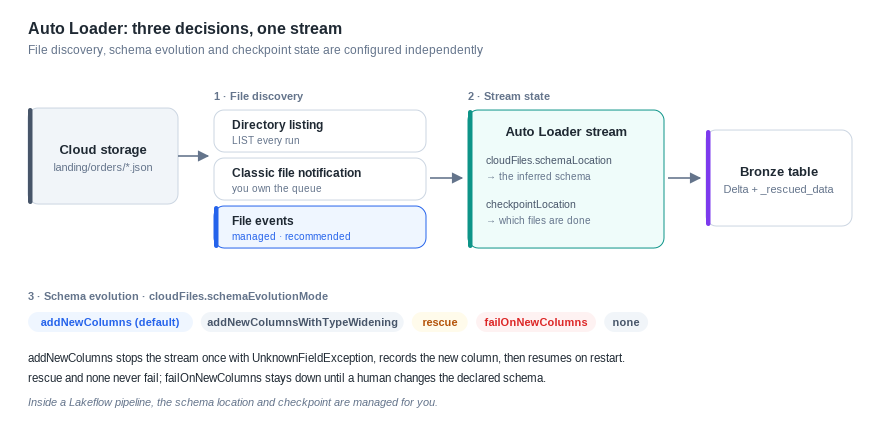 Three decisions, configured in three different places. Changing one does not change the others.
Step-by-step implementation
Step 1 — A stream that states its two state locations out loud
# Environment: Databricks Runtime 16.4 LTS, PySpark 3.5, Unity Catalog
from pyspark.sql import functions as F

CHECKPOINT = "/Volumes/northbridge/ops/checkpoints/bronze_orders"

bronze = (
    spark.readStream.format("cloudFiles")
    .option("cloudFiles.format", "json")
    .option("cloudFiles.schemaLocation", f"{CHECKPOINT}/schema")
    .option("cloudFiles.schemaEvolutionMode", "addNewColumns")
    .option("rescuedDataColumn", "_rescued_data")
    .load("/Volumes/northbridge/landing/partner_orders/")
    .withColumn("_ingest_ts", F.current_timestamp())
    .withColumn("_source_file", F.col("_metadata.file_path"))
)

(
    bronze.writeStream
    .option("checkpointLocation", f"{CHECKPOINT}/offsets")
    .trigger(availableNow=True)
    .toTable("northbridge.bronze.partner_orders")
)
Two things in there are worth more than they look. _metadata.file_path costs nothing and turns every future "where did this row come from?" conversation into a one-line query — add it to every bronze table you ever build. And keeping schema and offsets as sibling folders under one checkpoint root means the pair always travels together; the failure mode where someone clears the offsets but leaves a stale schema behind is genuinely unpleasant to debug.
Schema inference, by the way, is not free and not exhaustive. On first run Auto Loader samples the most recent 50 GB or 1,000 files by modification time and infers from that. If supplier number thirty-seven only ever sends one small file a week, its quirks may not be in the sample at all.
Step 2 — Pick a discovery mode on purpose
# Directory listing — the default. Nothing to configure, and nothing to tune
# once the folder has a few million objects in it.

# File events — a managed notification service attached to the Unity Catalog
# external location. One-time permissions grant, then every stream reading
# that location can use it.
    .option("cloudFiles.useManagedFileEvents", "true")

# Classic file notification — Auto Loader creates and reads its own
# cloud queue. Works, but it is yours to operate.
.option("cloudFiles.useNotifications", "true")| Mode | Setup | Scales to | Relative cost |
|---|---|---|---|
| Directory listing | None | Limited by directory size | Highest — you pay LIST on every run |
| Classic file notification | High — a long list of cloud configuration options | Millions of files per hour | Medium |
| File events | Low — one permissions grant on the external location | Millions of files per hour | Lowest |
The honest default for anything that will live longer than a quarter: enable file events on the Unity Catalog external location and stop thinking about it. Databricks' own recommendation for most workloads is a file arrival trigger with file events enabled — compute wakes only when files actually land, and discovery costs almost nothing.
A detail worth knowing: when you first turn on file events, Databricks performs a full directory listing to seed the cache, and repeats a full scan every 24 hours while a stream is using it. So the first run after enabling is slow, and then it isn't. Don't judge it on run one.
One deprecation to clean up if you inherit an older codebase: cloudFiles.useIncrementalListing is deprecated. It defaulted to auto on Databricks Runtime 17.2 and below and false from 17.3 — so a runtime upgrade can quietly change the cost profile of an old stream. File events is the replacement.
Step 3 — Decide what a new column means to you
-- The same thing in Spark SQL, using the read_files table-valued function
CREATE OR REFRESH STREAMING TABLE northbridge.bronze.partner_orders AS
SELECT *, _metadata.file_path AS _source_file
FROM STREAM read_files(
  '/Volumes/northbridge/landing/partner_orders/',
  format        => 'json',
  schemaEvolutionMode => 'addNewColumns',
  schemaHints   => 'order_id STRING, order_ts TIMESTAMP, total_amount DECIMAL(12,2)'
);
There are five evolution modes and they are genuinely different policies, not shades of the same one:
addNewColumns(default when you don't provide a schema) — Auto Loader appends the new column to the stored schema, then fails the stream withUnknownFieldException. On restart it resumes with the updated schema. Existing column types never change. Run it from a job with retries and this is self-healing; run it from a notebook you babysit and it looks like an outage.addNewColumnsWithTypeWidening— the same, and it also widens compatible types (int→long) instead of rescuing them. Incompatible changes (int→string) still go to rescued data.rescue— never evolves, never fails. Everything new lands in_rescued_data. Excellent for genuinely chaotic sources, as long as somebody is reading that column.failOnNewColumns— fails and stays failed until a human updates the declared schema or removes the offending file. This is the right choice when the schema is a contract, and the wrong choice when it is a wish.none(default when you do provide a schema) — new columns are silently ignored. Data is only kept if you've setrescuedDataColumn. This is the mode that loses data quietly, and it's the default more often than people realise.
Note the interaction: addNewColumns isn't allowed when you hand Auto Loader an explicit schema — but it does work if you supply that structure as schema hints instead. Hints are only consulted when no schema is provided, and they're how you pin order_ts to a TIMESTAMP and total_amount to a DECIMAL while leaving the rest of the payload free to grow.
Step 4 — Make rescued data visible
-- Run this as a scheduled query, not as a thing you remember to check
SELECT
  _source_file,
  count(*)                         AS rescued_rows,
  min(_ingest_ts)                  AS first_seen,
  collect_set(get_json_object(_rescued_data, '$.columnName')) AS sample_keys
FROM northbridge.bronze.partner_orders
WHERE _rescued_data IS NOT NULL
  AND _ingest_ts >= current_timestamp() - INTERVAL 1 DAY
GROUP BY _source_file
ORDER BY rescued_rows DESC;
_rescued_data is a JSON blob containing the rescued columns and the source file path of the record, which is the detail that makes it actually actionable — you can tell a supplier exactly which file broke and what was in it. It collects three different things: columns missing from the schema, type mismatches, and case mismatches. That last one surprises people. If the schema says orderId and a file arrives with OrderID, that value goes to rescued data rather than the column you'd expect; set readerCaseSensitive to false if your sources are casual about casing.
From production: gotchas and lessons
-
Symptom: An Auto Loader stream failed roughly once a week with
UnknownFieldException, always overnight, and someone restarted it manually each time. Cause:addNewColumnsworking exactly as documented, against a source that kept adding optional fields — but the stream was running on an all-purpose cluster from a notebook, with nothing to restart it. Fix: Moved it into a job with task retries. The same exception now resolves itself in under a minute and shows up as a retry in the run history rather than a page. -
Symptom: Monthly storage costs climbed steadily while data volume stayed flat. Cause: Directory listing mode on a landing zone that had grown past two million objects, with the stream triggered every fifteen minutes. The bill was almost entirely
LISToperations against files that had been processed months earlier. Fix: Enabled file events on the external location and switched the job to a file arrival trigger. Ingestion cost dropped by an order of magnitude and latency improved as a side effect. -
Symptom: A supplier swore they'd been sending a
discount_codefield for weeks. It wasn't in the bronze table, and there were no errors anywhere. Cause: The stream had been given an explicit schema during an earlier incident, which silently flipped the evolution mode default tonone. New columns were being dropped on the floor, andrescuedDataColumnwasn't set, so they weren't even rescued. Fix: Removed the explicit schema, moved the type pinning intocloudFiles.schemaHints, and backfilled from the raw files. Three weeks of a field nobody could get back without the original files still sitting in storage — which, thankfully, they were. -
Symptom: After a checkpoint folder was deleted to "clean up," the next run reprocessed four hundred million rows into bronze. Cause: The checkpoint is the only record of which files have been consumed. There is no second source of truth to fall back on. Fix: Short term, dedupe on
_source_fileand roll back the Delta table to the prior version with time travel. Long term, checkpoints moved into a Unity Catalog volume with restricted permissions, and the runbook now says plainly that deleting a checkpoint is a full reprocess, not a cleanup. -
Symptom: A re-uploaded correction file was never picked up. Cause: Auto Loader tracks files it has seen; overwriting a file with the same name does not reliably make it new again.
cloudFiles.allowOverwritesexists but comes with its own warning — in notification mode a file can be seen twice, through both the notification and a listing. Fix: Asked the supplier to write corrections as new files with a version suffix, and handled the dedupe in the bronze-to-silverMERGEwhere it belongs. Reprocessing-by-overwrite is a source-side habit worth breaking rather than a Databricks setting worth tuning.
Performance and cost notes
The expensive part of file ingestion at scale is almost never the parsing — it's the discovery. Every LIST against a large prefix costs money and wall-clock time, and the cost grows with the total number of objects in the folder, not the number of new ones. That's the asymmetry worth internalising: a directory-listing stream that reads ten new files a day out of five million gets slower and more expensive every single day while doing exactly the same amount of real work.
File events removes that curve almost entirely, which is why it's worth the one-time permissions conversation with whoever owns your cloud subscription.
For the compute side, Trigger.AvailableNow plus a file arrival trigger is the cheapest shape for anything that doesn't need sub-minute latency: nothing runs until files land, the backlog is drained in properly sized batches, and the cluster shuts down. Use cloudFiles.maxFilesPerTrigger or cloudFiles.maxBytesPerTrigger to keep individual micro-batches sane when a supplier dumps a month of history at once.
And if you're running Auto Loader inside a Lakeflow pipeline, skip most of this: the pipeline manages the schema location and checkpoint for you, and you don't specify either one. That's genuinely less to get wrong, and it's Databricks' recommended shape for new production ingestion.
When not to use this
If you're loading a fixed set of files once — a historical backfill, a one-time migration — a plain batch read or COPY INTO will finish faster and leave less state behind. Auto Loader's machinery pays for itself over time, and a one-shot load has no "over time."
If your directory will realistically hold thousands of files rather than millions, and your team is SQL-first, COPY INTO is simpler and easier to reason about, especially when you need to reload a specific subset of files. That trade-off is worth its own article — see below.
And if your source is a database or a SaaS application rather than files in object storage, don't build a file drop just so you can use Auto Loader. A managed connector in Lakeflow Connect handles the CDC, the schema drift and the retries without you owning any of it.
Checklist
-
cloudFiles.schemaLocationandcheckpointLocationboth set explicitly, as siblings under one root - File discovery mode chosen deliberately — file events enabled unless something prevents it
-
schemaEvolutionModematches the actual policy you want, and you know which default applies -
rescuedDataColumnset, and a scheduled query alerts when rescued rows appear -
_metadata.file_pathcaptured as a real column in bronze - Stream runs from a job with retries, so
addNewColumnsself-heals - Checkpoint paths live somewhere with permissions that discourage casual deletion
- Runbook states that deleting the checkpoint means reprocessing everything
Practice
- Try: PySpark Interview Questions: 50 Coding and Scenario Problems
- Build it yourself: point an Auto Loader stream at a folder, land three files with a consistent schema, then land a fourth with one extra column. Watch the stream fail, read the exception, restart it, and confirm the column appears with nulls for the earlier rows. Then repeat the whole exercise with
schemaEvolutionModeset torescueand compare what ends up in_rescued_data.
Further reading
- Databricks: What is Auto Loader?
- Databricks: Configure schema inference and evolution in Auto Loader
- Databricks: Auto Loader best practices
Keep going
COPY INTO vs Auto Loader: Which Ingestion Method and When
Both load files into Delta exactly once. The choice comes down to file volume over the table's lifetime, who maintains the pipeline, and how often you need to reload a subset.
Lakeflow Spark Declarative Pipelines (Formerly DLT): Getting Started
Build your first declarative pipeline end to end — streaming tables, materialized views, flows and the pipeline graph — using the pyspark.pipelines API that replaced import dlt.
Structured Streaming on Databricks: Trigger Modes, Checkpoints and Exactly-Once
Which trigger mode to pick and what it costs, what actually lives in a checkpoint, and the three conditions exactly-once depends on — one of which is your code.
One practical note a week
Get new articles, problems and guides in your inbox.
Thanks! You're on the list. (Local demo — no email provider is wired up yet.)