Lakeflow Jobs: Task Dependencies, Repair Runs and Triggers
Build a job graph that survives a bad night — run_if conditions for error handling, the five trigger types and their limits, and why repair runs only help idempotent tasks.
TL;DR
- A job is a DAG of tasks. Dependencies are declared with
depends_on; cycles fail validation rather than deadlocking at runtime. run_ifis the feature most teams never discover. The default isALL_SUCCESS, and the other five values are how you build alerting, cleanup and fan-in branches that behave sensibly when something fails.- Five trigger types — scheduled, file arrival, table update, continuous, manual — and the choice is about meaning, not cost. "Run at 07:00" and "run when the data is ready" are different requirements.
- Repair run re-executes only failed, cancelled and skipped tasks plus their downstream, reusing successful output. It turns a two-hour rerun into a six-minute one.
- Repair only works if your tasks are idempotent. Lakeflow Jobs does not guarantee idempotency — that's your
MERGE INTOinstead ofINSERT INTO.
The problem
NorthBridge Retail Group's nightly batch is fourteen tasks and takes about ninety minutes. One Tuesday, task eleven — a currency conversion that calls an external rate API — failed on a timeout.
What happened next is the part worth examining. The on-call engineer hit Run now, because that's the obvious button. All fourteen tasks ran again from scratch. The first ten re-ingested data they had already ingested, which was fine for the eight written with MERGE and not fine for the two written with INSERT INTO, which cheerfully doubled a day of rows. The whole thing finished at 06:40, twenty minutes after the regional leadership dashboards were due.
Three separate things went wrong there, and only one of them was the API timeout. The second was not knowing that Repair run exists and would have re-executed four tasks instead of fourteen. The third was two tasks that weren't safe to run twice — which made the first two problems much more expensive than they needed to be.
Orchestration isn't the happy path. The happy path is easy. Orchestration is what the graph does on a bad night.
Key concepts
| Concept | What it means | Why it matters here |
|---|---|---|
| Task | One unit of work: a notebook, pipeline, SQL file, dbt project, JAR, or another job | The unit of retry and of repair |
depends_on |
The upstream tasks that must finish before this one starts | Defines the DAG; cycles are rejected at validation |
run_if |
The condition under which a task runs, given its dependencies' outcomes | Turns a DAG into something that can handle its own failures |
| Trigger | What starts a run: schedule, file arrival, table update, continuous, or manual | Encodes why the job runs, which is a design decision |
| Repair run | Re-execute only the failed, cancelled and skipped tasks and their downstream | The difference between a 6-minute and a 90-minute recovery |
| Task values | Small values passed from one task to another at runtime | How tasks communicate without a side table |
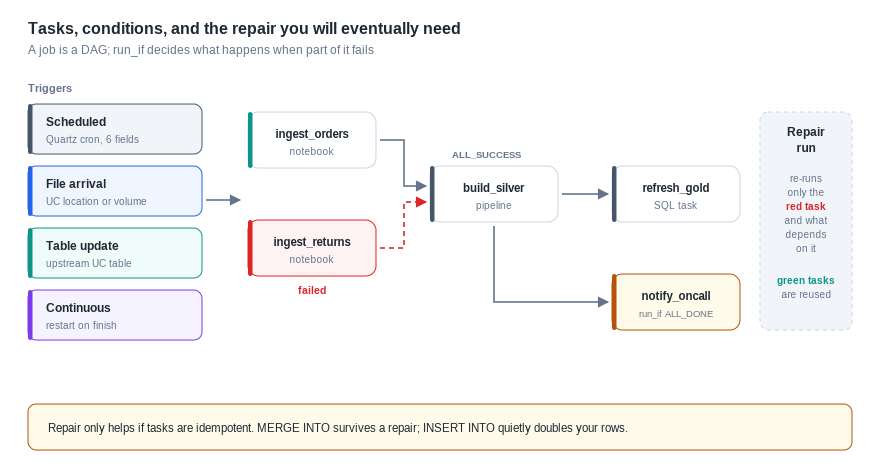 A repair run re-executes the red task and what depends on it. Everything green is reused.
Step-by-step implementation
Step 1 — A job as code, with real dependencies
# resources/nightly_batch.job.yml — deployed with bundles
resources:
  jobs:
    nightly_batch:
      name: nightly-retail-batch
      max_concurrent_runs: 1

      tasks:
        - task_key: ingest_orders
          notebook_task:
            notebook_path: ../src/ingest/orders.py
          max_retries: 3
          min_retry_interval_millis: 60000

        - task_key: ingest_returns
          notebook_task:
            notebook_path: ../src/ingest/returns.py
          max_retries: 3

        - task_key: build_silver
          depends_on:
            - task_key: ingest_orders
            - task_key: ingest_returns
          pipeline_task:
            pipeline_id: ${resources.pipelines.retail_silver.id}

        - task_key: refresh_gold
          depends_on: [{ task_key: build_silver }]
          sql_task:
            warehouse_id: ${var.warehouse_id}
            file:
              path: ../src/sql/refresh_gold.sql
max_concurrent_runs: 1 is the setting I'd put on almost every batch job and almost nobody sets. Without it, a run that overruns its schedule gets a second run starting alongside it, two instances of the same MERGE race each other, and you spend a morning working out why a table has duplicates on exactly one date.
Task types cover most of what you'd otherwise script: notebooks, Python scripts and wheels, SQL files and queries, dbt projects, pipelines, JARs, dashboard refreshes, and run_job to call another job. If you're shelling out from a notebook to do something a task type already does, you're giving up retry granularity and run history for no reason.
Step 2 — Use run_if for the unhappy path
        # Runs whether or not upstream succeeded — the alerting branch
        - task_key: notify_oncall
          depends_on:
            - task_key: build_silver
            - task_key: refresh_gold
          run_if: AT_LEAST_ONE_FAILED
          notebook_task:
            notebook_path: ../src/ops/page_oncall.py

        # Runs when upstream finishes, succeeded or not — cleanup
        - task_key: release_locks
          depends_on: [{ task_key: refresh_gold }]
          run_if: ALL_DONE
          notebook_task:
            notebook_path: ../src/ops/release_locks.py

        # Partial results are better than none for this consumer
        - task_key: publish_partial_dashboard
          depends_on:
            - task_key: ingest_orders
            - task_key: ingest_returns
          run_if: AT_LEAST_ONE_SUCCESS
          notebook_task:
            notebook_path: ../src/publish/dashboard.py
The six values:
run_if |
Task runs when… | Typical use |
|---|---|---|
ALL_SUCCESS |
every dependency succeeded | the default; the normal path |
ALL_DONE |
every dependency finished, whatever the outcome | cleanup, notifications, lock release |
NONE_FAILED |
nothing failed (skipped is acceptable) | optional-branch fan-in |
AT_LEAST_ONE_SUCCESS |
at least one dependency succeeded | partial results are useful |
ALL_FAILED |
every dependency failed | total-outage escalation |
AT_LEAST_ONE_FAILED |
any dependency failed | alerting branch |
Without run_if, the pattern teams reach for is a notification task wrapped in a try/except inside the last notebook — which doesn't fire when the notebook itself dies, which is exactly when you need it. Making the alert its own task with AT_LEAST_ONE_FAILED is both simpler and more reliable.
Alongside these, if/else condition tasks branch on a value, and for each tasks loop a task over a parameter list. A for each over a list of regions, each running the same notebook with a different parameter, replaces the copy-pasted-task-six-times pattern and gives you per-iteration status in the run view.
Step 3 — Pick a trigger for what it means, not what it costs
| Trigger | Fires when | Use it for |
|---|---|---|
| Scheduled | a Quartz cron expression matches | work whose timing is the requirement |
| File arrival | new files land in a UC external location or volume | partner feeds with unpredictable timing |
| Table update | a monitored Unity Catalog table changes | following another team's pipeline |
| Continuous | the previous run finishes or fails | always-on streaming workloads |
| Manual | someone runs it, or an external orchestrator does | ad-hoc and externally scheduled work |
Plus, more recently: model update triggers on a Unity Catalog model, upstream job completion triggers, and a Beta feature that lets you attach a SQL condition to scheduled, table update, file arrival, model update and job completion triggers — so a run only starts when your own readiness query returns true.
The choice is about meaning. "Update the executive report every weekday at 07:00" is Scheduled — it must run whether or not new data arrived, because a stale report is itself the signal. "Build gold as soon as the silver tables another team owns are refreshed" is Table update. Picking data-driven triggers because they're cheaper, when the requirement is actually a time, produces a report that silently doesn't exist on the morning an upstream feed is late.
Two sets of constraints worth knowing before you design around them:
- Scheduled uses Quartz cron with six fields — seconds first — which means day-of-month and day-of-week can't both be specified. Daily at 02:00 is
0 0 2 * * ?. The?trips up everyone coming from standard five-field cron. - File arrival monitors a Unity Catalog external location or volume, recursively, and is checked about every minute. Wildcards in the path aren't supported. There are caps: roughly 50 jobs per workspace can use file arrival triggers, and the monitored location is limited to around 10,000 files. You need
READon the location andCAN MANAGEon the job. These limits are the reason file arrival triggers are for landing zones you clear, not for an archive directory that grows forever.
Both file arrival and table update triggers have a wait after last change debounce. When forty files land in ninety seconds, the timer resets on each one and you get a single run instead of forty. Set it deliberately — the default is rarely what a bursty source needs.
Step 4 — Make repair possible before you need it
Repair run re-executes the failed, cancelled and skipped tasks of a run plus anything downstream of them, reusing the output of tasks that already succeeded. It's available on multi-task jobs; on a single-task job you just run it again.
It only helps if the tasks it re-runs are safe to run twice. Lakeflow Jobs does not guarantee idempotency. That's on you:
-- Not repair-safe. Running this twice doubles the day's rows.
INSERT INTO northbridge.silver.orders
SELECT * FROM northbridge.bronze.orders
WHERE order_date = '{{ job.parameters.run_date }}';

-- Repair-safe. Running this twice changes nothing.
MERGE INTO northbridge.silver.orders AS t
USING (
  SELECT * FROM northbridge.bronze.orders
  WHERE order_date = '{{ job.parameters.run_date }}'
) AS s
ON t.order_id = s.order_id
WHEN MATCHED THEN UPDATE SET *
WHEN NOT MATCHED THEN INSERT *;
Same result on a clean run. Completely different behaviour on a bad night. The test to apply to every task in a job: if this runs twice with the same parameters, is the outcome identical? If not, it isn't finished.
Note the parameter rather than current_date(). A repair run that happens after midnight and derives its own date silently processes the wrong day — which is a genuinely horrible bug to find a week later. Pass the business date in as a job parameter so a repair reprocesses the run's date, not today's.
Step 5 — Pass values between tasks properly
# Upstream task: publish a value
row_count = spark.table("northbridge.bronze.orders").count()
dbutils.jobs.taskValues.set(key="bronze_row_count", value=row_count)
# Downstream task: read it
count = dbutils.jobs.taskValues.get(
taskKey="ingest_orders", key="bronze_row_count", debugValue=0
)
if count == 0:
dbutils.notebook.exit("No new rows — skipping downstream work")Task values are for small scalars: a row count, a batch ID, a flag. Not DataFrames, not blobs. The debugValue matters more than it looks — it's what the notebook uses when you run it interactively, so your development loop doesn't break outside a job context.
Step 6 — Monitor from system tables, not from the UI
-- Tasks that have failed most often over the last 30 days
SELECT
  t.job_id,
  t.task_key,
  count(*)                                        AS runs,
  sum(CASE WHEN r.result_state = 'FAILED' THEN 1 ELSE 0 END) AS failures,
  round(avg(unix_timestamp(r.end_time) - unix_timestamp(r.start_time)) / 60.0, 1) AS avg_minutes
FROM system.lakeflow.job_task_run_timeline r
JOIN system.lakeflow.job_tasks t
  ON r.job_id = t.job_id AND r.task_key = t.task_key
WHERE r.start_time >= current_timestamp() - INTERVAL 30 DAYS
GROUP BY t.job_id, t.task_key
HAVING failures > 0
ORDER BY failures DESC, avg_minutes DESC;
The system.lakeflow schema holds job definitions, task definitions, run timelines and task run timelines. The UI retains run history for about 60 days and shows one job at a time; the system tables let you ask portfolio-level questions — which tasks fail most, which are getting slower, which jobs routinely overrun their window. That's where capacity planning and reliability work actually start.
From production: gotchas and lessons
-
Symptom: Duplicate rows appeared in silver on exactly one date after an incident recovery. Cause: An on-call engineer used Run now instead of Repair run after a mid-graph failure, and two tasks used
INSERT INTO. Fix: Converted every write toMERGE, and added one line to the runbook: after a partial failure, always Repair run, never Run now. Repair was the cheap fix; idempotency was the real one. -
Symptom: A job that normally took 40 minutes occasionally ran for three hours and produced nonsense. Cause: No
max_concurrent_runslimit. A slow run overlapped the next scheduled start and two instances fought over the same target tables. Fix:max_concurrent_runs: 1with queueing enabled. Also added a run duration health rule so an overrun pages someone instead of silently doubling up. -
Symptom: A file arrival trigger stopped firing after several months. Cause: The monitored location had accumulated well past the supported file count, because nothing ever moved processed files out of it. Fix: Added an archive step that moves processed files to a dated subfolder outside the monitored path. The trigger's limits assume a landing zone that gets cleared, which is a healthy pattern regardless.
-
Symptom: A repair run performed after midnight reprocessed the wrong business date. Cause: The notebook called
current_date()instead of reading a job parameter. During the original run that was correct; during the 00:40 repair it was a day out. Fix: Every date-sensitive task now takes an explicitrun_datejob parameter. Repairs reprocess the run's date because the run carries its date with it. -
Symptom: Nobody was told when the nightly batch failed. Cause: The notification was a Slack call inside a
try/exceptin the final notebook. When an earlier task failed, the final notebook never ran, so no alert fired. The failure mode suppressed its own alarm. Fix: A dedicatednotify_oncalltask withrun_if: AT_LEAST_ONE_FAILED, plus job-level failure notifications as a backstop. Alerting should not be a line of code inside the thing that's broken. -
Symptom: A new scheduled job ran at completely the wrong time. Cause: A five-field cron expression pasted from a Linux crontab into a Quartz field that expects six, with seconds leading. Fix: Defined schedules in the bundle YAML with a comment stating the intended time in plain English, and checked the next-run preview in the UI after deploying. The preview takes three seconds and has caught this more than once.
Performance and cost notes
Job clusters over all-purpose clusters for anything scheduled — they're billed at a lower rate and terminate when the job finishes. All-purpose clusters are for interactive development; using one for a nightly batch is one of the most common sources of avoidable Databricks spend.
Serverless compute removes cluster startup time entirely, which changes the economics of small tasks. A graph of twelve two-minute tasks on classic job clusters can spend more time starting clusters than doing work. Serverless also auto-optimises retries, whereas classic jobs default to no task retries — worth knowing, because "it didn't retry" is often just an unset default.
Shape the DAG for parallelism. Because the task graph is a DAG, independent tasks run in parallel and a task is blocked only until its own upstream dependencies finish. Teams routinely leave a chain of A → B → C → D in place when B and C don't depend on each other, and halve their runtime by deleting one depends_on line.
Set a timeout_seconds on tasks that call external systems. Without it, a hung API call holds a cluster until someone notices — and "someone notices" is usually measured in hours.
When not to use this
If your work is a set of datasets with dependencies between them rather than a sequence of operations, use a declarative pipeline instead. Databricks draws this line directly: Lakeflow Jobs provides a procedural approach to defining relationships between tasks, while declarative pipelines provide a declarative approach to defining relationships between datasets and transformations. Hand-wiring eleven notebooks in a job when the dependency is really "silver reads bronze" is rebuilding by hand what the pipeline engine derives for free.
If you already run a mature Airflow or Dagster estate that orchestrates across Databricks and other systems, keep it as the top-level scheduler and let it trigger Databricks jobs. Two orchestrators competing for ownership of the same DAG is worse than either one alone.
And for sub-minute reactive work, a continuous trigger or a streaming job fits better than any scheduled graph.
Checklist
-
max_concurrent_runsset on every scheduled job - Every task is idempotent —
MERGE, notINSERT INTO - Date-sensitive tasks take an explicit date parameter, never
current_date() - Alerting is a task with
run_if: AT_LEAST_ONE_FAILED, not code inside another task - Independent tasks aren't artificially chained
- Trigger type matches the requirement, not the cheapest option
- File arrival locations are cleared, not grown indefinitely
- Cron expressions verified against the next-run preview after deploy
- Runbook says Repair run, not Run now
- Reliability tracked from
system.lakeflowtables, not by clicking through run history
Practice
- Build it yourself: create a four-task job where task two fails deliberately. Run it, then use Repair run and watch which tasks re-execute. Then make task one a non-idempotent
INSERT INTO, repeat the exercise, and count the rows. That's the lesson in two runs.
Further reading
Keep going
Databricks Asset Bundles: CI/CD for Jobs and Pipelines
One databricks.yml, three environments, zero clicking. Bundle structure, targets and modes, variables, and a promotion pipeline that deploys as a service principal.
Lakeflow Spark Declarative Pipelines (Formerly DLT): Getting Started
Build your first declarative pipeline end to end — streaming tables, materialized views, flows and the pipeline graph — using the pyspark.pipelines API that replaced import dlt.
Auto Loader: Schema Evolution, Notifications and Checkpoints
The three settings that decide whether Auto Loader is cheap and boring or expensive and surprising — file discovery mode, schema evolution mode, and what actually lives in the checkpoint.
One practical note a week
Get new articles, problems and guides in your inbox.
Thanks! You're on the list. (Local demo — no email provider is wired up yet.)