COPY INTO vs Auto Loader: Which Ingestion Method and When
Both load files into Delta exactly once. The choice comes down to file volume over the table's lifetime, who maintains the pipeline, and how often you need to reload a subset.
TL;DR
- Both are idempotent. Both skip files they've already loaded. Neither one is "the modern way" and the other "legacy" — they solve the same problem at different scales.
- The first question is volume over the table's lifetime, not today's volume: thousands of files points to
COPY INTO, millions points to Auto Loader. - Auto Loader needs fewer operations to discover files and splits work across micro-batches, which makes it cheaper and steadier at scale.
COPY INTOwins on one thing Auto Loader is genuinely bad at: reloading a specific subset of files on purpose.- They coexist happily on the same directory. Using
COPY INTOto patch history while an Auto Loader stream handles the present is a legitimate production pattern, not a hack.
The problem
NorthBridge Retail Group's analytics team owns two file feeds, and the same engineer made the same decision twice with opposite results.
The first feed is the nightly store-level inventory extract: 180 CSV files, one per store, dropped once a day at 02:00. The team built it with Auto Loader because that was the recommended tool, which meant a streaming query, a checkpoint directory, a schema location, and a Trigger.AvailableNow job. It works perfectly. It is also four moving parts for a job that could have been one SQL statement, and the analyst who owns the feed can't read any of it.
The second feed is clickstream JSON from the e-commerce platform: small files, continuously, around 40,000 a day. That one was built with COPY INTO on a schedule, because the first version only had to cope with a few hundred files during the pilot. Eighteen months later the folder holds over twenty million objects, each run spends most of its time working out what's new, and the nightly load has quietly drifted from four minutes to fifty.
Both choices were defensible on day one. Both were made by looking at the current file count rather than at the slope of the line.
Key concepts
| Concept | What it means | Why it matters here |
|---|---|---|
COPY INTO |
A SQL command that loads files from object storage into a Delta table, skipping files it has already loaded | SQL-native, batch-shaped, runs in a SQL warehouse — no streaming concepts to learn |
Auto Loader (cloudFiles) |
A Structured Streaming source that incrementally discovers and ingests new files | Built for continuous arrival and very large directories; brings a checkpoint with it |
| Idempotency | Running the same load twice doesn't duplicate rows | Both tools provide it, by different means: a load history for COPY INTO, a checkpoint for Auto Loader |
| File discovery cost | The work needed to answer "what's new?" | The real scaling difference between the two; it grows with total files, not new files |
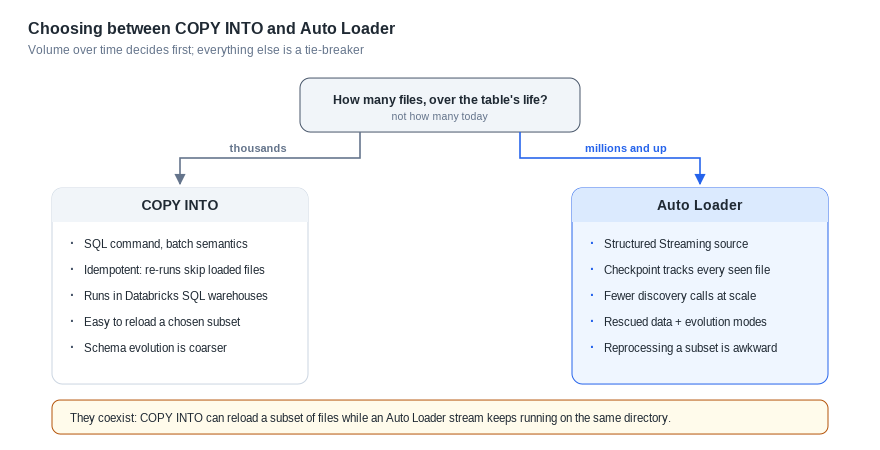 Volume over the table's lifetime decides first. Everything below that line is a tie-breaker.
Step-by-step implementation
Step 1 — The same load, written both ways
-- COPY INTO: Databricks Runtime 16.4 LTS / Databricks SQL
CREATE TABLE IF NOT EXISTS northbridge.bronze.store_inventory;

COPY INTO northbridge.bronze.store_inventory
FROM '/Volumes/northbridge/landing/inventory/'
FILEFORMAT = CSV
FORMAT_OPTIONS ('header' = 'true', 'inferSchema' = 'true', 'mergeSchema' = 'true')
COPY_OPTIONS  ('mergeSchema' = 'true');
Run that twice and the second run loads nothing. COPY INTO keeps a record of the files it has already ingested against that target table, which is what makes re-running it safe — and what makes it a reasonable thing to schedule every hour without thinking hard about it.
# Auto Loader: Databricks Runtime 16.4 LTS, PySpark 3.5
CHECKPOINT = "/Volumes/northbridge/ops/checkpoints/store_inventory"

(
    spark.readStream.format("cloudFiles")
    .option("cloudFiles.format", "csv")
    .option("header", "true")
    .option("cloudFiles.schemaLocation", f"{CHECKPOINT}/schema")
    .load("/Volumes/northbridge/landing/inventory/")
    .writeStream
    .option("checkpointLocation", f"{CHECKPOINT}/offsets")
    .trigger(availableNow=True)
    .toTable("northbridge.bronze.store_inventory")
)
Same outcome, more apparatus. The apparatus is the point when the directory is large — but it's genuinely overhead when it isn't.
Step 2 — Run the comparison that actually decides it
| Question | COPY INTO |
Auto Loader |
|---|---|---|
| Files over the table's lifetime | Thousands | Millions and up |
| Discovery cost at scale | Grows with total files in the directory | Flat, with file events |
| Where it runs | Databricks SQL, notebooks, Lakeflow Jobs | Notebooks, jobs, Lakeflow pipelines — not SQL warehouses directly |
| Schema evolution | mergeSchema — coarse but workable |
Five evolution modes plus _rescued_data |
| Reload a chosen subset | Straightforward | Awkward — the checkpoint is working against you |
| State you have to look after | A load history Databricks keeps for you | A checkpoint directory you own and must not delete |
| Who can maintain it | Anyone who writes SQL | Someone comfortable with streaming concepts |
Databricks' own guidance lands in the same place: use COPY INTO for thousands of files, Auto Loader for millions or more, because Auto Loader needs fewer total operations to discover files and can split processing across batches — making it cheaper and more efficient at scale.
The row that matters most in practice is the last one. A pipeline the owning team can't debug is a pipeline that becomes somebody else's problem on their worst day.
Step 3 — The pattern where you use both
-- An Auto Loader stream is running continuously on this directory.
-- A supplier re-sent three days of corrected files with new names.
-- Don't touch the stream. Patch the history with a scoped COPY INTO.

COPY INTO northbridge.bronze.partner_orders
FROM '/Volumes/northbridge/landing/partner_orders/'
FILEFORMAT = JSON
PATTERN = 'supplier_17/2026-10-{0[4-6]}*.json';
This is explicitly supported: you can use COPY INTO to reload a subset of files while an Auto Loader stream runs on the same directory at the same time. It's the cleanest answer to "we need to reprocess these specific files" that doesn't involve resetting a checkpoint and re-reading a year of history.
The one thing to think through before you run it is duplicates. COPY INTO and the Auto Loader checkpoint keep separate records of what's been loaded, so if the stream has already consumed a file and you force it through COPY INTO as well, you get it twice. Either scope the pattern to files the stream genuinely hasn't seen, or make bronze-to-silver a MERGE on a natural key so a duplicate bronze row is harmless. The second is better engineering anyway.
Step 4 — When the answer is actually "neither"
-- For a SQL-first team on a growing directory, a streaming table
-- gets you Auto Loader's engine without the streaming apparatus.
CREATE OR REFRESH STREAMING TABLE northbridge.bronze.clickstream AS
SELECT *, _metadata.file_path AS _source_file
FROM STREAM read_files(
  '/Volumes/northbridge/landing/clickstream/',
  format => 'json'
);
This is worth knowing about before you commit to either side of the comparison. A streaming table runs Auto Loader underneath, manages the schema location and checkpoint for you, and is defined in SQL. For a team that chose COPY INTO purely because nobody wanted to own a checkpoint, this removes the reason for the choice.
From production: gotchas and lessons
-
Symptom: A
COPY INTOjob that ran in four minutes a year ago now takes most of an hour, loading the same volume of new data. Cause: Twenty million objects in the source directory. The load itself was fast; working out which files were new was not. Fix: Migrated to a streaming table backed by Auto Loader with file events enabled. The useful diagnostic was comparing files loaded against runtime over twelve months — the divergence between those two lines is the whole argument, and it makes the case to a manager far better than a benchmark does. -
Symptom: Duplicate rows in bronze after an engineer "helpfully" re-ran a
COPY INTOto backfill files an Auto Loader stream had already picked up. Cause: Two independent idempotency mechanisms. Each tool was correct about its own history and neither knew about the other. Fix: Deduplicated with aMERGEinto silver keyed on order ID and source file, and wrote down the rule: on a directory with a live Auto Loader stream,COPY INTOis only for files the stream hasn't seen, scoped with an explicitPATTERN. -
Symptom: A team adopted Auto Loader for a feed of 200 daily files and then spent two sprints on checkpoint-related incidents. Cause: Over-engineering. The feed never needed incremental discovery; it needed a scheduled SQL statement. Fix: Replaced it with
COPY INTOon a scheduled job. Two hundred lines of pipeline code became six lines of SQL that the analytics engineer who owns the feed can actually change. -
Symptom:
COPY INTOsilently stopped picking up new columns a supplier had added. Cause:mergeSchemawasn't set inCOPY_OPTIONS. Schema evolution inCOPY INTOis opt-in and much blunter than Auto Loader's rescued-data behaviour — there's no equivalent of_rescued_datacatching the values you didn't ask for. Fix: EnabledmergeSchemaand added a weekly schema-diff check comparing the target table's columns against a sample of recent raw files. If schema drift is a regular event on a feed rather than a rare one, that's a strong signal to move the feed to Auto Loader.
Performance and cost notes
The cost model is the clearest way to think about this. COPY INTO pays discovery cost proportional to everything in the directory; Auto Loader with file events pays discovery cost proportional to what's new. Below a few thousand files that difference is noise. Above a million it's the dominant term in both your runtime and your cloud bill.
There's a compute dimension too. COPY INTO runs happily on a SQL warehouse, which many teams already have running for BI — so the marginal cost of a scheduled load can genuinely be close to zero. Auto Loader needs a job cluster or serverless compute, which is cheap with Trigger.AvailableNow and a file arrival trigger, but it's a separate thing to size and pay for.
One practical note on large one-off loads: for a single bulk ingestion of a few hundred thousand existing files, a plain batch read or COPY INTO will usually finish faster than an Auto Loader stream, which is optimised for incremental discovery rather than a cold start over a huge backlog. Load the history in bulk, then start the stream from that point forward.
When not to use this
Neither tool is the right answer when the source isn't files. If you're pulling from SQL Server, Salesforce or Workday, a managed connector in Lakeflow Connect handles CDC, schema drift and retries without you operating anything — don't build a file-drop staging layer purely so you can use an ingestion tool you already know.
And if you're inside a Lakeflow pipeline, the comparison mostly dissolves. Auto Loader is the recommended source there, the schema location and checkpoint are managed for you, and the operational objection to Auto Loader largely goes away.
Checklist
- Estimated file count over the table's lifetime, not its current size
- Checked who will maintain the pipeline and whether they read SQL or Python
- If
COPY INTO:mergeSchemaset deliberately, and a schema drift check exists - If Auto Loader: checkpoint and schema locations owned, documented and permission-protected
- If both run on one directory:
PATTERNalways scoped, and silverMERGEs on a natural key - Considered whether a streaming table removes the choice entirely
- Tracked files-loaded against runtime over time, so the migration point is visible before it's painful
Practice
- Try: PySpark Interview Questions: 50 Coding and Scenario Problems
- Build it yourself: load the same 20 files into two Delta tables, one with
COPY INTOand one with Auto Loader. Re-run both and confirm nothing duplicates. Then delete the Auto Loader checkpoint and re-run — watch what happens, and write down what you'd tell a colleague who did that in production.
Further reading
Keep going
Auto Loader: Schema Evolution, Notifications and Checkpoints
The three settings that decide whether Auto Loader is cheap and boring or expensive and surprising — file discovery mode, schema evolution mode, and what actually lives in the checkpoint.
Lakeflow Spark Declarative Pipelines (Formerly DLT): Getting Started
Build your first declarative pipeline end to end — streaming tables, materialized views, flows and the pipeline graph — using the pyspark.pipelines API that replaced import dlt.
Lakeflow Connect: Managed Ingestion from Databases and SaaS Sources
What a managed connector actually runs on your behalf — the ingestion gateway, staging and pipeline — plus when a connector beats hand-rolled CDC and when it doesn't.
One practical note a week
Get new articles, problems and guides in your inbox.
Thanks! You're on the list. (Local demo — no email provider is wired up yet.)