Lakeflow Connect: Managed Ingestion from Databases and SaaS Sources
What a managed connector actually runs on your behalf — the ingestion gateway, staging and pipeline — plus when a connector beats hand-rolled CDC and when it doesn't.
TL;DR
- Lakeflow Connect is the ingest pillar of Lakeflow: managed connectors that pull from SaaS applications and operational databases into Unity Catalog tables.
- There are two architectures under one button. SaaS connectors are query-based and run as a serverless ingestion pipeline. Database connectors add an always-on ingestion gateway plus staging storage, because CDC needs something continuously watching the log.
- Every schedule you add quietly creates a Lakeflow Job with the ingestion pipeline as a task — which means you can extend it with your own downstream tasks.
- Connector release states move constantly. Check the availability matrix before you design around one; what's GA this quarter was Beta two quarters ago.
- The decision isn't "connector vs custom code." It's connector vs Lakehouse Federation vs Delta Sharing vs building it, and those answer genuinely different questions.
The problem
NorthBridge Retail Group needed Salesforce opportunity data joined to warehouse shipment data, which is the kind of request that sounds like an afternoon and turns into a quarter.
The first version was a Python notebook on a schedule: authenticate against the Salesforce REST API, page through results, handle the token refresh, store a high-water mark in a control table, deal with the API's rate limits, retry on the 503s, and write Parquet to a landing zone for a second job to pick up. Four hundred lines, most of it about Salesforce rather than about data.
It ran for a year. In that year it broke for: an expired refresh token, a new custom field that changed the response shape, a Salesforce API version deprecation, a rate limit change during a sales-quarter crunch, and a daylight-saving transition that made the high-water mark skip an hour. Each fix was small. Collectively they were most of an engineer's maintenance budget, spent on plumbing that produced no business value when it worked and caused incidents when it didn't.
A managed connector is the deal where somebody else owns those four hundred lines. The judgement you still have to make is whether the connector covers your source, and whether what it gives up is something you needed.
Key concepts
| Concept | What it means | Why it matters here |
|---|---|---|
| Managed connector | A Databricks-operated ingestion path for a specific source, configured not coded | No auth handling, no pagination, no retry logic in your repo |
| Ingestion gateway | A continuously running task that captures changes from a source database | Only database connectors have one; it's the piece you're really paying for |
| Staging storage | A volume where the gateway writes captured changes before the pipeline loads them | Decouples capture from load; also where you look when things lag |
| Ingestion pipeline | The serverless pipeline that writes captured data into Unity Catalog tables | A Lakeflow pipeline like any other — it shows up in the same UI |
| Standard connectors | Configurable paths for cloud storage and message buses (Kafka, Kinesis) | Not fully managed pipelines; compatible with Structured Streaming and pipelines |
| Lakehouse Federation | Query a source in place, without copying it | Different tool, different question — no ingestion at all |
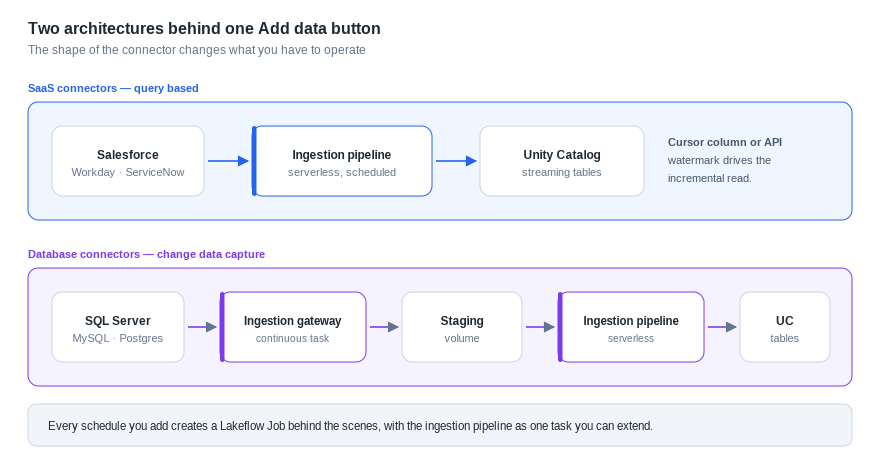 One "Add data" button, two very different things running on your behalf.
Step-by-step implementation
Step 1 — Know which architecture you're getting
This is the part the UI hides, and it's the part that determines your cost and your failure modes.
SaaS connectors (Salesforce, Workday Reports, ServiceNow, Google Analytics 4, and a growing Beta list) are query-based. The ingestion pipeline queries the source API on a schedule, works out what's new using whatever the source offers — a cursor column chosen from a set list of options, in Salesforce's case — and writes into Unity Catalog. These run exclusively on serverless, so you're billed serverless pipeline DBUs for the duration of each run and nothing in between.
Database connectors (SQL Server, MySQL, PostgreSQL) are change data capture. They add an ingestion gateway, which runs in its own job as a continuous task, capturing changes and writing them to staging storage. The ingestion pipeline then loads from staging. Depending on the source, the gateway can run on classic or serverless compute, while the ingestion pipeline is always serverless.
That "continuous task" is the sentence to read twice. A database connector is not a scheduled job you pay for in bursts — something is always running. Budget for it accordingly.
For SQL Server specifically, you can use both change tracking and change data capture; the connector picks the right mechanism based on what's enabled on the source. Which means part of connector setup happens on the database side, with a DBA, and is worth scheduling before you start.
Step 2 — Set it up as code, not in the UI
# resources/salesforce_ingestion.pipeline.yml
# Deployed with Declarative Automation Bundles (formerly Databricks Asset Bundles)
resources:
  pipelines:
    salesforce_ingestion:
      name: salesforce-crm-ingestion
      catalog: northbridge
      schema: bronze_salesforce
      ingestion_definition:
        connection_name: salesforce_prod_connection
        objects:
          - table:
              source_schema: objects
              source_table: Opportunity
              destination_catalog: northbridge
              destination_schema: bronze_salesforce
          - table:
              source_schema: objects
              source_table: Account
              destination_catalog: northbridge
              destination_schema: bronze_salesforce
      channel: PREVIEW
databricks bundle validate -t prod
databricks bundle deploy -t prodAll managed connectors support pipeline creation through the Databricks API and through bundles; most also support the UI. Use the UI to explore and the bundle to deploy — an ingestion pipeline that exists only because somebody clicked through a wizard in production is a resource nobody can recreate after an incident.
One trap worth knowing before you reach for the API: some capabilities are API-only, and using them makes the pipeline API-only permanently. Writing to multiple destination schemas and renaming an ingested table both fall into this category — once you use them, the pipeline can no longer be edited in the UI. That's usually a fine trade, but make it deliberately rather than discovering it when a colleague can't open the pipeline.
Step 3 — Understand what scheduling actually creates
You add a schedule to the ingestion pipeline. Behind the scenes, Lakeflow Connect creates a Lakeflow Job for that schedule, with the ingestion pipeline as one task inside it.
That's not trivia — it's an extension point. The job is a normal job, so you can add tasks after the ingestion task:
# The generated job, extended with downstream work
resources:
  jobs:
    salesforce_ingestion_job:
      tasks:
        - task_key: ingest_salesforce
          pipeline_task:
            pipeline_id: ${resources.pipelines.salesforce_ingestion.id}

        - task_key: build_crm_silver
          depends_on: [{ task_key: ingest_salesforce }]
          pipeline_task:
            pipeline_id: ${resources.pipelines.crm_silver.id}

        - task_key: notify_sales_ops
          depends_on: [{ task_key: build_crm_silver }]
          run_if: ALL_DONE
          notebook_task:
            notebook_path: ../src/notify.py
You can add multiple schedules to one pipeline, and each creates its own job — useful when a few high-churn objects need hourly refreshes and the rest are fine daily.
For database connectors the shape is slightly different: the ingestion gateway runs in its own job as a continuous task, separate from the scheduled ingestion pipeline. Two jobs, two things to monitor.
Step 4 — Check schema evolution behaviour per connector, not in general
This is where "managed" stops being a blanket promise. Schema change handling varies by connector, and the differences matter:
- Most connectors handle new and deleted columns automatically — for some, only if you're ingesting the entire schema rather than a hand-picked list of tables.
- Column renames are typically treated as a new column plus a deleted column, which is usually what you want and does not require a full refresh.
- The SQL Server connector requires a full refresh of affected tables to continue ingestion after certain schema changes. On a large table, that's a real operational event, not a footnote.
Read the feature availability section for your specific connector before you promise anyone zero-downtime schema evolution. "Lakeflow Connect handles schema drift" is true in aggregate and misleading in the specific.
Step 5 — Know the three alternatives you're choosing against
-- Option A: managed connector — copies data in, incrementally
SELECT * FROM northbridge.bronze_salesforce.opportunity;

-- Option B: Lakehouse Federation — queries the source in place, no copy
SELECT * FROM sqlserver_prod.sales.orders;

-- Option C: Delta Sharing — the provider shares; you don't ingest at all
SELECT * FROM shared_partner_catalog.analytics.inventory;
These answer different questions, and teams conflate them constantly:
- Managed connectors incrementally ingest from SaaS applications and databases into your lakehouse. You own a copy. Queries are fast and the source isn't involved.
- Lakehouse Federation queries the source system in place. No copy, no ingestion latency, but every query hits an operational database — which your DBA will have opinions about.
- Delta Sharing is for data somebody else already has in a lakehouse and wants to share. No pipeline on either side.
If the data is operational, queried often, and needs history, you want a connector. If it's a small reference table queried occasionally and must always be live, federation is simpler. If it's a partner's data, ask them about Delta Sharing before you build anything at all.
From production: gotchas and lessons
-
Symptom: A database connector's monthly cost was roughly four times the estimate. Cause: The estimate assumed the connector was a scheduled job. The ingestion gateway runs as a continuous task — always-on compute — and the scheduled ingestion pipeline is billed on top of it. Fix: Nothing to fix technically; the estimate was wrong. Now the first question for any database connector is "what does the gateway cost per month?" and that number is approved before the connector is built. For low-change tables, a scheduled query-based extract genuinely can be cheaper.
-
Symptom: An ingestion pipeline worked in dev and couldn't be reproduced in prod. Cause: It had been built by clicking through the Add data wizard. There was no definition in Git, and the person who built it had moved teams. Fix: Rebuilt as a bundle resource. The team's rule is now: explore in the UI, ship in a bundle. A connector you can't redeploy from source isn't production infrastructure.
-
Symptom: A colleague couldn't open an ingestion pipeline in the UI — the edit screen simply wasn't available. Cause: Someone had used an API-only feature to rename a destination table. That permanently converts the pipeline to API-only. Fix: Documented in the pipeline's description, with the bundle file path, so the next person knows where to make changes instead of filing a bug about a broken UI.
-
Symptom: A connector that had been running happily for months stopped ingesting one table after a source-side schema change. Cause: A SQL Server column type change that required a full refresh of the affected table. The pipeline reported the condition; nobody was watching for it specifically. Fix: Added an alert on ingestion pipeline failures and a monthly review of the connector's schema-change behaviour against the source team's release calendar. The real fix was social — getting on the source team's change notification list.
-
Symptom: A team spent two weeks building a custom connector for a source that was in Beta on the roadmap. Cause: Nobody checked the availability matrix, and the connector shipped as GA a month later. Fix: Before building any custom ingestion, check the managed connector list and ask the Databricks account team about Private Preview connectors. Release states move quickly, and a connector six weeks away is usually worth waiting for over code you'll maintain for three years.
Performance and cost notes
The cost model splits cleanly along the two architectures.
SaaS connectors run exclusively on serverless and incur serverless pipeline DBUs for the duration of each run. Cost scales with how often you schedule and how much data moves. Hourly refreshes on a handful of objects are cheap; five-minute refreshes on fifty objects are not, and usually nobody actually needed five minutes.
Database connectors have a floor. The gateway's continuous task runs whether or not anything changed in the source. For a high-churn operational database that's excellent value — you're getting low-latency CDC without writing any of it. For a table that changes twice a day, you're paying always-on compute to watch a log that's almost always empty, and a scheduled query-based extract would be cheaper.
Incremental ingestion does the heavy lifting on efficiency, and the approach depends on what the source offers. Knowing which mechanism your connector uses — CDC, change tracking, or a cursor column — tells you what its latency floor is and what happens to rows deleted in the source. A cursor-based connector generally cannot see hard deletes; a CDC-based one can.
As a managed service, Lakeflow Connect retries with exponential backoff when a connector fails. That's genuinely useful and also means a degraded connector can look healthy for a while. Alert on data freshness — the age of the newest row in the target table — rather than only on pipeline status.
When not to use this
If your source isn't in the connector list and isn't on the roadmap, a managed connector isn't an option. Check the community connectors first — open-source, community-built connectors extend Lakeflow Connect to sources without managed support — before you start from scratch.
If you need transformation during ingestion, that's not what this is for. Managed connectors land source-shaped data in bronze. Transformation belongs in a declarative pipeline downstream, and that separation is correct: a connector that also transforms is a connector you can't replay.
If the data is small, static and occasionally queried, federation or a one-off load will serve you better than a continuously running ingestion path.
And if you need the data written back to the source, stop — managed connectors read. Reverse ETL is a different tool entirely.
Checklist
- Confirmed whether your connector is query-based or CDC-based, and what that costs per month
- Checked the connector's current release state and its specific schema evolution behaviour
- Source-side prerequisites (change tracking, CDC, API permissions) scheduled with the owning team
- Pipeline defined in a bundle, not clicked together in production
- Decided consciously whether any API-only feature is worth losing UI editing
- Downstream tasks attached to the generated job rather than scheduled separately
- Alerting on data freshness, not just on pipeline status
- Compared against Lakehouse Federation and Delta Sharing before building
Practice
- Build it yourself: set up a managed connector against a sandbox source — a free Salesforce developer org works well — and ingest two objects. Then export the pipeline definition into a bundle, destroy the original, and redeploy it from the bundle. The round trip is the part that matters; it's the difference between a demo and something you can run in production.
Further reading
Keep going
COPY INTO vs Auto Loader: Which Ingestion Method and When
Both load files into Delta exactly once. The choice comes down to file volume over the table's lifetime, who maintains the pipeline, and how often you need to reload a subset.
Lakeflow Spark Declarative Pipelines (Formerly DLT): Getting Started
Build your first declarative pipeline end to end — streaming tables, materialized views, flows and the pipeline graph — using the pyspark.pipelines API that replaced import dlt.
Lakeflow Jobs: Task Dependencies, Repair Runs and Triggers
Build a job graph that survives a bad night — run_if conditions for error handling, the five trigger types and their limits, and why repair runs only help idempotent tasks.
One practical note a week
Get new articles, problems and guides in your inbox.
Thanks! You're on the list. (Local demo — no email provider is wired up yet.)