repartition vs coalesce: When Each Is Right
repartition shuffles to any count with even sizes; coalesce merges without a shuffle but only downwards. When to use each, and the coalesce(1) trap.
TL;DR
repartition(n)does a full shuffle. It can go up or down, gives roughly equal partitions, and costs network and disk I/O.coalesce(n)merges existing partitions without a shuffle. It can only go down, partitions can stay uneven, and it's cheap.- The trap:
coalesceis a narrow operation, so it's merged into the previous stage.coalesce(1)makes the whole upstream read and transform run as one task. Userepartition(1)if that upstream work is heavy. repartition("col")(no number) and theREBALANCEhint let AQE choose the count.repartition(400)doesn't.- Most of the time you need neither: AQE sizes shuffles and Delta's optimized writes size files.
The problem
Two NorthBridge engineers, two habits.
Priya ended every notebook with .coalesce(1).write.csv(...) "to get one file for finance". On a 2 GB extract it was fine. On a 400 GB extract the job ran for 3 hours, using one core on a 32-node cluster.
Arjun ended every write with .repartition(2000) "for parallelism". His daily 3 GB table now had 2,000 files of 1.5 MB per day and queries on it were planning for longer than they ran.
Both were using a partitioning tool to solve a problem it didn't fit.
Key concepts
| Concept | What it means | Why it matters here |
|---|---|---|
| Partition | A chunk of rows processed by one task | Partition count = task count = (usually) output file count |
| Narrow transformation | Each output partition depends on a few input partitions; no shuffle | coalesce, filter, select |
| Wide transformation | Output partitions depend on many inputs; needs a shuffle | repartition, groupBy, joins |
| Stage | Tasks between shuffles | Narrow ops are fused into the surrounding stage |
| Hash / round-robin / range partitioning | How repartition assigns rows |
Determines balance and co-location |
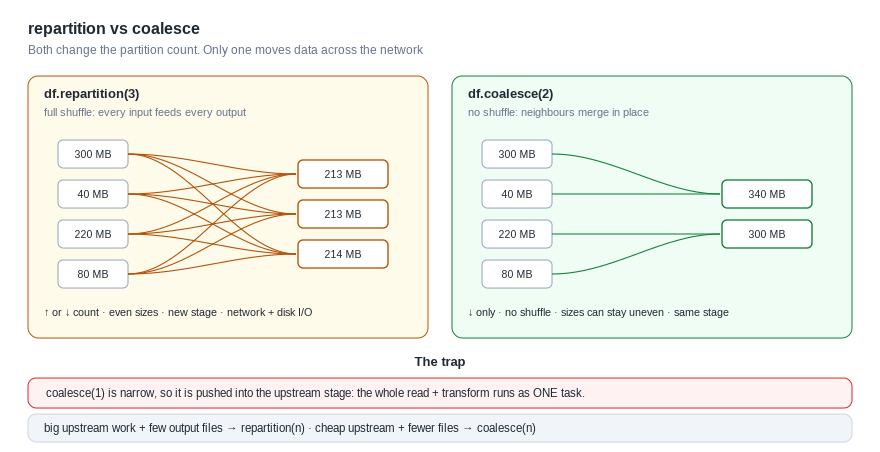 Only one of them moves data across the network.
The APIs
# Spark 3.5 / 4.0, Databricks Runtime 16.4 LTS+
df.repartition(400)                      # round-robin into exactly 400 partitions
df.repartition(400, "store_id")          # hash by store_id into exactly 400
df.repartition("store_id")               # hash by store_id; count from shuffle.partitions, AQE may coalesce
df.repartitionByRange(400, "sale_ts")    # range partitions, sorted boundaries (sampled)
df.coalesce(50)                          # merge down to at most 50, no shuffle
df.hint("rebalance")                     # shuffle that AQE sizes (and splits if skewed)
SQL equivalents as hints:
SELECT /*+ REPARTITION(400, store_id) */ * FROM sales;
SELECT /*+ COALESCE(50) */ * FROM sales;
SELECT /*+ REPARTITION_BY_RANGE(400, sale_ts) */ * FROM sales;
SELECT /*+ REBALANCE(store_id) */ * FROM sales;
Side by side
repartition |
coalesce |
|
|---|---|---|
| Shuffle | Yes, full | No |
| Direction | Up or down | Down only (asking for more is a no-op) |
| Partition sizes | Roughly even (round-robin) or by key (hash) | Whatever the merged inputs add up to |
| New stage | Yes | No: fused into the upstream stage |
| Upstream parallelism | Unchanged | Reduced to n |
| Cost | Network + disk write + read | Near zero |
| AQE can resize | Only without an explicit number | No |
When repartition is right
1. You need more parallelism. A single 20 GB gzip CSV isn't splittable, so it's read as one partition. Everything downstream runs in one task until a shuffle.
raw = spark.read.option("header", True).csv("/Volumes/northbridge/landing/pos/2026-11-12.csv.gz")
print(raw.rdd.getNumPartitions())   # 1  (classic compute; see note below)

spread = raw.repartition(256)        # now 256 tasks for the parsing and cleanup that follows
2. Heavy upstream work, few output files. Repartition creates a stage boundary, so the expensive part keeps its full parallelism and only the final write is narrow.
(heavy_transform(df)       # runs with full parallelism
   .repartition(8)         # shuffle the (small) result into 8 even partitions
   .write.mode("overwrite")
   .parquet("/Volumes/northbridge/exports/finance/weekly"))
3. Co-locating by key for a partitioned write. One task per date means one file per date folder:
(df.repartition("sale_date")
   .write.partitionBy("sale_date")
   .mode("append").saveAsTable("northbridge.silver.sales_by_day"))
This creates one file per date, which can be huge and skewed for a busy day (Black Friday in one task). The REBALANCE(sale_date) hint in SQL keeps rows for a date together where it can but lets AQE split oversized partitions. For Delta, clustering usually beats partitionBy anyway; see Liquid Clustering vs Partitioning vs Z-Order.
4. Reusing a key across several operations. If you join on customer_id and then aggregate on customer_id, Spark can reuse the existing hash partitioning and skip the second shuffle. It does this on its own when the plans line up; an explicit repartition("customer_id") plus a cache helps when the DataFrame feeds several joins.
When coalesce is right
1. Fewer partitions after a big filter, when upstream is cheap.
recent = (spark.table("northbridge.bronze.clickstream")   # 4,000 input partitions
               .where("event_date = current_date()"))      # 1% survives
small = recent.coalesce(40)                                # 40 tasks downstream, no shuffle
Here the upstream work (scanning and filtering) is light, and data skipping already avoided reading most files. Dropping parallelism costs little.
2. A small result written as a few files. A 200 MB summary written with coalesce(4) is fine.
The coalesce(1) trap
coalesce doesn't create a stage boundary. Spark fuses it into the stage before it, so the whole stage runs with n tasks:
# Priya's job: read 400 GB, join a broadcast dimension, write one CSV
from pyspark.sql import functions as F
stores = spark.table("northbridge.silver.stores")
path = "/Volumes/northbridge/exports/finance/margin_extract"

(spark.table("northbridge.silver.sales_lines")
   .join(F.broadcast(stores), "store_id")
   .withColumn("margin", F.col("net_amount") - F.col("cost_amount"))
   .coalesce(1)                         # <- the scan, join and withColumn now run in ONE task
   .write.mode("overwrite").csv(path))
The Spark UI shows a stage with 1 task reading 400 GB. Compare:
(spark.table("northbridge.silver.sales_lines")
   .join(F.broadcast(stores), "store_id")
   .withColumn("margin", F.col("net_amount") - F.col("cost_amount"))
   .repartition(1)                      # heavy work in the upstream stage at full parallelism
   .write.mode("overwrite").csv(path))  # only the final write is single-threaded
Still one 400 GB file, still slow to write, but the read and transform run in parallel. The honest fix is to ask whether finance needs one 400 GB CSV. Usually a handful of files in one folder, or a table they can query, works better.
How many files will I write?
For a plain df.write, roughly one file per partition of the final stage (more if a partition exceeds maxRecordsPerFile; with partitionBy, one per partition per folder it touches).
| Your code | Output files |
|---|---|
df.write... after a shuffle, AQE on |
Coalesced shuffle partitions (often sensible) |
df.write... with no shuffle |
Number of input partitions (can be thousands) |
df.repartition(2000).write... |
2,000, however small the data |
df.coalesce(8).write... |
At most 8 |
df.write.partitionBy("d")... with no repartition |
Up to partitions × distinct d values |
| Delta table with optimized writes | Delta sizes the files for you |
That's why Arjun's repartition(2000) on 3 GB was a small-files generator. Removing it and letting optimized writes size the files fixed it; see The Small Files Problem.
Checking partition counts
df.rdd.getNumPartitions() # classic computeOn Spark Connect (Databricks serverless, standard access mode clusters), the RDD API isn't available. Count partitions from the data instead:
from pyspark.sql import functions as F
df.select(F.spark_partition_id().alias("pid")).distinct().count()

# and the distribution, which matters more than the count
df.groupBy(F.spark_partition_id().alias("pid")).count().orderBy(F.desc("count")).show(5)
The result
Priya's export: repartition(16) and a folder of 16 files that finance's tool already supported. 3 hours → 9 minutes.
Arjun's table: repartition(2000) removed, optimized writes on. 2,000 files a day → 6 files a day, and the downstream dashboard query dropped from 14 seconds to 2.
From production: gotchas and lessons
-
Symptom:
df.coalesce(500)on a 200-partition DataFrame still had 200 partitions. Cause:coalescecan't increase the count; it silently does nothing. Fix:repartition(500)if you really need more. -
Symptom:
repartition(400)produced 400 nearly empty partitions after a filter and AQE didn't merge them. Cause: An explicit number is a requirement AQE respects. Fix:repartition("key")without a number, or theREBALANCEhint. See Why AQE Coalesces Shuffle Partitions. -
Symptom: After
orderBy("sale_ts").repartition(10), the output wasn't sorted. Cause:repartitionshuffles and destroys ordering. Fix: Sort last:repartition(10).sortWithinPartitions("sale_ts"), orrepartitionByRangethensortWithinPartitionsfor a global order across files. -
Symptom:
coalesce(20)left one partition of 6 GB and nineteen of 50 MB. Cause:coalescemerges what's there, including an already-skewed partition. Fix:repartition(20)when balance matters more than avoiding a shuffle. -
Symptom:
repartition("country")put 70% of data in one task. Cause: Hash partitioning by a low-cardinality, skewed column. Fix: Partition by a higher-cardinality column, add a second column, or useREBALANCE. See Data Skew in Spark.
Performance and cost notes
A shuffle writes the whole dataset to local disk and reads it over the network, so repartition on 400 GB costs real time. But a single-task stage on 400 GB costs far more. The question is never "shuffle or not" in the abstract; it's "where does parallelism matter in this job?"
Both are frequently unnecessary in modern Spark. AQE right-sizes shuffles, and Delta optimized writes and auto compaction size files. Add an explicit repartition or coalesce when you can name the problem it fixes.
When not to use this
Don't repartition before a join or groupBy "to help Spark": it will shuffle by the key anyway, so you've added a second shuffle. Don't repartition before writing to a Delta table that has optimized writes on. And don't use either to fix skew from a single hot key; more or fewer partitions can't split one key.
Checklist
- Every explicit
repartition/coalescehas a comment saying why - No
coalesce(1)after heavy work on large data - No
repartition(n)with a hard-coded bignbefore small writes -
repartition("col")orREBALANCEwhere AQE should choose the count - Partition distribution checked, not just the count
- Output file count and size checked after the first run
Practice
- Try: PySpark Interview Questions: 50 Coding and Scenario Problems
- Build it yourself: read a 10 GB table, apply a costly
withColumn, then write withcoalesce(1)and withrepartition(1). Compare the number of tasks in each stage in the Spark UI.
Further reading
Keep going
Why AQE Coalesces Shuffle Partitions (and When It Can't Help)
How Adaptive Query Execution merges small shuffle partitions at runtime, the settings that control it, and the cases where you still have to tune.
Reading the Spark UI: Stages, Tasks, Spill and Skew
A practical route through the Spark UI: map a slow query to its stage, read the summary metrics, and recognise skew, spill, tiny files and GC pressure.
The Small Files Problem in Delta Lake: Causes, Diagnosis and Compaction Strategies
Why Delta tables collect tiny files, how to measure it, and the writer fixes and compaction strategies that stop it coming back.
One practical note a week
Get new articles, problems and guides in your inbox.
Thanks! You're on the list. (Local demo — no email provider is wired up yet.)