Databricks Asset Bundles: CI/CD for Jobs and Pipelines
One databricks.yml, three environments, zero clicking. Bundle structure, targets and modes, variables, and a promotion pipeline that deploys as a service principal.
TL;DR
- A bundle is your Databricks project as code: jobs, pipelines, schemas, volumes, dashboards and permissions in YAML, in Git, deployed with one command.
- The structure is always the same: a root
databricks.ymlwithbundle,include,variablesandtargets, plus resource files it pulls in. mode: developmentprefixes every resource with your username and pauses schedules. It is the reason two engineers can share a workspace without destroying each other's work.databricks bundle validatenever touches a workspace — it's purely local, which makes it the correct first step in CI.- The failure mode isn't technical. It's deploying to production from a laptop. Route staging and prod through CI, deploying as a service principal.
- Renamed to Declarative Automation Bundles in 2026. Same file, same commands, new heading in the docs.
The problem
NorthBridge Retail Group's Databricks workspace had 61 jobs. Four were documented. Two had names ending in _v2_FINAL. One had been created by someone who left in 2024 and was still running nightly, writing to a table nobody queried.
The process for shipping a change was: open dev, edit the job in the UI, test it, then open prod and make the same edits by hand. The gap between those two steps is where the incidents lived — a cluster size someone forgot to match, a schedule that was left paused in dev and un-paused in prod, a notebook path pointing at a personal workspace folder that would break the day that person's account was deactivated.
Everyone knew this was bad. The reason nobody fixed it is that the alternative looked like Terraform, and nobody wanted to learn a whole infrastructure-as-code tool to schedule a notebook.
Bundles are the version of this that's proportionate. You describe what should exist in YAML, commit it, and deploy it per environment. There's no state file to corrupt and no new language to learn — and the whole thing is close enough to the job JSON you already have that databricks bundle generate can produce a first draft from a job you built in the UI.
Key concepts
| Concept | What it means | Why it matters here |
|---|---|---|
| Bundle | A project directory with a databricks.yml at its root |
The unit of deploy, promote and roll back |
| Resource | A Databricks object defined in YAML: job, pipeline, schema, volume, dashboard, app | What actually gets created in the workspace |
| Target | A named deployment environment — dev, staging, prod | The same resources, different workspace and settings |
| Mode | development or production — a bundle of behavioural defaults per target |
Isolation in dev, safety in prod, without hand-written conditionals |
| Variable | A value overridden per target: catalog, warehouse ID, cluster size | How one definition serves three environments |
run_as |
The identity a deployed job runs as | In prod, a service principal — not whoever deployed last |
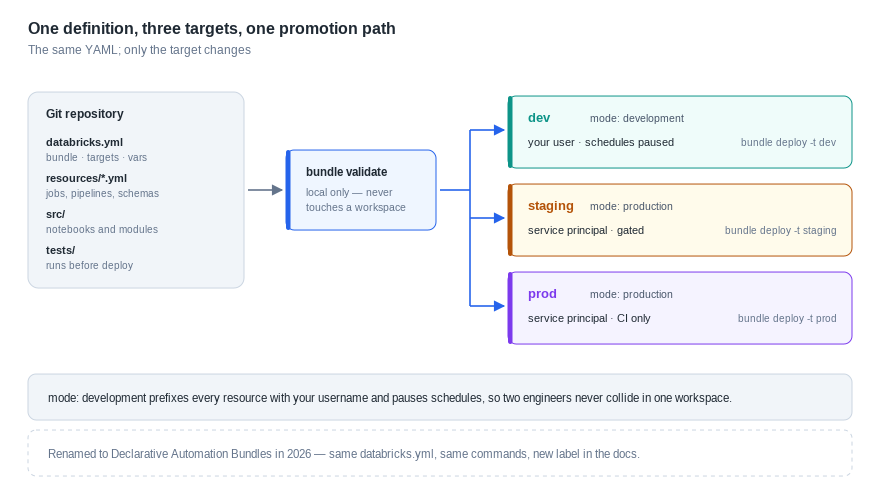 One definition, three targets. The only thing that changes between them is the target name on the command line.
Step-by-step implementation
Step 1 — The layout that scales past one job
retail-platform/
├── databricks.yml              # root: bundle, include, variables, targets
├── resources/
│   ├── ingestion.job.yml
│   ├── silver.pipeline.yml
│   └── gold.job.yml
├── src/
│   ├── ingest/
│   ├── transformations/
│   └── sql/
├── tests/
│   └── test_transformations.py
└── .github/workflows/deploy.yml
Everything in one databricks.yml works for a demo and becomes unreadable at about the third job. Split resources into one file per logical unit and pull them in with include from the start — it costs nothing and saves a painful refactor later.
Step 2 — The root file
# databricks.yml
bundle:
  name: retail-platform

include:
  - resources/*.yml

variables:
  catalog:
    description: Unity Catalog catalog for this environment
    default: dev_northbridge
  warehouse_id:
    description: SQL warehouse used by SQL tasks
    default: abc123def456
  node_type:
    description: Worker node type
    default: Standard_D4ds_v5
  max_workers:
    description: Autoscale ceiling
    default: 2

targets:
  dev:
    mode: development
    default: true
    workspace:
      host: https://adb-1111111111111111.1.azuredatabricks.net

  staging:
    mode: production
    workspace:
      host: https://adb-2222222222222222.2.azuredatabricks.net
      root_path: /Shared/.bundle/${bundle.name}/${bundle.target}
    variables:
      catalog: staging_northbridge
      warehouse_id: ghi789jkl012
      max_workers: 4
    run_as:
      service_principal_name: ${var.deploy_sp}

  prod:
    mode: production
    workspace:
      host: https://adb-3333333333333333.3.azuredatabricks.net
      root_path: /Shared/.bundle/${bundle.name}/${bundle.target}
    variables:
      catalog: northbridge
      warehouse_id: mno345pqr678
      node_type: Standard_D8ds_v5
      max_workers: 12
    run_as:
      service_principal_name: ${var.deploy_sp}
    permissions:
      - level: CAN_VIEW
        group_name: data-engineering
      - level: CAN_MANAGE
        group_name: platform-admins
The two modes do real work, and knowing what they do saves you from writing conditionals by hand:
mode: developmentprefixes every resource with your username, pauses schedules and triggers, and marks clusters as development resources. Two engineers deploying the same bundle to the same workspace getalex_ingestionandpriya_ingestion, neither of which is running on a schedule, neither of which clobbers the other.mode: productiondoes the opposite: no prefix, schedules active, and stricter validation of things likerun_as.
That first one is the feature that makes shared dev workspaces workable. Without it, every engineer deploying the same bundle overwrites the same job, and you end up back at "ping the channel before you deploy."
Step 3 — A resource file
# resources/ingestion.job.yml
resources:
  jobs:
    ingestion:
      name: retail-ingestion
      max_concurrent_runs: 1

      schedule:
        quartz_cron_expression: "0 0 2 * * ?"   # daily at 02:00
        timezone_id: Asia/Kolkata

      email_notifications:
        on_failure:
          - data-platform-alerts@example.com

      job_clusters:
        - job_cluster_key: ingest_cluster
          new_cluster:
            spark_version: 16.4.x-scala2.12
            node_type_id: ${var.node_type}
            data_security_mode: SINGLE_USER
            autoscale:
              min_workers: 1
              max_workers: ${var.max_workers}

      tasks:
        - task_key: ingest_orders
          job_cluster_key: ingest_cluster
          notebook_task:
            notebook_path: ../src/ingest/orders.py
            base_parameters:
              catalog: ${var.catalog}
          max_retries: 3

        - task_key: build_silver
          depends_on: [{ task_key: ingest_orders }]
          pipeline_task:
            pipeline_id: ${resources.pipelines.silver.id}
Two references worth noticing. ${var.catalog} resolves per target, so the same notebook writes to dev_northbridge in dev and northbridge in prod without a single if environment == anywhere in your Python. And ${resources.pipelines.silver.id} resolves to the pipeline deployed by this bundle, in this target — no hardcoded pipeline IDs that mean the wrong thing in the wrong workspace.
Relative paths like ../src/ingest/orders.py resolve from the resource file's location and are uploaded as part of the deploy. That's what makes a bundle self-contained: no job pointing at a notebook in someone's personal folder.
Step 4 — The four commands
# Local check. Never contacts a workspace — ideal as CI step one.
databricks bundle validate -t prod

# Create or update everything for a target
databricks bundle deploy -t dev

# See what a target resolved to, after variable substitution
databricks bundle summary -t prod

# Run a job or pipeline defined in the bundle
databricks bundle run -t dev ingestion

# Tear down everything this bundle deployed to a target
databricks bundle destroy -t dev
validate being purely local is the detail that makes CI clean: a pull request can be checked for YAML errors, bad references and unresolved variables with no workspace credentials in the pipeline at all. Make it a required check on every PR.
summary is the underused one. It shows the fully resolved configuration — every variable substituted — which answers "what will actually be deployed to prod?" before you find out the interesting way.
Step 5 — The promotion pipeline
# .github/workflows/deploy.yml
name: deploy-bundle

on:
  pull_request:
    branches: [main]
  push:
    branches: [main]
  release:
    types: [published]

jobs:
  validate:
    runs-on: ubuntu-latest
    steps:
      - uses: actions/checkout@v4
      - uses: databricks/setup-cli@main
      - run: databricks bundle validate -t staging
      - run: databricks bundle validate -t prod

  unit-tests:
    runs-on: ubuntu-latest
    steps:
      - uses: actions/checkout@v4
      - uses: actions/setup-python@v5
        with: { python-version: "3.11" }
      - run: pip install -r requirements-dev.txt && pytest tests/ -q

  deploy-staging:
    needs: [validate, unit-tests]
    if: github.event_name == 'push' && github.ref == 'refs/heads/main'
    runs-on: ubuntu-latest
    environment: staging
    env:
      DATABRICKS_CLIENT_ID:     ${{ secrets.STAGING_SP_CLIENT_ID }}
      DATABRICKS_CLIENT_SECRET: ${{ secrets.STAGING_SP_SECRET }}
    steps:
      - uses: actions/checkout@v4
      - uses: databricks/setup-cli@main
      - run: databricks bundle deploy -t staging
      - run: databricks bundle run -t staging integration_tests

  deploy-prod:
    needs: [deploy-staging]
    if: github.event_name == 'release'
    runs-on: ubuntu-latest
    environment: production          # requires manual approval
    env:
      DATABRICKS_CLIENT_ID:     ${{ secrets.PROD_SP_CLIENT_ID }}
      DATABRICKS_CLIENT_SECRET: ${{ secrets.PROD_SP_SECRET }}
    steps:
      - uses: actions/checkout@v4
      - uses: databricks/setup-cli@main
      - run: databricks bundle deploy -t prod
The shape matters more than the syntax, and it translates directly to Azure DevOps or GitLab:
- Validate on every PR — cheap, fast, no credentials.
- Unit tests on every PR — the transformations, not the platform.
- Deploy to staging on merge — automatic, as a service principal, followed by integration tests that run against real data shapes.
- Deploy to prod on release — gated behind a protected environment with manual approval.
The service principal is the part teams skip, and it's the one that bites. A job deployed with run_as set to a person stops working the day that person's account is deactivated — typically discovered at 02:00 on the first night after someone's last day. Deploying as a service principal also means prod resources aren't owned by whoever happened to run the last deploy.
Step 6 — Generate rather than hand-write the first version
# Capture an existing UI-built job as bundle YAML
databricks bundle generate job --existing-job-id 123456789

# Same for a pipeline
databricks bundle generate pipeline --existing-pipeline-id abcd-1234
For a workspace with 61 undocumented jobs, this is the migration path. Generate each one, read it, delete the cruft, parameterise what varies per environment, commit. It won't be perfect — generated YAML carries hardcoded IDs and absolute paths you need to clean up — but it beats transcribing job configuration by hand from a screenshot.
From production: gotchas and lessons
-
Symptom: Every production job stopped at 02:00 on a Monday, all with permission errors. Cause:
run_ashad never been set, so jobs ran as the engineer who last deployed. Their account was deactivated on Friday. Fix:run_as: service_principal_nameon every non-dev target, and abundle validatecheck in CI that fails if a production target omits it. The single highest-value line in the whole file. -
Symptom: Two engineers deploying the same bundle kept overwriting each other's jobs in the shared dev workspace. Cause: The dev target had
mode: productioncopied from the prod block, so no username prefixing and no paused schedules. Fix:mode: developmenton the dev target. Resources becamealex_ingestionandpriya_ingestion, schedules stayed paused, and the "who's deploying?" messages stopped. -
Symptom: A deploy succeeded and the job immediately failed, unable to find its notebook. Cause: An absolute
notebook_pathpointing at/Users/someone@example.com/notebooks/ingest— a leftover frombundle generatethat worked in dev and meant nothing in prod. Fix: All notebook paths made relative to the resource file, so they're uploaded with the bundle. A grep for/Users/inresources/is now part of code review. -
Symptom: A production deploy silently removed a job that was still needed. Cause: Someone deleted a resource file in a refactor. Bundles are declarative — if a resource isn't in the bundle, it doesn't exist in the target. That's correct behaviour and it's a surprise exactly once. Fix:
databricks bundle summaryoutput is diffed in CI and posted as a PR comment, so removals are visible in review rather than at deploy time. -
Symptom: A
bundle destroy -t devrun by someone who thoughtdevwas the default target removed a colleague's work for the afternoon. Cause:destroydoes what it says, and the default target wasdevfor everyone. Fix:destroyis never run from a laptop against a shared workspace; it's a CI job with an approval gate. Worth deciding before someone learns it the hard way. -
Symptom: The team couldn't find documentation for a CLI error message. Cause: The docs now call this feature Declarative Automation Bundles — renamed from Databricks Asset Bundles in 2026, from CLI v0.287 onwards. Searching for "asset bundles" increasingly returns older material. Fix: Search for both names. Nothing about the file, the schema or the commands changed; only the heading did.
Performance and cost notes
Bundles don't change runtime cost directly, but they change the two things that drive it.
First, cluster configuration becomes reviewable. A cluster sized in the UI is invisible until the bill arrives. A cluster sized in YAML shows up in a pull request, where someone can ask why staging needs twelve workers. Parameterising node_type and max_workers per target makes right-sizing a one-line change rather than a fiddly UI edit in three workspaces.
Second, orphaned resources disappear. The 2024 job writing to a table nobody queries only survives because nobody can see the full inventory. Once every resource is in Git, the inventory is a directory listing — and the unused ones get deleted in the first clean-up.
For CI speed: validate runs in seconds with no network, so run it on every push. deploy is a workspace API operation whose duration scales with the number of resources and uploaded files. Keep bundles scoped to a team or a domain rather than building one monolith for the whole platform — a bundle that takes four minutes to deploy discourages the small, frequent changes you want.
When not to use this
If you're managing workspace-level infrastructure — the workspaces themselves, Unity Catalog metastores, network configuration, account-level identities — Terraform is the right tool and bundles aren't trying to compete. The usual split is Terraform for the platform, bundles for the workloads that run on it.
If you have exactly one notebook on a schedule and no second environment, a bundle is overhead you don't need yet. Set it up when a second environment appears, which is the moment manual sync starts costing you.
And if your organisation has standardised on an external orchestrator that already deploys Databricks assets through its own mechanism, adding bundles alongside it creates two sources of truth. Pick one.
Checklist
-
databricks.ymlholds only bundle, include, variables and targets; resources live in their own files -
mode: developmenton dev,mode: productionon staging and prod -
run_asset to a service principal on every non-dev target - Environment-specific values are variables, with no
if environment ==in the code - All notebook and file paths are relative to the resource file
-
bundle validateis a required check on every PR - Prod deploys happen only from CI, behind an approval gate
-
bundle summarydiffed in review so removals are visible before deploy -
destroyis not something anyone runs from a laptop
Practice
- Build it yourself: take one job you built in the UI, run
databricks bundle generate jobagainst it, and clean the output into a proper bundle with dev and prod targets. Deploy to dev, confirm the username prefix and paused schedule, then runbundle summary -t prodand read exactly what would go to production. The gap between what you expected and what it prints is the thing worth learning.
Further reading
Keep going
Lakeflow Jobs: Task Dependencies, Repair Runs and Triggers
Build a job graph that survives a bad night — run_if conditions for error handling, the five trigger types and their limits, and why repair runs only help idempotent tasks.
Lakeflow Spark Declarative Pipelines (Formerly DLT): Getting Started
Build your first declarative pipeline end to end — streaming tables, materialized views, flows and the pipeline graph — using the pyspark.pipelines API that replaced import dlt.
DLT, Lakeflow and Spark Declarative Pipelines: The Naming Decoded
Four names, one engine, four years. A short map of what got renamed, what got open-sourced, what your old code still does, and which word to use in an interview.
One practical note a week
Get new articles, problems and guides in your inbox.
Thanks! You're on the list. (Local demo — no email provider is wired up yet.)