Slowly Changing Dimensions: Types 1, 2, 3 and 6 with SQL
One customer moves city. Four SCD types record it four different ways. See the rows each type produces, the SQL that writes them, and how to choose per column.
TL;DR
- A slowly changing dimension (SCD) is just a rule for what happens to a dimension row when the source value changes.
- Type 1 overwrites. Type 2 adds a new row and keeps the old one. Type 3 keeps the previous value in an extra column. Type 6 combines all three so you can report by "as it was" and "as it is now" from the same row.
- You choose the type per attribute, not per table. One customer dimension often has Type 1, Type 2 and Type 0 columns side by side.
- Type 2 is the one interviewers ask about and the one that breaks most often in production, usually through bad change detection.
The problem
Priya is a NorthBridge loyalty customer. She's bought groceries at the Chennai Velachery store for three years. In March 2026 she moves to Pune and starts shopping there.
Two questions land on the data team the same week. Marketing asks: "What did Chennai customers spend in 2025?" They want Priya's 2025 spend counted under Chennai, because that's where she lived. The CRM team asks: "How much have our current Pune customers spent with us in total?" They want all of Priya's history counted under Pune.
Both questions are reasonable. If the customer dimension only keeps her current city, you can answer the second and get the first wrong. If it only keeps history, the second becomes an awkward self-join. The SCD type you pick decides which questions are easy.
Key concepts
| Concept | What it means | Why it matters here |
|---|---|---|
| Natural key | The ID from the source system, e.g. customer_id = C-1042 |
Stays the same across every version of the customer |
| Surrogate key | A warehouse-generated key, e.g. customer_key = 88123 |
Type 2 gives each version its own surrogate key |
| Effective dates | valid_from / valid_to on each row |
Tells you which version was true at a point in time |
| Current flag | is_current = true on the latest version |
Makes "as of now" queries trivial |
| Change detection | Comparing incoming values to the current row | The part that decides whether a new version is created |
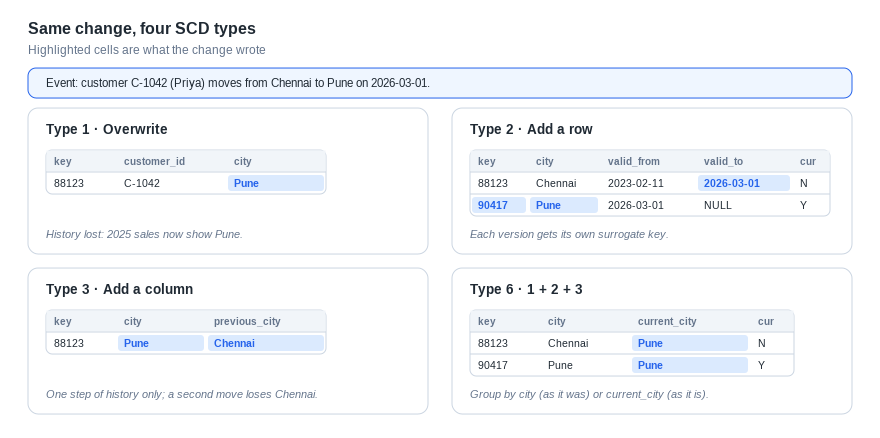 Same event, four storage rules. Type 6 is Type 2's rows with a Type 1 column added on top.
Step-by-step implementation
All examples use a changes view holding the latest source values per customer, built from silver.
Type 1 — Overwrite
-- Databricks Runtime 16.4 LTS
MERGE INTO northbridge.gold.dim_customer_t1 AS t
USING changes AS s
ON t.customer_id = s.customer_id
WHEN MATCHED AND NOT (t.city <=> s.city AND t.email <=> s.email) THEN
  UPDATE SET t.city = s.city, t.email = s.email, t.updated_at = current_timestamp()
WHEN NOT MATCHED THEN
  INSERT (customer_id, full_name, city, email, updated_at)
  VALUES (s.customer_id, s.full_name, s.city, s.email, current_timestamp());
After this runs, Priya's row says Pune, and every historical sale now shows up under Pune too. History has been rewritten.
That's exactly right for corrections. If the source fixes a typo in her email, nobody wants the misspelling preserved. Use Type 1 for fixes and for attributes nobody analyses over time.
Note the <=> operator. It's null-safe equality, so NULL <=> NULL is true. With plain =, a row where both sides are NULL counts as "changed" every single run.
Type 2 — Add a row
SELECT customer_key, customer_id, city, valid_from, valid_to, is_current
FROM northbridge.gold.dim_customer
WHERE customer_id = 'C-1042';

-- customer_key | customer_id | city    | valid_from | valid_to   | is_current
-- 88123        | C-1042      | Chennai | 2023-02-11 | 2026-03-01 | false
-- 90417        | C-1042      | Pune    | 2026-03-01 | NULL       | true
Two rows, two surrogate keys. Sales from 2025 were loaded with customer_key = 88123, so they stay attached to Chennai forever. Sales from April onwards carry 90417. Marketing's question is now a straight join with no date logic at all.
Writing Type 2 correctly needs an expire-then-insert in one atomic step. On Delta, that's a single MERGE with a staging trick, which gets its own article: SCD Type 2 with Delta MERGE.
Two conventions you have to pick and then never change. First, is the open end date NULL or 9999-12-31? I prefer NULL plus is_current, but a far-future date makes BETWEEN queries simpler. Second, is valid_to inclusive or exclusive? Make it exclusive, so valid_from <= x AND x < valid_to never matches two versions.
Type 3 — Add a column
ALTER TABLE northbridge.gold.dim_customer_t3 ADD COLUMNS (previous_city STRING, city_changed_on DATE);

MERGE INTO northbridge.gold.dim_customer_t3 AS t
USING changes AS s
ON t.customer_id = s.customer_id
WHEN MATCHED AND NOT (t.city <=> s.city) THEN
  UPDATE SET t.previous_city = t.city,
             t.city          = s.city,
             t.city_changed_on = current_date();
Type 3 keeps exactly one step of history in a sideways column. Priya's single row now says city = Pune, previous_city = Chennai. If she moves again to Bengaluru, Chennai is gone.
That sounds limited, and it is. Its real use is planned, one-off changes: a sales territory realignment where the business wants to compare "old territory" against "new territory" for a year. Inside the SET clause, t.city still refers to the old value, so the order of assignments doesn't matter.
Type 6 — Types 1 + 2 + 3 together
-- After the Type 2 MERGE has expired the old row and inserted the new one,
-- overwrite the "current" column on every version of the customer.
UPDATE northbridge.gold.dim_customer
SET current_city = 'Pune'
WHERE customer_id = 'C-1042';

-- customer_key | city (historical) | current_city | is_current
-- 88123        | Chennai           | Pune         | false
-- 90417        | Pune              | Pune         | true
Each row keeps the city that was true at the time (Type 2) and also carries the latest city (Type 1 behaviour, Type 3 shape). Now both of the week's questions are a simple GROUP BY. Marketing groups by city; the CRM team groups by current_city. Same fact table, same join.
In practice you don't run that UPDATE by hand. You write the change into the Type 2 MERGE pipeline as a second step that updates current_city for every key that changed in the batch.
Choosing per attribute
| Attribute | Type | Reason |
|---|---|---|
date_of_birth |
0 (never changes) | Original value is the value; corrections handled manually |
email, phone |
1 | Nobody reports sales by old email |
city, loyalty_tier |
2 (or 6) | Analysed over time; history matters |
sales_territory (during realignment) |
3 | Old vs new comparison for a fixed period |
last_login_at |
Not in the dimension | Changes daily; belongs in a fact or a separate table |
The rule I use: if someone will ever ask "what was it at the time of the sale?", it's Type 2. If not, it's Type 1. Types 3 and 6 are answers to specific reporting requests, not defaults.
From production: gotchas and lessons
-
Symptom: The customer dimension grew from 4 million to 210 million rows in six months. Cause:
points_balancewas tracked as Type 2, and it changes on every purchase. Fix: Moved it out of the dimension into a periodic snapshot fact. Fast-changing attributes don't belong in a Type 2 dimension; if you need them banded (e.g. "points 0–500"), use a small mini-dimension. -
Symptom: Every nightly run created a new version for about 30,000 customers who hadn't changed. Cause: Change detection compared
NULL = NULL, which is never true, and trailing spaces differed between extracts. Fix:<=>for comparisons andtrim()in silver. We then switched to comparing a hash of the tracked columns, which also made theMERGEcondition one line. -
Symptom: Reports filtered
is_current = trueand then joined to facts, and last year's sales vanished. Cause: Facts point at the version that was current when they were loaded, not the current version. Fix: Join facts oncustomer_keywith no current filter. Usecurrent_city(Type 6) or a self-join on the natural key when you need "as of now".
When not to use this
If the attribute history already exists somewhere queryable, such as a CDC change table in silver or Delta's change data feed, you may not need Type 2 in gold for low-value attributes. Delta time travel is not a substitute, though. It's bounded by your retention settings and shows table state at a moment, not each row's validity period.
Frequently asked questions
What is the difference between SCD Type 1 and Type 2? Type 1 overwrites the old value, so history is lost. Type 2 keeps the old row, closes it with an end date, and inserts a new row with a new surrogate key.
Is SCD Type 6 the same as hybrid SCD? Yes. It's called 6 because 1 + 2 + 3 = 6.
Can Lakeflow Declarative Pipelines do SCD for me?
Yes, AUTO CDC (formerly APPLY CHANGES) supports STORED AS SCD TYPE 1 and SCD TYPE 2. Type 3 and Type 6 columns you still add yourself.
Checklist
- SCD type decided for every attribute, written in the table comment
- Change detection is null-safe and trims whitespace
- End-date convention (
NULLvs9999-12-31, exclusivevalid_to) documented - Fast-changing attributes kept out of Type 2 dimensions
- Facts join on the surrogate key, never on
is_current - A test asserts exactly one current row per natural key
Practice
- Try: Data Modeling Interview Questions: 20 Design Problems
- Build it yourself: create a 10-row customer table, apply three batches of changes, and implement Types 1, 2 and 3 as three separate tables. Then write the two queries from "The problem" against each one.
Further reading
Keep going
SCD Type 2 with Delta MERGE: One Atomic Statement, SQL and PySpark
Expire the old version and insert the new one in a single Delta MERGE. The staged-union pattern, a PySpark version, the tests that catch broken history, and when to hand it to AUTO CDC.
Star Schema in the Lakehouse: Facts, Dimensions and Grain
Delta tables didn't make dimensional modeling obsolete. Here's how to pick the grain, split facts from dimensions, and build a star schema on Databricks that analysts can trust.
Handling Late-Arriving Dimensions and Facts in a Lakehouse
Facts that show up before their customer exists, and facts that show up weeks after the event. Inferred members, point-in-time joins and re-keying jobs on Delta Lake, with the trade-offs of each.
One practical note a week
Get new articles, problems and guides in your inbox.
Thanks! You're on the list. (Local demo — no email provider is wired up yet.)