cache vs persist vs checkpoint in Spark: What Each Keeps and When to Use It
cache and persist keep results but remember the lineage; checkpoint keeps only the result. Storage levels, when each pays off, and what to use on serverless.
TL;DR
cache()=persist()with the default level. For DataFrames that's memory first, spilling to disk (MEMORY_AND_DISK; PySpark shows it asMEMORY_AND_DISK_DESER).persist(level)lets you choose: memory only, disk only, replicated, off-heap.- Both are lazy (filled by the first action), keep the lineage, and recompute lost partitions if an executor dies. Release them with
unpersist(). checkpoint()writes the data to reliable storage and cuts the lineage: later plans start from the files. It's eager by default and survives executor loss.localCheckpoint()is faster but not fault tolerant.- Cache only what's reused in the same job. For reuse across jobs, or on serverless (which rejects
cache()), write a Delta table.
The problem
NorthBridge's customer segmentation notebook built a 40-step DataFrame (features) from six silver tables, then used it in five places: two model inputs, two reports and a data quality check.
Each of those five actions re-ran all 40 steps from the source tables. The notebook took 75 minutes, 60 of them recomputing the same features.
The first fix, features.cache(), got it to 20 minutes. A second notebook, an iterative graph algorithm that joined a DataFrame to itself 30 times, didn't improve with caching at all: it spent most of its time planning, because every iteration's plan contained every previous iteration. That one needed a checkpoint.
Key concepts
| Concept | What it means | Why it matters here |
|---|---|---|
| Lineage | The plan of transformations that produces a DataFrame | Spark recomputes from it whenever it needs the data |
| Action | An operation that triggers execution (count, write, collect) |
Each action recomputes the lineage unless results are kept |
| Storage level | Where and how cached blocks are kept | Memory vs disk, serialized vs not, replicas |
| Cache manager | Spark's registry of cached plans | A query whose plan matches a cached one reads the cache |
| Checkpoint directory | Reliable storage for checkpoint files | Required for checkpoint() |
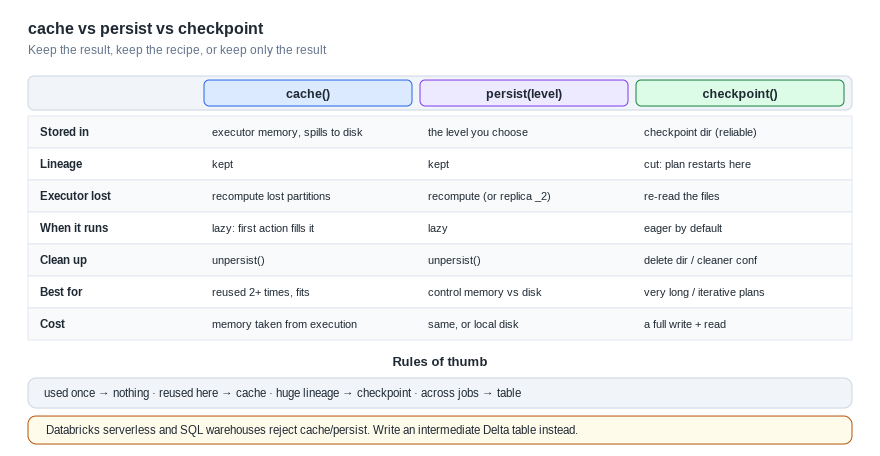 Keep the result and the recipe, or keep only the result.
cache()
# Databricks Runtime 16.4 LTS+ (classic compute), PySpark
features = build_features(spark)        # 40 transformations

features.cache()                         # marks it; nothing is computed yet
features.count()                         # first action computes and stores every partition

train_model_a(features)                  # reads from cache
train_model_b(features)
write_reports(features)

features.unpersist()                     # release memory when done
Things to know:
- It's lazy. Nothing is stored until an action runs. An action that only touches part of the data (
show(),take(10)) only caches the partitions it computed.count()touches every partition, so it's the usual way to materialize. - It matches by plan, not by variable. Any later query with the same logical plan reads the cache, even if built separately. A query that changes the plan before the cached part (a different filter pushed into the scan) won't.
- DataFrames are cached in a compressed columnar format, so they often take less memory than you'd expect, and selecting a few columns from the cache is cheap.
- The Storage tab in the Spark UI shows each cached DataFrame, its storage level and the fraction cached. Less than 100% means some partitions didn't fit or were evicted.
persist(level)
from pyspark import StorageLevel

features.persist(StorageLevel.MEMORY_AND_DISK)    # same idea as cache()
features.persist(StorageLevel.DISK_ONLY)          # big, reused, don't want to squeeze execution memory
features.persist(StorageLevel.MEMORY_AND_DISK_2) # replicate to two executors| Level | Stored | When to use it |
|---|---|---|
MEMORY_AND_DISK / MEMORY_AND_DISK_DESER |
Memory; partitions that don't fit go to local disk | The default; good for most reuse |
MEMORY_ONLY |
Memory; partitions that don't fit are recomputed when needed | Small, cheap-to-recompute data |
DISK_ONLY |
Local disk only | Large data that's expensive to recompute but would crowd out execution memory |
*_2 (e.g. MEMORY_AND_DISK_2) |
Two replicas on different executors | Spot instances or flaky nodes where recomputation is very expensive |
OFF_HEAP |
Off-heap memory | Only if off-heap memory is configured; rarely needed |
Cached data lives in storage memory, which shares the unified pool with execution. A big cache can be evicted by a memory-hungry join, which then forces recomputation. See Spark Memory Management.
SQL has the same tools:
CACHE TABLE recent_sales AS
SELECT * FROM northbridge.silver.sales_lines WHERE sale_date >= '2026-11-01';

CACHE LAZY TABLE northbridge.silver.stores;   -- fill on first use
UNCACHE TABLE recent_sales;
checkpoint()
A checkpoint writes the DataFrame's data to the checkpoint directory and returns a new DataFrame whose plan starts from those files. The old lineage is gone.
spark.sparkContext.setCheckpointDir("/Volumes/northbridge/scratch/checkpoints")

graph = initial_edges
for i in range(30):
    graph = expand_one_hop(graph)            # joins graph to itself
    if i % 5 == 4:
        graph = graph.checkpoint()           # eager: writes now; plan resets here
result = graph
Without the checkpoint, iteration 30's plan contains 30 nested joins. Planning time grows with each iteration, and if an executor is lost late in the run, Spark may recompute a long chain. With a checkpoint every 5 iterations, the plan never holds more than 5.
Things to know:
- Use the returned DataFrame.
graph.checkpoint()doesn't changegraph; it returns a new one. - Eager by default.
checkpoint(eager=False)defers the write until the next action. - Files aren't cleaned up automatically. Delete the directory at the end of the job, or set
spark.cleaner.referenceTracking.cleanCheckpoints=true. - It costs a full write and read. Worth it when lineage is long; wasteful for a short pipeline.
localCheckpoint()
graph = graph.localCheckpoint()Cuts the lineage too, but stores the data in executor storage instead of reliable storage. Faster, no checkpoint directory needed, but if an executor dies the data is gone and the job fails. Fine for interactive work on stable clusters; risky for production on autoscaling or spot capacity.
Not the streaming checkpoint
Structured Streaming's checkpointLocation is something else: it stores a query's progress and state so a stream can restart exactly where it stopped. See Structured Streaming on Databricks.
Serverless, Spark Connect and the table alternative
On Databricks serverless compute, the DataFrame and SQL cache APIs aren't supported: cache(), persist(), unpersist(), CACHE TABLE and related commands raise an exception. Standard access mode and serverless also run on Spark Connect, where spark.sparkContext isn't available, so setCheckpointDir as shown above doesn't work there.
The portable alternative is a "manual checkpoint": write an intermediate Delta table and read it back.
(features.write.mode("overwrite")
         .saveAsTable("northbridge.scratch.segmentation_features"))
features = spark.table("northbridge.scratch.segmentation_features")
This works everywhere, survives cluster restarts, can be shared between jobs and tasks, and shows up in lineage and permissions in Unity Catalog. For anything reused across jobs or tasks, it's the right answer even on classic compute.
Databricks also has a disk cache (formerly Delta cache) that's separate from all of the above: it automatically keeps copies of remote Parquet data on local SSDs of supported instance types and stays consistent with the table. You don't call it; it just makes repeated reads of the same files faster.
Which one?
| Situation | Use |
|---|---|
| DataFrame used once | Nothing |
| Used by 2+ actions in the same job, fits comfortably | cache() |
| Reused, big, would crowd execution memory | persist(DISK_ONLY) |
| Long or iterative lineage, slow planning | checkpoint() every few iterations |
| Interactive exploration, stable cluster | cache() or localCheckpoint() |
| Reused across jobs, tasks or sessions | Write a Delta table |
| Serverless compute | Write a Delta table |
The result
The segmentation notebook: features written to a scratch Delta table once (the team ran it on serverless), then read by all five consumers. 75 minutes → 17 minutes. The graph notebook: checkpoint every 5 iterations on a classic cluster. 3 hours with most of it in planning → 26 minutes.
From production: gotchas and lessons
-
Symptom:
df.cache()added, no speed-up. Cause: The DataFrame was only used once, or each consumer applied a different transformation before the cached point, so plans didn't match. Fix: Cache the DataFrame exactly as consumers use it, after the shared work and before they diverge. -
Symptom: A cached DataFrame kept returning yesterday's data in a long-running notebook. Cause: The cache held the table snapshot it was built from; another job had since written new data. Fix:
unpersist()and rebuild after upstream writes. Don't cache source tables in long-lived sessions. -
Symptom: Joins started spilling after caching was added. Cause: The cache filled storage memory; execution had to evict it or spill. Fix: Cache a narrower DataFrame (fewer columns), use
DISK_ONLY, or don't cache. -
Symptom: Scratch storage grew by 4 TB over a month. Cause: Checkpoint directories from every run were never deleted. Fix: Clean up at the end of the job, or enable checkpoint cleaning; give the directory a lifecycle rule.
-
Symptom: A notebook that worked on a personal cluster failed in a serverless job with an error on
persist. Cause: Cache APIs aren't supported on serverless. Fix: Replace with an intermediate table.
Performance and cost notes
Caching trades memory (or local disk) for recomputation. It pays off when the recomputation is expensive and the data is reused; it hurts when the cache evicts execution memory or nothing reuses it. Materializing a cache with count() is itself a full pass, so a DataFrame used twice gets one recompute's worth of savings, not two.
A checkpoint or scratch table costs a full write. On iterative workloads that's small compared with planning and recomputation; on a short linear pipeline it's pure overhead.
When not to use this
Don't add cache() everywhere "to be safe". Unused caches waste memory, evict useful data and confuse the Storage tab. Don't use checkpoints to persist results between jobs; that's what tables are for.
Checklist
- Each cache has at least two consumers in the same job
- Caches materialized deliberately and released with
unpersist() - Storage tab shows ~100% cached for the DataFrames you rely on
- Long or iterative lineages checkpointed every few steps
- Checkpoint directories cleaned up
- Serverless or cross-job reuse handled with an intermediate Delta table
Practice
- Try: PySpark Interview Questions: 50 Coding and Scenario Problems
- Build it yourself: build a DataFrame with 20 transformations, run three actions on it with and without
cache(), then loop a self-join 20 times with and without a checkpoint every 5. Compare job counts and planning time.
Further reading
Keep going
Spark Memory Management: Executors, Spills and OOM Fixes
How executor and driver memory is actually divided, why tasks spill, and how to diagnose and fix each kind of out-of-memory error instead of just adding RAM.
PySpark Performance Tuning Checklist for Production Jobs
A field checklist for slow or expensive PySpark jobs: baseline first, then read less, shuffle less, balance the work, compute smarter, use memory well and write right.
Reading the Spark UI: Stages, Tasks, Spill and Skew
A practical route through the Spark UI: map a slow query to its stage, read the summary metrics, and recognise skew, spill, tiny files and GC pressure.
One practical note a week
Get new articles, problems and guides in your inbox.
Thanks! You're on the list. (Local demo — no email provider is wired up yet.)