Fact Table Types: Transaction, Periodic Snapshot and Accumulating
Three fact table types answer three kinds of question: what happened, what's the position, and how far along is it. Build each on Delta Lake, and avoid summing what shouldn't be summed.
TL;DR
- Transaction facts record events: one row per sale, scan or payment. Insert-only, and the measures add up across everything.
- Periodic snapshot facts record a position at regular intervals: stock on hand per store, product and day. The measures are semi-additive: sum across stores, never across days.
- Accumulating snapshot facts track a process with known milestones: one row per order, updated as it's picked, shipped and delivered.
- Factless facts record that something happened or was possible, with no numeric measure at all.
- Most business processes need more than one type. Inventory nearly always needs both transactions and snapshots.
The problem
NorthBridge's supply chain team asked for three numbers in one meeting.
"How many units of basmati rice did we sell last week?" Easy. Sum the sales lines.
"How much basmati rice is sitting in our stores right now, and how did that look at each month-end this year?" The team tried to answer that from the stock movement transactions: receipts minus sales minus write-offs, summed from the beginning of time. The query scanned four years of movements and took eleven minutes, and it was wrong, because the opening balances from the old system were never loaded as movements.
"How long does an online order take from payment to delivery, and where does it get stuck?" Nobody could answer that one at all. The milestones were spread across four event tables with different keys.
Three questions, three fact table shapes. Trying to answer all of them from one table is where the eleven-minute query came from.
Key concepts
| Concept | What it means | Why it matters here |
|---|---|---|
| Additive measure | Can be summed across every dimension | Sales amount, quantity sold |
| Semi-additive measure | Can be summed across some dimensions but not time | Stock on hand, account balance |
| Non-additive measure | Can't be summed at all | Ratios, unit prices, percentages; store the parts instead |
| Snapshot grain | One row per entity per period, whether or not anything changed | Makes "position at date X" a filter, not a calculation |
| Milestone | A defined step in a process with a date | The columns of an accumulating snapshot |
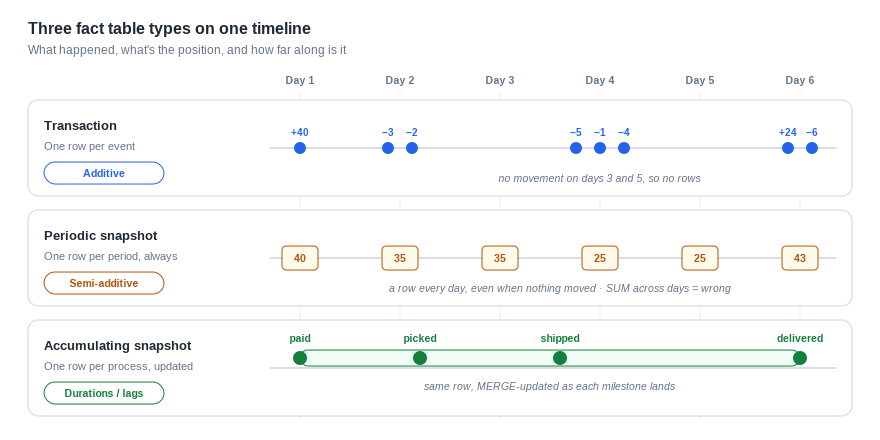 Transactions are dots on the timeline. Snapshots are regular readings. Accumulating rows are updated as each milestone is reached.
Step-by-step implementation
Type 1 — Transaction fact
-- Databricks Runtime 16.4 LTS
CREATE TABLE IF NOT EXISTS northbridge.gold.fact_stock_movement (
  date_key        INT    NOT NULL,
  store_key       BIGINT NOT NULL,
  product_key     BIGINT NOT NULL,
  movement_type_key INT  NOT NULL,       -- receipt, sale, write-off, transfer
  movement_id     STRING NOT NULL,       -- degenerate dimension
  quantity_delta  INT    NOT NULL,       -- +40 received, -3 sold
  value_delta     DECIMAL(14,2)
)
CLUSTER BY (date_key, store_key);
One row per event, written once, never updated. If an event was wrong, the source sends a reversing event and you insert that too. Every measure is additive, so SUM(quantity_delta) works across any combination of date, store and product.
This is the most flexible fact type and should usually be your first one, because every other type can be derived from it. That doesn't mean you should derive them at query time.
Type 2 — Periodic snapshot fact
CREATE TABLE IF NOT EXISTS northbridge.gold.fact_inventory_daily (
  snapshot_date_key INT    NOT NULL,
  store_key         BIGINT NOT NULL,
  product_key       BIGINT NOT NULL,
  units_on_hand     INT    NOT NULL,
  value_on_hand     DECIMAL(14,2),
  units_on_order    INT,
  days_of_cover     DECIMAL(6,1)        -- non-additive; see below
)
CLUSTER BY (snapshot_date_key, store_key);
The grain: one row per store, per product, per day, including rows where nothing moved. That last part is what makes it a snapshot. A product that sat untouched for a week still gets seven rows. "Stock on 31 March" becomes a filter instead of a four-year aggregation.
Load each day with REPLACE WHERE, so a rerun replaces that day cleanly instead of duplicating it:
INSERT INTO northbridge.gold.fact_inventory_daily
REPLACE WHERE snapshot_date_key = 20261112
SELECT
  20261112                    AS snapshot_date_key,
  p.store_key,
  p.product_key,
  p.units_on_hand + coalesce(m.qty, 0)  AS units_on_hand,
  p.value_on_hand + coalesce(m.val, 0)  AS value_on_hand,
  o.units_on_order,
  NULL                        AS days_of_cover
FROM (SELECT * FROM northbridge.gold.fact_inventory_daily
      WHERE snapshot_date_key = 20261111) p
LEFT JOIN (SELECT store_key, product_key,
                  SUM(quantity_delta) AS qty, SUM(value_delta) AS val
           FROM northbridge.gold.fact_stock_movement
           WHERE date_key = 20261112
           GROUP BY ALL) m
  USING (store_key, product_key)
LEFT JOIN northbridge.silver.open_purchase_orders o
  USING (store_key, product_key);
Each day is yesterday's balance plus today's movements. That's cheap: one day of snapshot plus one day of transactions. (Products that appear for the first time today need a FULL OUTER JOIN or a separate insert; it's left out here to keep the example readable.) Better still, if the source system can provide a daily stock count, load that directly and use the movement-based figure as a reconciliation check.
Now the trap:
-- WRONG: sums stock across 30 days and reports 30x the real stock
SELECT product_key, SUM(units_on_hand)
FROM northbridge.gold.fact_inventory_daily
WHERE snapshot_date_key BETWEEN 20261001 AND 20261031
GROUP BY product_key;

-- RIGHT: pick a point in time, or average across time
SELECT product_key,
       SUM(units_on_hand) FILTER (WHERE snapshot_date_key = 20261031) AS month_end_units,
       SUM(units_on_hand) / COUNT(DISTINCT snapshot_date_key)          AS avg_daily_units
FROM northbridge.gold.fact_inventory_daily
WHERE snapshot_date_key BETWEEN 20261001 AND 20261031
GROUP BY product_key;
Summing stock across stores is fine. Summing it across days is nonsense. Write this into the semantic layer or metric definitions so BI users can't drag the wrong aggregation onto a chart.
days_of_cover is non-additive. Don't store a ratio you'll want to roll up. Store the numerator and denominator (units on hand, average daily sales) and compute the ratio after aggregating.
Type 3 — Accumulating snapshot fact
CREATE TABLE IF NOT EXISTS northbridge.gold.fact_order_fulfilment (
  order_number      STRING NOT NULL,
  customer_key      BIGINT NOT NULL,
  fulfilment_store_key BIGINT NOT NULL,
  paid_date_key     INT    NOT NULL,
  picked_date_key   INT,              -- NULL until the milestone happens
  shipped_date_key  INT,
  delivered_date_key INT,
  paid_ts           TIMESTAMP,
  picked_ts         TIMESTAMP,
  shipped_ts        TIMESTAMP,
  delivered_ts      TIMESTAMP,
  order_value       DECIMAL(14,2),
  hours_paid_to_picked     DECIMAL(8,2),
  hours_picked_to_shipped  DECIMAL(8,2),
  hours_shipped_to_delivered DECIMAL(8,2),
  current_status    STRING
)
CLUSTER BY (paid_date_key);
One row per order for its whole life. Each new milestone event updates that row:
MERGE INTO northbridge.gold.fact_order_fulfilment AS t
USING northbridge.silver.order_milestones_latest AS s   -- one row per order, latest known ts per milestone
ON t.order_number = s.order_number
WHEN MATCHED THEN UPDATE SET
  t.picked_ts    = coalesce(t.picked_ts,    s.picked_ts),
  t.shipped_ts   = coalesce(t.shipped_ts,   s.shipped_ts),
  t.delivered_ts = coalesce(t.delivered_ts, s.delivered_ts),
  t.picked_date_key    = coalesce(t.picked_date_key,    CAST(date_format(s.picked_ts,    'yyyyMMdd') AS INT)),
  t.shipped_date_key   = coalesce(t.shipped_date_key,   CAST(date_format(s.shipped_ts,   'yyyyMMdd') AS INT)),
  t.delivered_date_key = coalesce(t.delivered_date_key, CAST(date_format(s.delivered_ts, 'yyyyMMdd') AS INT)),
  t.hours_paid_to_picked = (unix_timestamp(coalesce(t.picked_ts, s.picked_ts)) - unix_timestamp(t.paid_ts)) / 3600,
  t.current_status = s.current_status
WHEN NOT MATCHED THEN INSERT (order_number, customer_key, fulfilment_store_key,
  paid_date_key, paid_ts, order_value, current_status)
VALUES (s.order_number, s.customer_key, s.fulfilment_store_key,
  CAST(date_format(s.paid_ts, 'yyyyMMdd') AS INT), s.paid_ts, s.order_value, s.current_status);
The coalesce(t.x, s.x) pattern keeps the first recorded time for each milestone, so a duplicate "shipped" event doesn't move the date. The other lag columns follow the same pattern as hours_paid_to_picked. Now "where do orders get stuck?" is an average of three columns grouped by store, which was the question nobody could answer before.
The fact has several date keys, each pointing at dim_date in a different role. BI tools handle this with role-playing views: dim_paid_date, dim_shipped_date, and so on.
Bonus — Factless fact
-- Which products were on promotion in which stores on which days?
CREATE TABLE IF NOT EXISTS northbridge.gold.fact_promotion_coverage (
  date_key INT NOT NULL, store_key BIGINT NOT NULL,
  product_key BIGINT NOT NULL, promotion_key BIGINT NOT NULL
);
No measures. Its job is answering "what was on promotion but didn't sell?", which you can't get from the sales fact because unsold products have no sales rows.
From production: gotchas and lessons
-
Symptom: The month-end stock report was 30 times too high. Cause: A BI tool's default
SUMon a semi-additive measure across days. Fix: Defined stock measures in the semantic layer as "last value in period". Raw access to snapshot tables in self-service went to a curated view only. -
Symptom: The daily snapshot table grew to 9 billion rows in a year. Cause: 600 stores × 25,000 products × 365 days, with most rows showing zero stock for products a store never stocks. Fix: Only generate rows for store–product pairs on the store's range, keep daily grain for 90 days, and roll older history to month-end snapshots.
-
Symptom: Orders showed as "shipped" before "picked". Cause: Milestone events arrived out of order and the
MERGEoverwrote timestamps. Fix: Thecoalescefirst-value pattern above, plus a data quality check on milestone order that flags rows instead of rejecting them.
When not to use this
Don't build an accumulating snapshot for a process without a stable set of milestones. If orders can loop back (re-picked, re-shipped) many times, a transaction fact of status changes is more honest, and you compute durations from that. And if a periodic snapshot is only queried for "today", a current-state table is enough.
Frequently asked questions
What is the difference between a periodic snapshot and an accumulating snapshot? A periodic snapshot adds a new row for every entity in every period and never updates old rows. An accumulating snapshot has one row per process instance, such as an order, and updates it as milestones happen.
What is a semi-additive fact? A measure that can be summed across some dimensions but not across time. Stock on hand and account balances are the classic examples.
Can one business process have more than one fact table? Yes, and it often should. Inventory typically has a transaction fact for movements and a periodic snapshot for positions, and the two reconcile with each other.
What is a factless fact table? A fact table with only foreign keys and no measures. It records that an event or a coverage condition existed, like a product being on promotion in a store on a day.
Checklist
- Each fact table's type and grain written in its table comment
- Semi-additive measures defined with the right time aggregation in the semantic layer
- Ratios stored as numerator and denominator, not as the ratio
- Snapshot loads use
REPLACE WHEREso reruns are safe - Accumulating snapshot updates keep the first value per milestone
- Snapshot row volume estimated before the first load
Practice
- Try: Data Modeling Interview Questions: 20 Design Problems
- Build it yourself: generate 30 days of stock movements for 5 stores and 20 products, build the daily snapshot from them, then write the wrong and right month-end queries side by side.
Further reading
Keep going
Star Schema in the Lakehouse: Facts, Dimensions and Grain
Delta tables didn't make dimensional modeling obsolete. Here's how to pick the grain, split facts from dimensions, and build a star schema on Databricks that analysts can trust.
Handling Late-Arriving Dimensions and Facts in a Lakehouse
Facts that show up before their customer exists, and facts that show up weeks after the event. Inferred members, point-in-time joins and re-keying jobs on Delta Lake, with the trade-offs of each.
Slowly Changing Dimensions: Types 1, 2, 3 and 6 with SQL
One customer moves city. Four SCD types record it four different ways. See the rows each type produces, the SQL that writes them, and how to choose per column.
One practical note a week
Get new articles, problems and guides in your inbox.
Thanks! You're on the list. (Local demo — no email provider is wired up yet.)